
6 Stages to Ship an AI MVP in Weeks for Founders and PMs
6 Stages to Ship an AI MVP in Weeks for Founders and PMs
Yes, AI can cut MVP timeframes dramatically when used correctly. The move is to validate the use case first, build a focused prototype plus a lightweight model prototype, and iterate with real users before writing a line of production code. Skip validation and you’re gambling engineering hours on an assumption nobody tested.
TL;DR:
- Validating the AI use case through quick, low-cost experiments like Wizard of Oz tests and landing pages is essential to avoid wasting engineering hours on untested assumptions.
- Focus on developing a narrow, well-scoped AI feature that accomplishes a measurable user outcome, rather than broadly applying AI across the entire product.
- Building a stage-by-stage workflow—from hypothesis and prototypes to testing and monitoring—reduces integration risks and improves model performance and reliability.
- Using off-the-shelf AI models, early labeling, and exportable tools can greatly shorten development time, often from months to just weeks for a focused MVP.
- Prioritize data governance, model guardrails, and operational safeguards from the start to mitigate unique AI failure modes and ensure responsible deployment.
Table of Contents
- What Is an AI-Powered MVP, and When Should You Add AI?
- How Do You Validate an AI MVP Idea Before Building It?
- What Does a Stage-by-Stage AI MVP Workflow Look Like?
- What Tools Actually Speed Up Each Phase of an AI MVP?
- What Are the Biggest Risks in AI MVP Development?
- How Long Does an AI MVP Take, and What Does It Cost?
- Zatersio’s Rapid-Delivery Method for AI MVPs
- The Bottom Line on AI for MVP Development
- What Practitioners Get Wrong About Speed and Trade-offs
- Ready to Build Your AI MVP in Weeks, Not Months?
- Sources
What Is an AI-Powered MVP, and When Should You Add AI?
An AI-powered MVP is a minimum viable product where a machine learning model or generative AI feature drives a specific, user-facing outcome. Not a chatbot bolted onto a form for the sake of it. A working piece of software that predicts, classifies, generates, or automates something a user actually needed done, wrapped in just enough interface to test whether people want it.
Most founders reach for AI because it’s exciting, not because the problem demands it. That’s backward. Before you write a single model spec, run your idea through a short checklist:
- Problem fit: Does the task involve pattern recognition, prediction, or content generation that a human currently does slowly or inconsistently? If a simple rule (“if X, then Y”) solves it, you don’t need AI.
- Measurable outcome: Can you define success with measurable improvement, such as time saved or improved accuracy? If you can’t measure it, you can’t validate it.
- Data availability: Do you have, or can you quickly get, enough representative data to train or fine-tune something useful? “We’ll collect it later” is how AI MVPs stall for months.
- Minimal scope: Can the AI feature be isolated to one workflow, not woven through the entire product? A tangled dependency on day one becomes a maintenance nightmare by month three.
- Team readiness: Does someone on the team understand the model’s limitations well enough to set realistic expectations with users?
Skip AI when the task is deterministic (tax calculations, scheduling logic, basic CRUD operations), when your data set is too thin to produce reliable outputs, or when a simpler automation (a workflow trigger, a form, a template) solves the same problem for a fraction of the build cost. Google Cloud’s engineering guidance makes this point directly: prototype-and-test first, because it’s the fastest way to find out whether AI is even the right solution for the business problem you’re chasing.
How Do You Validate an AI MVP Idea Before Building It?
Validation is where most AI MVPs either earn their engineering budget or quietly die, and it should happen before any model gets trained. The fastest way to know if your AI feature deserves real investment is to fake it first.
- Run a Wizard of Oz test. Build the front end your users see, but have a human perform the “AI” task behind the scenes. If you’re prototyping an AI intake assistant for a law firm, have a staff member manually triage requests using the same interface a model would eventually power. This tells you whether the workflow itself has value before you spend a dollar on training data.
- Try a concierge test for higher-touch use cases. Deliver the outcome manually, one on one, for a small group of real users. It’s slower than a Wizard of Oz test, but it surfaces edge cases and language patterns you’ll need for labeling later.
- Launch a landing page with a specific signup metric. Don’t measure general interest. Measure whether people will hand over an email, a document, or a calendar slot for the specific outcome you’re proposing. A 2% conversion on a vague pitch means little. A 15% conversion on “upload your invoices and we’ll flag anomalies within a minute” means something.
- Test a clickable prototype for usability, not just appeal. Time users completing the core task. If it takes them longer than the manual process they use today, the AI layer isn’t earning its complexity yet.
- Build a minimum data plan. Decide what you’ll collect from these early tests (inputs, outputs, edge cases) and label a small, clean sample by hand. Even 200 well-labeled examples beat 20,000 messy ones for a first model pass.
Pro Tip: Treat your Wizard of Oz test transcripts as your first labeled dataset. The exact language and edge cases your human “model” encounters are the same ones your real model will need to handle.
This experiment-first approach matches what Google Cloud recommends for AI product validation: confirm the business, the user, and the model all align before you commit to full production.
What Does a Stage-by-Stage AI MVP Workflow Look Like?
Building an AI MVP isn’t a straight line from idea to launch. It’s six distinct stages, each with its own deliverable and its own exit criteria. Skip a stage and you’ll pay for it later, usually during integration when nobody can explain why the model behaves differently than the prototype suggested.
Stage 1: Strategic hypothesis and success metrics. Write down the one core workflow the AI feature must improve, and attach a number to it. Not “improve customer service,” but “cut average response time on routine queries from four hours to under ten minutes.” This becomes your acceptance test later.
Stage 2: UX and clickable prototypes. Build interactive mockups with real user scenarios attached, not generic screens. Tools like Figma work here, but the deliverable that matters is a scenario walkthrough: what does a user do, what do they see, what happens when the AI gets it wrong.
Stage 3: Model prototyping. This is where you run baseline experiments against your curated dataset. You’re not building a production model yet. You’re finding out if an off-the-shelf model, a fine-tuned version, or a simple heuristic gets you 80% of the way there. Quick evaluation loops matter more than model sophistication at this stage.
Stage 4: Integration. Build API-first, with modular components you could swap out later. This is where teams either save themselves months of future pain or lock themselves into a vendor’s black box. Favor exportable components over proprietary lock-in wherever the cost difference is reasonable.
Stage 5: Testing. Combine standard user validation with A/B tests on the AI-specific feature, plus deliberate edge-case QA. AI features fail differently than traditional software. They fail confidently, giving wrong answers with the same tone as right ones. Your QA process needs to hunt for that specifically.
Stage 6: Deploy and monitor. Ship with logging and observability built in from day one, and have a rollback plan ready before you need it. IBM’s product development research notes that AI accelerates every one of these cycles, but only if monitoring and guardrails are designed in from the start rather than added after something breaks.
Here’s how the deliverables map to each stage:
| Stage | Primary deliverable | Exit criteria |
|---|---|---|
| Strategic hypothesis | One-page problem and metric doc | Metric is specific and measurable |
| UX prototype | Clickable prototype with scenarios | Users complete core task unaided |
| Model prototyping | Model proof of concept (POC) | Baseline accuracy beats manual process |
| Integration | Technical design doc, exportable API | Components run independently in test |
| Testing | QA report, A/B results | Edge cases documented and handled |
| Deploy and monitor | Logging dashboard, rollback plan | Alerts trigger correctly in a dry run |
The checklist that matters most for founders reviewing progress: a clickable prototype, a model proof of concept, and a technical design document. If your team can’t produce all three by the end of stage 4, you’re not ready to integrate, no matter how good the model demo looked in a meeting.
What Tools Actually Speed Up Each Phase of an AI MVP?
Tool selection matters less than most guides suggest, but the categories still matter a lot. You need something in each of these five buckets, and the goal is picking tools you can walk away from if they stop serving you.
- Prototyping tools for clickable mockups and user scenario testing (Figma and similar design tools remain the standard here).
- Code copilots that speed up boilerplate and integration work without locking your codebase into a proprietary format.
- No-code or full-stack MVP builders for teams that need a working front end fast. These platforms can compress build time from months to days for simple cases, though the tradeoff is usually customization depth once your requirements get specific.
- Labeling and data tools for turning raw validation-stage inputs into clean training samples.
- Testing and observability tools for tracking model confidence, drift, and failure rates once you’re live.
The smarter move for most teams is assembling a minimal, exportable stack rather than chasing the newest platform. Use a model-as-a-service API for the AI layer itself (this avoids the cost and complexity of training from scratch), but own your integration layer completely. That way, if the underlying model provider changes pricing or shuts down a feature, you’re not rebuilding your entire product.
Before committing to any tool, run it through a short selection checklist:
- Exportability: Can you take your code and data out if you switch providers?
- Data residency options: Does the tool let you control where data is stored and processed, especially if you’re handling health, legal, or financial information?
- Cost model: Is pricing usage-based in a way that scales sanely, or will a spike in traffic blow your budget?
- Team fit: Does your team already know the tool’s language and ecosystem, or are you adding a learning curve on top of a tight timeline?
A rapid full-stack generator can genuinely take an MVP from idea to a working demo in days rather than months when it outputs standard, exportable code. That speed only pays off if you don’t sacrifice ownership of your own product to get it.
What Are the Biggest Risks in AI MVP Development?
AI features fail in ways traditional software doesn’t, and the failures are often invisible until a user notices something’s wrong. Three categories of risk deserve guardrails before launch, not after.
Data governance comes first. Collect only what you need, get explicit consent for anything sensitive, and anonymize wherever the use case allows it. If you’re building for healthcare, legal, or finance clients, data residency isn’t optional. Where your data lives and who can access it determines whether you can even sell the product in certain markets. Teams weighing private deployment options should look closely at how enterprise data sovereignty works before choosing a hosting model, since retrofitting compliance after launch is far more expensive than designing for it.
Model guardrails come next. Ground your model’s outputs in verified data sources wherever possible, set confidence thresholds that trigger human review below a certain certainty level, and build human-in-the-loop patterns into any workflow where a wrong answer carries real cost.
Operational safeguards round it out:
- Log every prediction, input, and confidence score from day one, not after something breaks.
- Run tests specifically designed to catch confident-but-wrong outputs, not just crashes.
- Build a rollback plan before you need one, not while a bug is live.
- Monitor continuously for drift, since a model that worked well at launch can degrade silently as real-world data shifts away from training data.
Pro Tip: Instrument your model’s confidence scores from the first deployment, even if you don’t act on them yet. Six months later, that historical data is often the fastest way to spot drift before your users do.
Academic reviews of AI in product development back this up directly: teams that build monitoring and human oversight into their process from the start catch drift and hallucination problems far earlier than teams that treat monitoring as an afterthought.
How Long Does an AI MVP Take, and What Does It Cost?
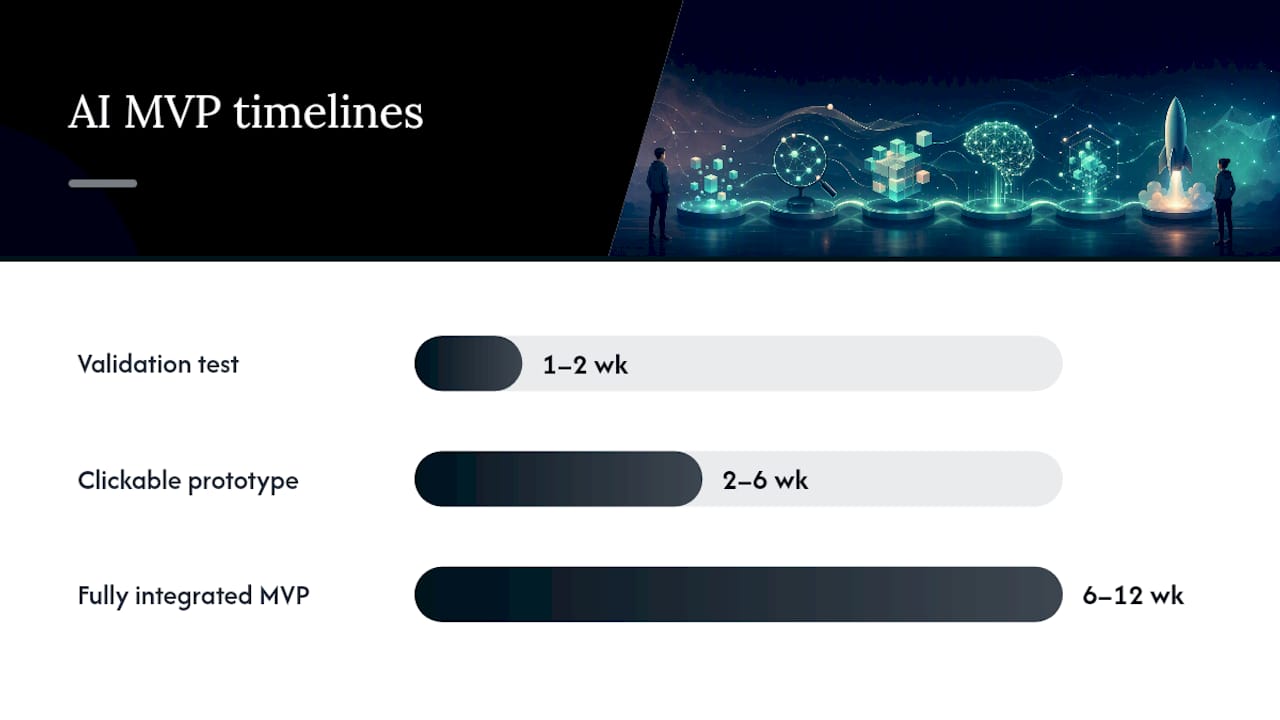
Timelines depend heavily on which stage you’re in, and that dependency compounds. A validation experiment, a Wizard of Oz test or landing page, typically takes one to two weeks. A clickable prototype with a model proof of concept usually runs two to six weeks depending on data readiness. A fully integrated, tested MVP with monitoring in place generally lands somewhere between six and twelve weeks for a focused, single-workflow build.
Costs scale with three levers, and they’re the same three levers regardless of your industry:
- Scope compression: Every additional workflow you try to cram into version one multiplies both cost and risk of delay. One core workflow, done well, beats three done poorly.
- Off-the-shelf models: Using a proven model-as-a-service API instead of training from scratch cuts both time and cost dramatically, especially for common tasks like classification, extraction, or summarization.
- Focused labeling: Spending a week on a clean, well-labeled 500 item dataset almost always beats spending a month on a messy 50,000-item one.
Academic research on AI in new product development found something worth sitting with: the benefits of AI are stage-dependent and cumulative. Teams that invest in high-quality AI-assisted ideation early see significantly better development efficiency and stronger post-launch learning than teams that add AI only at the integration stage. Where you apply AI matters as much as whether you apply it.
Zatersio’s Rapid-Delivery Method for AI MVPs
Some companies build working AI MVPs on a fixed scope, sometimes shipping a functioning product in under two weeks for a focused, single-workflow build. The engagement model is deliberately narrow: one core problem, one measurable outcome, one dedicated engineering team assigned to your project from discovery through deployment.
Every build follows the same deliverable structure covered earlier in this guide:
- A clickable prototype your team and early users can test immediately.
- A model proof of concept validated against real or representative data before any integration work begins.
- A technical design document that lays out architecture, data flow, and exportability decisions in plain terms.
Clients typically choose their data residency setup upfront, which matters directly for governance concerns, especially for trades, healthcare, and professional services businesses handling client or patient information. Pricing is often fixed before work starts to avoid surprise scope creep.
Some software projects are structured to be R&D Tax Incentive ready from day one, meaning the documentation and technical design work required for a claim is built alongside the product instead of reconstructed after the fact.
The team composition mirrors what Google Cloud’s own guidance recommends for successful AI products: a product lead defining the hypothesis, a designer building the user scenarios, and engineers who own both the model prototyping and the integration work, working from the same fixed scope rather than a moving target.
The Bottom Line on AI for MVP Development
The core recommendation hasn’t changed since the opening line: validate first, then build a tightly scoped AI MVP around one workflow that matters. Skipping validation to chase a bigger model or a flashier feature set is the single most common way founders burn through their runway without learning anything useful.
Your immediate options are straightforward. Run a Wizard of Oz test this week if you haven’t validated demand yet. Commission a focused two-week rapid build if you have validated demand and need a working product to show investors or early customers. Or start collecting and labeling a clean dataset now if your bottleneck is data, not idea confidence. Whichever path fits your stage, the next move is a small, deliberate one, not a six-month engineering commitment made on faith.
What Practitioners Get Wrong About Speed and Trade-offs
The uncomfortable trade-off nobody likes discussing openly: speed and technical debt are almost always in tension, and pretending otherwise sets teams up for a painful rebuild. Move fast on validation, sure. But moving fast on architecture decisions you’ll live with for years is a different kind of risk, and founders often confuse the two.
The heuristic that holds up across most AI MVPs: keep the core workflow small enough that one team can hold the whole thing in their heads, instrument every prediction and outcome from the first user session, and assume you’ll pivot at least once based on what real usage tells you that your validation testing didn’t. Accuracy versus scope is the same tension in different clothing. A narrow feature done well beats a broad one done adequately, every time this gets tested against real users instead of a demo audience.
Watch your model’s confidence scores and your users’ actual completion rates more closely than you watch vanity metrics like signups. Those two numbers tell you, faster than any dashboard, whether you’re solving something real.
— Lakitha
Ready to Build Your AI MVP in Weeks, Not Months?
Some providers offer an alternative to a slow, exploratory build cycle for founders who’ve validated demand and need a working product quickly. Instead of assembling freelancers or waiting months for agency staffing, clients may receive a dedicated engineering team, fixed price agreements before work starts, and working AI MVPs delivered within a rapid timeframe.

That speed doesn’t come at the cost of ownership or compliance. You choose your data residency setup, you get a technical design document you actually own, and if your project qualifies, Zatersio structures the build to be R&D Tax Incentive ready from the outset rather than reconstructed for a claim after launch. The MVP development service covers everything from the clickable prototype through the model proof of concept, and teams looking to automate workflows beyond the MVP itself can explore AI agent solutions built the same way.
If you’re not ready to commit to a build yet, start with the free AI automation blueprint and get a clear picture of where AI actually fits your business before you spend a dollar on engineering.
Sources
For readers who want to go deeper on the frameworks referenced throughout this guide, Google Cloud’s breakdown of why to prototype and test AI products before full production remains one of the clearest practical walkthroughs available. The academic systematic review on AI in new product development backs up the stage-dependent efficiency claims made here, and IBM’s overview of AI in product development covers the workflow and guardrail concepts in more technical depth.
- The use of artificial intelligence in new product development: A systematic literature review, conceptual framework, and future research agenda
- AI in product development | IBM