
Recover 20 Hours a Week: Fix Automation Change Management for Leaders
Recover 20 Hours a Week: Fix Automation Change Management for Leaders
The most effective approach pairs clear governance and human-in-the-loop controls with codified changes built on Infrastructure as Code, CI/CD, and automated testing, rolled out through a measured pilot before scaling. In the near term, leaders should classify every pending automation by risk, put an approval gate in front of the highest-risk changes, and run one pilot with metrics attached before touching anything else.
TL;DR:
- Effective automation requires risk-based classification, with high-risk changes undergoing approval gates and measured pilot testing before scaling.
- Automation programs must rely on standardized change templates, infrastructure as code, automated testing, and human-in-the-loop gates to prevent failures.
- Successful rollout depends on deliberate pilot selection, clear success metrics, leadership sponsorship, and integrating change management into existing ITSM and DevOps systems.
- continuous improvement involves regular reviews of failure rates, approval times, and feedback to refine risk scoring, thresholds, and process automation.
- Resistance often stems from fear of obsolescence, loss of control, or mistrust, which can be mitigated through transparent communication, overrides, and early training.
Table of Contents
- Why Automation Change Management Works Differently
- Core Components: Governance, Code, and Human Checkpoints
- How to Roll Out Automation Change Without Breaking Things
- What Tools and Integration Patterns Actually Support This
- Measuring Success: The Metrics That Actually Matter
- How Zatersio Applies These Practices in Real Projects
- Why Culture and Leadership Decide Whether Automation Sticks
- Why People Resist Automated Change and What to Do About It
- Compliance, Security, and Audit Considerations for Automation
- Building Continuous Improvement Into the Change Process
- Getting Communication Right During Automation Rollouts
- Making Automation Change Fit ITSM and DevOps Workflows
- Leadership Priorities and Trade-offs
- How Zatersio Turns This Playbook Into a Working Pilot
- Where These Practices Come From
- Sources
- FAQ
Why Automation Change Management Works Differently
Traditional change management assumes a slow drumbeat: a handful of releases a month, each reviewed by a committee with time to think. Automation breaks that assumption. When a script or an AI agent can push dozens of changes a day, the review cadence that worked for quarterly software releases collapses under the volume.
The stakes went up before most organizations noticed. Forrester found that 82% of companies planned to invest in generative AI, which drove change velocity well past what most change programs were built to handle. Speed alone isn’t the risk. It’s speed without a matching increase in oversight capacity.
Two failure modes show up constantly in automation programs:
- Automated bureaucracy: teams bolt automation onto an unchanged approval process, so requests move faster but still queue behind the same slow human sign-offs.
- Bypassed approvals: under deadline pressure, engineers route around change controls entirely, leaving no audit trail when something breaks.
Both point to the same root cause: automation multiplies whatever process it’s layered onto, good or bad.
Core Components: Governance, Code, and Human Checkpoints
Every durable automation change program rests on four pillars, and skipping any one of them tends to surface as a production incident within months.
- Approval flows and change templates. Standardize change requests so low-risk changes (a config tweak, a minor script update) move through a lightweight template, while high-risk changes (schema migrations, customer-facing agent logic) trigger a fuller review. A change calendar that blocks deployments during restricted windows, similar to the pattern in AWS Systems Manager Change Manager, prevents changes from landing during a product launch or end-of-quarter freeze.
- Infrastructure as Code and version control. Every environment change should originate from a Git commit, not a manual console click. This makes changes reproducible, reviewable, and reversible by design.
- CI/CD pipelines with test gates. Automated tests run before any deployment, catching regressions before they reach customers. Google Cloud’s operational excellence guidance treats IaC, version control, CI/CD, and automated testing as the baseline for safely managing change at scale.
- Human-in-the-loop gates with exception handling. Not every change needs a committee. Risk-scored routing sends low-risk changes down a fast path and reserves manual review for changes with a wide blast radius.
Pro Tip: Build your risk score from three inputs only, service tier, blast radius, and error budget remaining. More inputs sound thorough but slow down the fast path you’re trying to protect.
How to Roll Out Automation Change Without Breaking Things
Rolling out an automation change program works best as a sequence, not a launch event.
- Run discovery and classify risk. Inventory every process slated for automation and tag each one by blast radius: how many customers, systems, or dollars it touches if it fails.
- Pick pilot candidates deliberately. Choose a process that’s frequent enough to generate real data within weeks but contained enough that a mistake stays cheap. Repetitive admin tasks, like intake forms or work order routing, tend to fit both criteria.
- Wire approvals into the pipeline. Instead of a separate change request form, generate deployment plans automatically from Git diffs and CI outputs. Practitioner projects using this “compliance-as-code” pattern report up to an 80% reduction in manual documentation for regulated deployments.
- Launch the pilot with metrics defined up front. Decide what success looks like before day one, not after.
- Train the affected team and iterate. Walk users through what changed, why, and how to flag problems, then adjust the process based on what the pilot actually surfaces.
Before scaling past the pilot, confirm three things:
- The pilot’s failure rate stayed within a range considered acceptable for its risk tier.
- Users actually adopted the new workflow instead of working around it.
- Rollback worked at least once, even if only in a test.
Only after those three hold should the same pattern extend to the next department or process.
What Tools and Integration Patterns Actually Support This
Category choices matter more than specific vendors here, because the pattern has to survive a tool swap five years from now.
- IaC toolchains paired with Git-based version control turn every infrastructure change into a reviewable, revertible commit rather than a one-off manual edit.
- CI/CD platforms with automated test stages validate each change before it reaches production, catching the regressions that manual review tends to miss under time pressure.
- Change orchestration layered onto existing ITSM tools brings templated requests, approval routing, and calendar checks into the same system engineers already use, echoing the runbook and calendar-check pattern AWS documents for Change Manager.
- Automated exception handling lets low-risk changes pause briefly for a lightweight approval while high-risk ones route to full review, a pattern vendors describe as conditional workflow logic.
- Monitoring and automated rollback watch post-deployment health and revert automatically when error rates spike past a defined threshold.
Zatersio’s workflow automation builds lean on this same category structure, matching the toolchain to the process rather than forcing a process to fit a preferred vendor stack.
Measuring Success: The Metrics That Actually Matter
Four numbers tell you whether an automation change program is working: deployment frequency, change failure rate, mean time to recovery, and hours saved per week. Track them from week one of the pilot, not after scale-up, because the baseline you capture early is the only honest comparison you’ll get later.
Adoption metrics matter just as much as technical ones. Are approvers actually processing requests through the new system, or quietly reverting to email? Sentiment surveys after the first month catch resistance before it hardens into a workaround.
Most pilots typically run for several weeks. Costs concentrate early, in the initial IaC setup, pipeline configuration, and integration with existing ITSM tools, and then drop sharply once the pattern is templated for the next process.
Budget the bulk of your pilot spend for setup, not for the automation logic itself.
How Zatersio Applies These Practices in Real Projects
A Melbourne professional services firm saved more than 20 hours a week after Zatersio automated the intake and document routing steps that used to consume a full day of staff time. A construction client saw meaningfully tighter document control after replacing manual file handoffs with an automated workflow, a pattern detailed in Zatersio’s construction document control case work. A trades business automating work order routing cut the lag between job request and technician dispatch from days to hours.
What ties these together is process, not just software:
- Every build starts with a scoped agreement, so governance decisions get made before a single line of code ships.
- The build is owned end to end so that approval and rollback logic remains inside the same team that wrote the automation.
- Clients can choose data residency options, which matter for audit and compliance requirements as much as for privacy.
Why Culture and Leadership Decide Whether Automation Sticks
The technical controls in this guide fail quietly when leadership treats automation as an IT project instead of an operational shift. A pipeline can be flawless and still get abandoned if the team using it never bought in.
Leadership support shows up in specific, visible actions. Sponsors who show up to the pilot review meeting, ask about the failure rate, and publicly back the rollback decision when something breaks send a signal that the program has real backing, not just a mandate that arrived by email. Sponsors who disappear after kickoff leave teams to interpret silence as “this doesn’t matter,” and adoption usually follows that interpretation.
Culture matters just as much at the team level. Organizations where engineers already trust code review and peer approval adapt to automated change gates quickly, because the mechanism is familiar even if the tool is new. Teams with a history of skipping process under deadline pressure will do the same thing to automated gates unless leadership actively closes that gap, usually by making the fast path for low-risk changes genuinely fast. If the “safe” route is also the slow route, people route around it.
The practical takeaway: assign a named executive sponsor to every automation change program, not a committee. Have that person review pilot metrics personally in the first month. A visible, accountable owner does more to drive adoption than any amount of documentation.
Why People Resist Automated Change and What to Do About It
Resistance to automation rarely sounds like resistance. It sounds like “I’ll just double check this manually,” or a spreadsheet that quietly survives next to the new system for six months. That’s not obstruction. It’s a rational response to a change nobody explained well enough to trust.
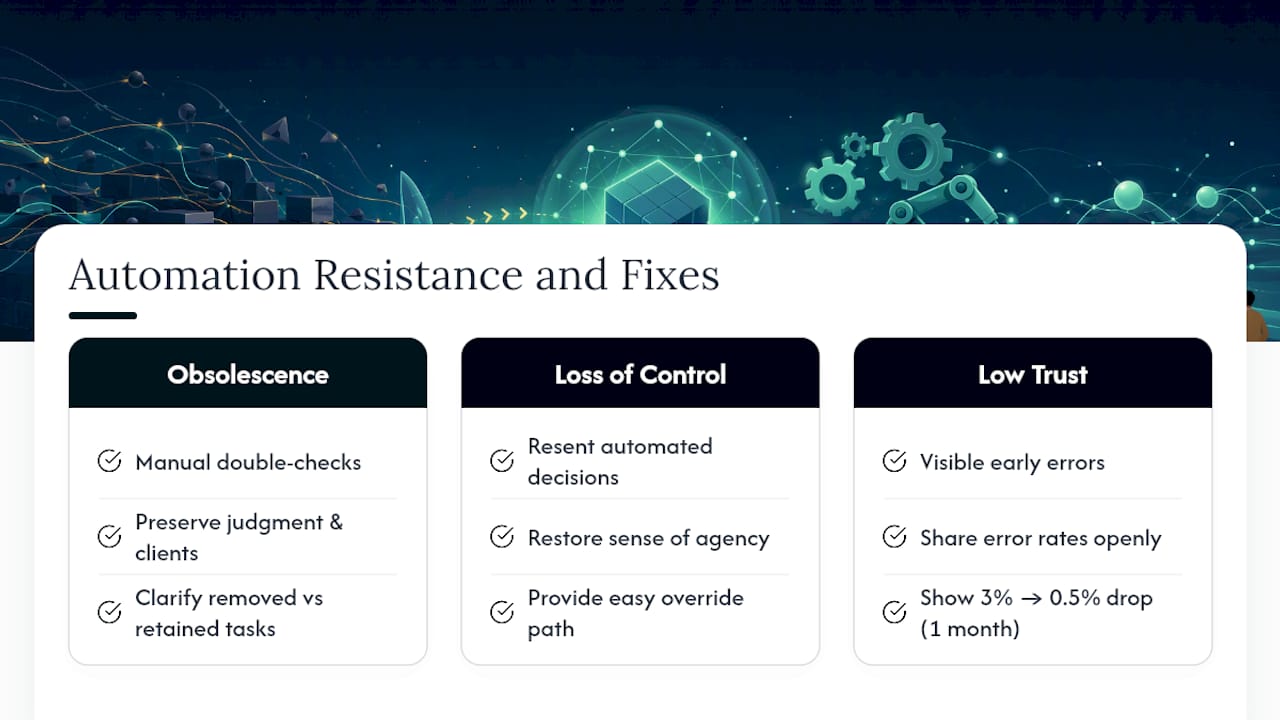
Three sources of resistance show up again and again. First, fear of obsolescence: staff worry the automation replaces their role rather than their busywork. Second, loss of control: people who used to make judgment calls resent a system that now makes those calls for them. Third, low trust in the automation’s accuracy, especially in the first weeks when errors are more visible than the labor they’re saving.
Address each one differently. For fear of obsolescence, be specific about what the automation removes (data entry, routing, follow-up emails) versus what stays human (judgment calls, client relationships, exceptions). For loss of control, build an easy override path so staff can correct the system without filing a ticket, which restores a sense of agency even when they rarely need to use it. For trust, share error rates transparently rather than hiding early mistakes. A team that sees a 3% error rate drop to 0.5% over a month trusts the system more than a team told it’s “basically perfect” from day one.
Training helps, but only if it happens before the automation launches, not as a rushed explainer after complaints start. Walk the affected team through a live run, let them ask what happens when something goes wrong, and show them the rollback path with their own eyes.
Compliance, Security, and Audit Considerations for Automation
Automated change introduces a paradox: it can make audits dramatically easier or dramatically harder, depending on whether compliance was designed in from the start. Regulated sectors, healthcare, finance, legal, benefit most from a “compliance-as-code” approach, where deployment plans and audit evidence get generated automatically from Git diffs and CI outputs rather than assembled by hand after the fact. Practitioner projects taking this approach report cutting manual documentation dramatically in regulated deployments.
Security considerations run parallel to compliance ones. Every automated change should carry an identity trail: who approved it, what triggered it, and what tests it passed before deployment. Change calendars that block deployments during restricted windows, the same pattern AWS documents in Change Manager, also double as a security control, preventing changes from landing during high-traffic periods when incident response bandwidth is thin.
Audit readiness comes down to one question: can you reconstruct, six months later, exactly why a specific change happened and who signed off on it? If the answer requires digging through Slack messages and email threads, the automation program has a compliance gap regardless of how well the code itself performs. Build the audit trail into the pipeline itself, not into a parallel documentation habit that people will eventually stop maintaining.
Building Continuous Improvement Into the Change Process
An automation change program that doesn’t revisit itself calcifies within a year. The fast path that made sense for a 20-person team creates bottlenecks at 200. The risk-scoring thresholds set during the pilot stop matching reality once the automation touches customer-facing systems instead of internal admin tasks.
Build a quarterly review into the calendar from day one. Pull the change failure rate, mean time to recovery, and approval turnaround time, and ask a blunt question: is the current process still earning its overhead, or has it become the automated bureaucracy this guide warned about earlier? If approvals are taking longer than they did six months ago, the process has drifted, not improved.
Feedback loops work best when they’re structured, not incidental. After every incident tied to an automated change, run a short retrospective focused on the process, not blame: did the risk score classify this correctly? Did the rollback work as designed? Should this change type move to a different approval tier? Feed those answers back into the risk-scoring model itself, so the system that routes changes gets sharper with every cycle instead of staying frozen at its pilot-era settings.
The organizations that get the most out of automation treat the change management process itself as something to automate incrementally, not as a fixed policy document written once and filed away.
Getting Communication Right During Automation Rollouts
Generic change communication, a company-wide email announcing “new automation coming soon”, tends to generate more anxiety than clarity. Automation-specific communication needs to answer three questions every affected employee is actually asking, whether they say it out loud or not: what exactly is changing, when does it happen to my work specifically, and what do I do if it breaks.
Segment the message by role. The person whose daily task gets automated needs different information than the manager approving the rollout budget. Give the frontline team a walkthrough of the new workflow with a real example from their own queue, not an abstract diagram. Give leadership the metrics that show the pilot is on track.
Timing matters as much as content. Announce a change far enough ahead that people can ask questions before it lands, but not so far ahead that the announcement fades from memory by launch day. Two to three weeks tends to work for most internal automation rollouts. Follow up during the first week live with a short, specific check-in, not a survey, a direct question like “did the new routing catch everything it should have this week?”
Keep a visible channel open for reporting issues that doesn’t require filing a formal ticket. The fastest way to lose trust in an automated process is to make it hard to report when the automation gets something wrong.
Making Automation Change Fit ITSM and DevOps Workflows
Automation change management doesn’t succeed as a standalone program bolted onto existing operations. It has to plug directly into the ITSM and DevOps tooling teams already use, or engineers will treat it as extra overhead and quietly bypass it.
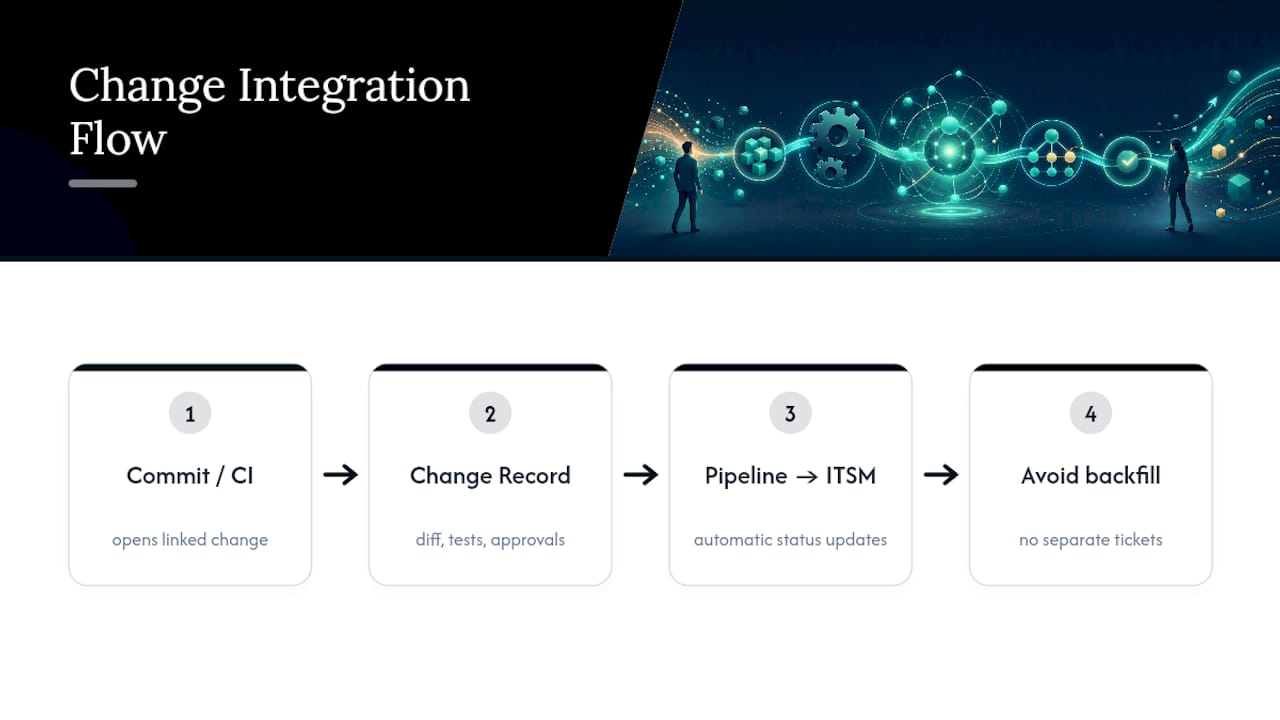
The integration point that matters most is the change request itself. Rather than requiring a separate ticket in the ITSM system alongside a pull request in the DevOps pipeline, route both through the same event: a code commit or CI run automatically opens a linked change record, carrying the diff, test results, and approval status. This is the same principle behind Change Manager’s templated requests and runbook execution, applied to whatever ITSM platform an organization already runs.
Where teams get this wrong is treating ITSM and DevOps as parallel systems that occasionally sync. That gap is exactly where automated bureaucracy creeps in, engineers deploy through the pipeline, then someone else manually backfills the ITSM record days later, if at all. Closing that gap usually means giving the DevOps pipeline write access to the ITSM system’s API, so status updates flow automatically instead of depending on someone remembering to log them.
Teams evaluating this kind of integration work sometimes bring in a partner for the enterprise SaaS layer connecting these systems. Firms like LogicBranch specialize in exactly that kind of custom integration work for organizations that need the ITSM and DevOps pipelines talking to each other natively rather than through manual handoffs.
Leadership Priorities and Trade-offs
Three things matter more than any tool choice: name an accountable sponsor, gate high-risk changes with humans, and measure the pilot honestly before scaling. Automation without those three guardrails doesn’t fail loudly. It fails quietly, through skipped approvals and a workforce that stops trusting the system. Oversight isn’t the brake on speed. It’s what makes speed sustainable.
— Lakitha
How Zatersio Turns This Playbook Into a Working Pilot
Most automation vendors sell software and leave the change management to you. The vendor scopes, builds, and governs the automation together with clients, so the approval flow, the rollback plan, and the working system ship from the same fixed-price project instead of getting bolted together after the fact.

If you’re not sure where to start, Zatersio’s free automation blueprint maps out which of your processes are the safest pilot candidates before you spend a dollar. From there, engagement scales to match the roadmap in this guide, single workflow automation starting at $2,000 AUD for a first pilot, up through multi-step automation across your stack once the pilot proves out. Every build stays on Australian-resident infrastructure under client control, which supports compliance and R&D Tax Incentive eligibility. Book a blueprint call and find out which process to automate first.
Where These Practices Come From
- Forrester: It’s Not Your Automation; It’s Your Change Management
- Google Cloud: Automate and Manage Change
- AWS Systems Manager Change Manager
- kj-hilger/change-automation-core
- brianpelow/cab-automation
Sources
- It’s Not Your Automation; It’s Your Change Management
- Automate and manage change | Cloud Architecture Center | Google Cloud
- AWS Systems Manager Change Manager
- kj-hilger/change-automation-core
- brianpelow/cab-automation
FAQ
What Are the 5 Pillars of Change Management?
Most frameworks build change management on five pillars: leadership sponsorship, structured communication, stakeholder engagement, training, and reinforcement to make the change stick. In automation specifically, governance and human-in-the-loop review effectively sit inside the sponsorship and reinforcement pillars, since someone has to own approval and someone has to confirm the change held.
What Are the Four Types of Automation?
The four common types are fixed automation for repetitive, unchanging tasks, programmable automation for processes that shift between defined configurations, flexible automation for systems that adapt to varied inputs, and integrated automation where multiple automated systems coordinate across a workflow. Most business process automation, including the workflow builds Zatersio delivers, falls into the flexible or integrated categories.
What Are the Four Types of Change Management?
Change management typically splits into developmental change (improving an existing process), transitional change (moving from one defined state to another, like a system migration), transformational change (a fundamental shift in how the organization operates), and remedial change (fixing something that broke). Automation projects most often start as transitional change and grow into transformational change once adoption scales.
What Are the 5 C’s of Change Leadership?
Definitions vary across frameworks, but a common version lists communication, commitment, culture, capacity, and change agents as the five C’s. Leadership commitment and organizational culture, both covered earlier in this guide, tend to be the two that determine whether an automation rollout actually sticks.
How Long Does an Automation Change Pilot Take?
Most pilots typically run for several weeks. Costs concentrate early, in the initial IaC setup, pipeline configuration, and integration with existing ITSM tools, and then drop sharply once the pattern is templated for the next process.