
Governance First Business Admin Automation for Owners & Managers
Governance First Business Admin Automation for Owners & Managers
Business admin automation cuts repetitive workload and makes processes auditable, freeing staff for higher-value work. It replaces manual invoice entry, payroll checks, and onboarding paperwork with rule-based bots, workflow platforms, or supervised AI agents that log every action. Zatersio builds these systems for Australian businesses, often delivering a working pilot in a few weeks.
TL;DR:
- RPA is ideal for stable, high-volume tasks like invoice data entry, while workflow platforms suit multi-person approval processes such as vendor setup.
- Prioritize automating invoices, payroll, onboarding, reconciliations, and scheduling, as these low-judgment tasks generate high returns and reduce errors.
- Start automation projects with thorough discovery, detailed process mapping, and pilot testing using real data to establish measurable goals and governance controls.
- Use native connectors for stable systems, UI-driven RPA for flexible but potentially fragile integrations, or custom solutions for unique or complex system requirements.
- Small, targeted MVP builds often yield measurable time savings within two weeks, helping determine if off-the-shelf platforms or bespoke development are more appropriate.
Table of Contents
- What Are the Main Types of Business Admin Automation?
- Which Admin Workflows Should You Automate First?
- How Do You Plan and Run a First Automation Project?
- What Should You Check Before Connecting Automation to Your Systems?
- How Much Time Can Business Admin Automation Actually Save?
- Bespoke Build or Off-the-Shelf Platform: Which One Do You Need?
- Ready to Automate? Here’s What Zatersio Builds
- Where to Read More on Admin Automation
- Sources
What Are the Main Types of Business Admin Automation?
Not every admin problem needs the same fix. Picking the wrong approach is the fastest way to waste a budget on software nobody uses, so it helps to know what each category actually does before you shop for tools.
Robotic process automation (RPA) mimics human clicks and keystrokes inside existing software. It’s the right call for high-volume, rules-based tasks where the underlying systems won’t change, like copying data from an invoice PDF into an accounting platform.
Workflow automation and business process management (BPM) tools map an entire process, from request to approval to completion, and route work automatically. These shine when a task involves multiple people signing off in sequence, such as expense approvals or new-vendor setup.
No-code and low-code platforms let non-technical staff build or adjust workflows without waiting on IT. FlowForma’s breakdown of back-office automation notes that modern platforms pair drag-and-drop workflow builders with AI document extraction, so a finance manager can adjust an approval chain without submitting a ticket.
Agentic AI automation goes further: an agent doesn’t just follow a script, it interprets a request and proposes an action. Microsoft’s own Microsoft 365 Admin agent is a clear example. It lets administrators run tasks across Microsoft 365 through plain-language prompts, but every write action still requires explicit confirmation, and role-based permissions stay intact throughout.
Here’s how to match approach to problem:
- High volume, stable rules, legacy software: RPA
- Multi-step approvals across departments: workflow/BPM
- Frequent process tweaks, non-technical owners: no-code/low-code
- Judgment calls, exceptions, cross-system requests: AI agents with human approval gates
Which Admin Workflows Should You Automate First?
Not every process deserves equal priority. Rank candidates by how much manual time they eat and how often errors slip through, and you’ll usually land on the same short list most businesses start with.
- Accounts payable and invoice matching. Capturing invoice data and matching it against purchase orders is repetitive, rules-heavy, and prone to duplicate payments when done by hand.
- Payroll and recurring payroll checks. Automated validation catches missing timesheets or award-rate errors before payday, not after a staff complaint.
- Employee onboarding and offboarding. Account provisioning, document collection, and equipment requests can run as a single triggered checklist instead of five separate emails.
- Bank and ledger reconciliations, recurring reports. These are calendar-driven and rules-based, which makes them ideal early automation candidates.
- Appointments, reminders, and scheduling. Automated reminders reduce no-shows and free front-desk staff from chasing confirmations by phone.
Back-office automation combines RPA, AI, natural language processing, and BPM specifically to speed up these five categories, and the reason they top most priority lists is simple: they’re high-frequency, low-judgment tasks where a wrong entry costs real money.
Pro Tip: Time one of these workflows manually for a week before you automate it. That baseline number is what proves the ROI later, and without it, you’re guessing.
How Do You Plan and Run a First Automation Project?
A first project succeeds or fails on discipline, not ambition. Start too big and you’ll spend months in planning meetings; start too narrow and you won’t learn anything useful.
Discovery comes first. Measure how long the current process takes, how often it produces errors, and which systems it touches. Without this baseline, you can’t prove the automation worked.
Mapping comes next. Document every exception, every approval step, and every place data moves between systems. Exceptions are where most automation projects go wrong if they’re ignored.
Then pilot, not launch. Atlassian’s guidance on business process automation recommends running a parallel test alongside the existing manual process before switching over completely. Zatersio typically builds a working MVP for this stage quickly, letting you smoke-test the workflow with real data before committing further budget.
Governance can’t be an afterthought:
- Role-based access control (RBAC) so only authorized staff can trigger sensitive actions
- Audit logs that record every automated decision, not just outcomes
- Approval workflows requiring a human sign-off before money moves or records change
Set your key performance indicators before the pilot starts, not after: hours saved per week, error rate before versus after, and time from request to completion. If you can’t measure it, you can’t defend the spend to your accountant later.
What Should You Check Before Connecting Automation to Your Systems?
Integration decisions determine whether an automation project runs smoothly for years or breaks every time a vendor updates their software.
You’ll generally choose between three connection methods:
- Native connectors and APIs, which are stable but only exist if the vendor built them.
- UI-driven RPA, which works with almost any software but breaks when a screen layout changes.
- Custom-built integrations, slower to set up but tailored to systems with no API at all.
Data quality matters more than most people expect. An automation that reads inconsistent customer records or duplicate supplier entries will simply automate the mess faster. Clean master data is a prerequisite, not a nice extra.
Security follows the same governance pattern discussed above: agentic back-office platforms route exceptions to a human and log full decision lineage, which matters most for anything touching accounts payable, payroll, or personal records. Cost and timeline scale with the number of systems involved and how much exception-handling logic each one needs, so a two-system invoice workflow will always price out faster than a five-system onboarding process.
How Much Time Can Business Admin Automation Actually Save?
A Melbourne services firm approached Zatersio to automate its client onboarding and invoice reconciliation workflows, both of which were consuming staff hours across multiple departments every week. The build automated document collection, data entry into the accounting system, and reconciliation checks, while keeping final approval steps with a human.
The result: significant time returned to staff who’d previously spent that time on manual data entry and chasing paperwork, based on the Melbourne workflow automation case study.
Zatersio delivers this kind of outcome through rapid MVP builds, often working software in under two weeks, fixed pricing agreed up front, and Australian data residency for businesses that need it. Projects structured correctly can also qualify for the R&D Tax Incentive, and clients work directly with the engineering team rather than through account layers.
Bespoke Build or Off-the-Shelf Platform: Which One Do You Need?
Here’s where most businesses get it backward. They assume a custom build is always the expensive, risky option and an off-the-shelf platform is always the safe one. That’s not how it plays out in practice.
If your process is genuinely standard, an approval chain that looks like every other business’s approval chain, a low-code platform will get you running faster and cheaper. But the moment your workflow involves unique integrations, specific data residency requirements, or judgment calls that don’t fit a generic template, bespoke automation stops being a luxury and starts being the only option that actually fits.
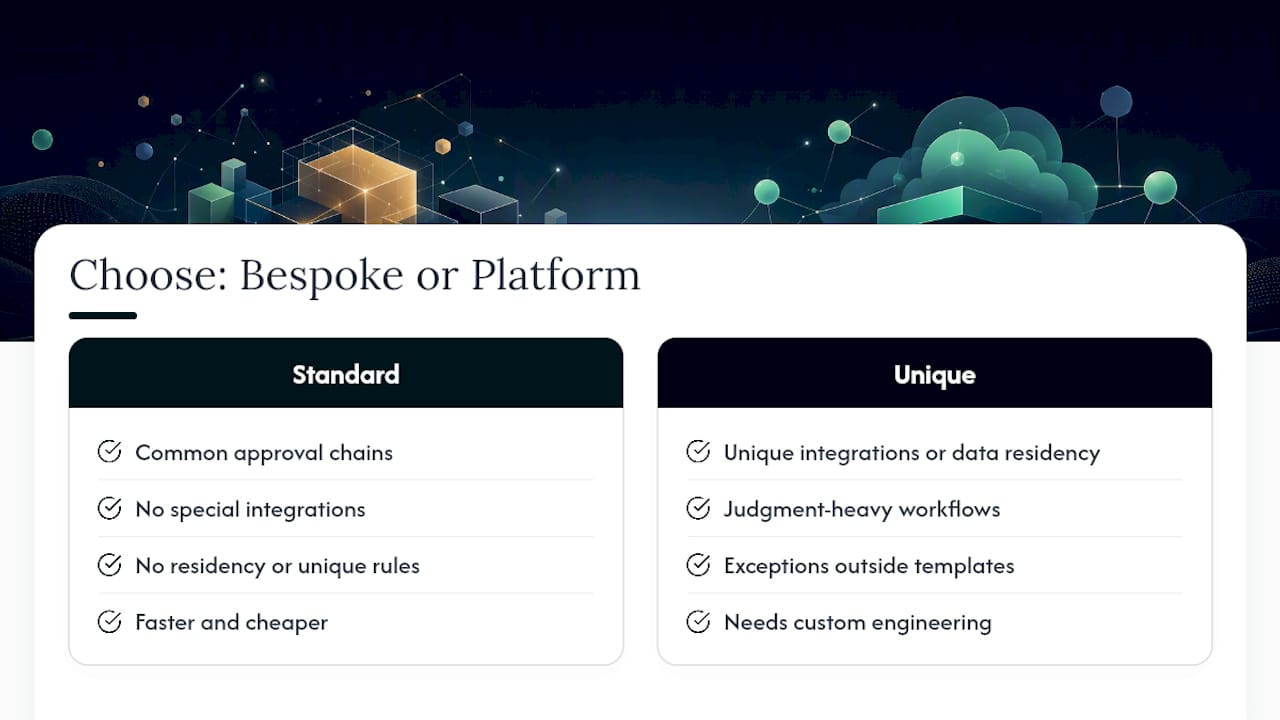
An MVP is the cheapest way to find out which category you’re in. Build a narrow, working version of the workflow, test it against real data, and you’ll know within weeks whether a platform can handle it or whether it needs custom engineering.
Before hiring anyone, ask three questions: Who approves each write action? Where does the audit log live? What happens when the process hits an exception it wasn’t built for?
— Lakitha
Ready to Automate? Here’s What Zatersio Builds
Zatersio is the alternative to hiring a slow-moving agency or wrestling with a generic no-code platform that doesn’t fit your process. You get a fixed-price, engineer-built MVP or automation, often working within two weeks, with direct access to the people writing the code instead of an account manager relaying messages. Builds are structured to qualify for the R&D Tax Incentive where eligible, and Australian data residency is available for businesses that need to keep records local.

A typical engagement starts with a short discovery call to map your highest-cost workflow, moves into a two-week MVP build, and scales from there once the pilot proves out. If accounts payable, onboarding, or reporting is eating hours every week, get a free automation blueprint or look at Zatersio’s workflow automation services to see what a first build could look like for your business.
Where to Read More on Admin Automation
For deeper technical detail, Microsoft documents the governance behavior of its admin agent directly. FlowForma and Aprio both publish practical explainers on back-office automation features and use cases. For architecture context on supervised AI agents, Automatic.co’s product overview is worth a look, and Zera Consulting’s Copilot licensing guide helps IT managers plan rollout readiness.
Sources
- Microsoft 365 Admin agent — documentation
- What is back-office automation? — Aprio
- Back office automation: meaning, features & use cases — FlowForma
- Automatic