
Australian Clinics: Two Weeks to Clinic Automation and a Manager Plan
Australian Clinics: Two Weeks to Clinic Automation and a Manager Plan
Adopt an AI-enabled, calendar-synced appointment system that combines patient self-scheduling with automated reminders, wired directly into your practice calendar. This is the fastest path to fewer no-shows and reclaimed staff hours. Most clinics see measurable gains within weeks, not months, and the checklist below covers the rollout steps, KPIs, and security controls you need to get there.
TL;DR:
- Automated scheduling and reminders can reduce missed appointments by a few percentage points to double digits, depending on baseline no-show rates and patient population.
- The system must sync provider calendars in real time and immediately offer canceled slots to waitlisted patients via SMS or app notification for maximum efficiency.
- Roll out should start with a pilot on a single high-volume service line, running for four to six weeks, with staff trained beforehand to handle system issues.
- Security measures require encryption, role-based access, audit logs, and explicit patient consent, especially for clinics in Australia with data residency needs.
- Key metrics include no-show rate, cancellation fill rate, staff time saved, and self-service booking percentage, tracked weekly or monthly to demonstrate ROI.
Table of Contents
- Why Clinic Appointment Automation Improves Operations and Access
- Core Features Your Automation Solution Must Have
- How to Roll Out Clinic Scheduling Software Without Disrupting Care
- Integration, Data Residency, and Security Requirements
- Metrics and a Simple ROI Model for Appointment Automation
- A Real Clinic Automation Build: Lessons From the Field
- What Clinic Managers Should Prioritize Right Now
- Build Your Clinic’s Automation Without the Agency Overhead
- Sources
Why Clinic Appointment Automation Improves Operations and Access
The evidence on this is not thin. A systematic review of web-based medical appointment systems found that pairing online scheduling with automated reminders consistently cuts missed visits and lightens administrative load across different clinic settings. Large-scale programs back this up. Research on scheduling systems with automated appointment reminders found SMS-based reminder programs reduced missed appointments and increased clinic throughput over time, even in national-scale rollouts where results varied by population.
What does that mean for your front desk? Fewer phone tag sessions, faster intake at check-in, and a waitlist that actually fills itself instead of sitting empty when someone cancels at 8 a.m.
The operational wins tend to cluster around three areas:
- Call volume drops sharply once patients can self-book online or by text.
- Idle capacity shrinks because canceled slots get auto-offered to waitlisted patients within minutes, not hours.
- Intake completion improves when forms arrive digitally before the visit instead of on a clipboard at check-in.
Quick fact: Reminder and scheduling automation studies report no-show reductions ranging from modest single digits to double-digit percentage points, depending on baseline no-show rates, patient population, and reminder timing. Treat any vendor’s flat percentage claim skeptically. Your clinic’s starting point determines your ceiling.
Core Features Your Automation Solution Must Have
A demo that looks slick on a sales call is not the same as a system that survives contact with a busy Monday morning. Before you sign anything, or brief an engineering team on a custom build, insist on these capabilities:
- Real-time calendar and EHR sync with writeback. The booking tool must read provider availability live and write confirmed appointments straight back into your practice management system, not just email a request to staff.
- Configurable visit types and durations. New patient intakes, follow-ups, and procedure visits need different time blocks and different intake requirements.
- Automatic waitlist fill. When a slot opens, the system should offer it to waitlisted patients immediately, by SMS or app notification, rather than waiting for a staff member to notice.
- Two-way messaging across SMS and WhatsApp. Patients respond faster to a text than an email, and two-way threads let them confirm, reschedule, or ask a quick question without calling in.
- Voice or AI receptionist coverage. Phone remains the first channel many patients reach for, especially older populations, so an AI receptionist that can book directly matters as much as the web widget.
- Digital intake form delivery. Forms sent ahead of the visit, tied to the specific visit type, cut front-desk paperwork time.
- Provider-level rules and buffers. Some clinicians need 15-minute gaps between patients; others don’t. The system should let you set this per provider, not clinic-wide.
- Audit trails and reporting. You need a record of who booked what, when, and through which channel, both for compliance and for tuning the system later.
How to Roll Out Clinic Scheduling Software Without Disrupting Care
Rushing a full-clinic rollout on day one is how automation projects stall. A staged pilot, with clear owners and metrics, gets you real answers before you commit clinic-wide.
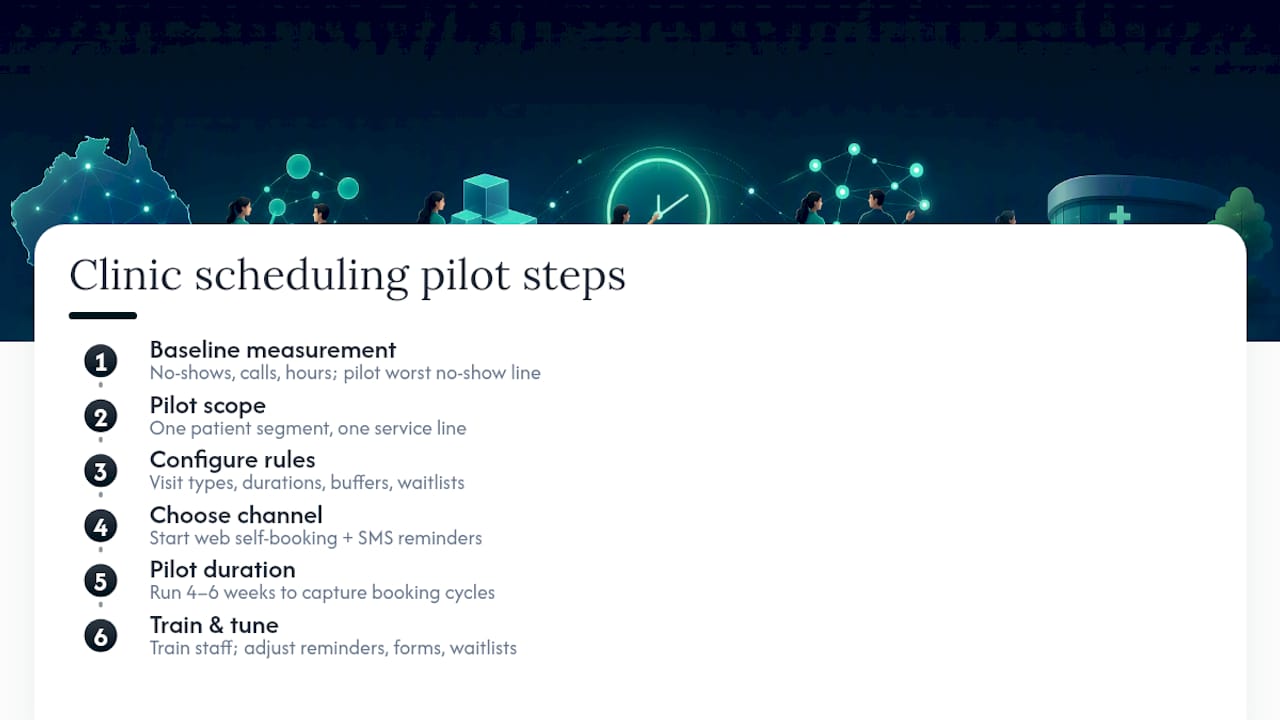
1. Set your baseline before you touch anything. Pull your current no-show rate, average call volume, and receptionist hours spent on scheduling. Without this, you cannot prove the project worked. Pick one patient segment and one service line to pilot on, ideally one with high volume and a stable no-show pattern.
2. Configure scheduling rules for the pilot service line only. Set visit types, durations, buffers, and waitlist thresholds specific to that line. Don’t try to configure every service at once.
3. Choose your first channel deliberately. Web-based self-scheduling plus SMS reminders is the standard starting combination; a related insight from implementation literature is to add complexity, like WhatsApp or voice booking, only after the first channel proves stable. Layering everything at once makes it hard to tell which change caused which result.
4. Run the pilot for four to six weeks. That window is long enough to capture a full booking cycle, including cancellations and rebookings, without dragging the evaluation out.
5. Train staff before go-live, not during it. Front-desk and clinical staff need a clear fallback process: what happens when a patient calls confused about a text reminder, or when the system double-books due to a sync error. Define escalation paths for clinical questions that a booking bot should never try to answer.
6. Tune based on pilot data. Adjust reminder timing (24 hours before tends to outperform same-day for reducing no-shows in most reports), revise intake form length if completion rates lag, and reset waitlist thresholds if slots are filling too slowly or too fast.
Pro Tip: Run your pilot on the service line with your worst no-show rate, not your best. That’s where the return is easiest to prove to leadership, and it gives you the clearest before-and-after story for the full rollout decision.
Integration, Data Residency, and Security Requirements
Every automation build rests on one technical decision: direct EHR API integration versus a middleware layer that sits between your practice management system and the booking tool. Direct API access gives cleaner real-time sync but demands more upfront engineering. Middleware is faster to deploy and easier to swap out later, at the cost of an extra system to maintain.
Whichever route you choose, three data flows have to work reliably: reading provider availability, writing confirmed bookings back to the calendar, and capturing intake form data securely. A research insight on scheduling reliability makes the point plainly: real-time calendar sync is the technical bottleneck that everything else, chatbots, reminders, voice booking, depends on. Get that piece wrong and the rest doesn’t matter.
Security controls are not optional extras:
- Encryption in transit and at rest for all patient data moving through the booking system.
- Role-based access so front-desk staff and clinicians see only what their role requires.
- Audit logging on every booking, cancellation, and message sent.
- Explicit patient consent captured before enrolling someone in SMS or WhatsApp reminders.
For Australian clinics, data residency options matter for procurement and compliance sign-off. In-country hosting removes a common blocker before it ever reaches a committee meeting.
Metrics and a Simple ROI Model for Appointment Automation
Four numbers tell you whether the system is earning its keep: no-show rate, cancellation fill rate, receptionist hours saved per week, and the percentage of bookings completed through self-service.
Reclaimed capacity converts to revenue through a straightforward calculation: multiply newly filled slots per week by your average visit revenue, then subtract the automation platform’s monthly cost. Staff-time savings follow the same logic. If your front desk previously spent 15 hours a week on phone-based scheduling and that drops to 5 hours after rollout, you’ve freed 10 hours weekly for patient-facing work or reduced overtime.
| KPI | What it measures | Reporting cadence |
|---|---|---|
| No-show rate | Percentage of booked appointments missed | Weekly during pilot, monthly after |
| Cancellation fill rate | Share of canceled slots refilled from waitlist | Weekly |
| Receptionist hours saved | Time freed from manual scheduling tasks | Monthly |
| Self-service booking rate | Percentage of bookings made without staff involvement | Monthly |
Build a simple dashboard around these four figures before you launch, not after. Retrofitting measurement onto a live system always produces gaps in the data you’ll wish you had from week one.
A Real Clinic Automation Build: Lessons From the Field
Rapid MVP development is Zatersio’s specialty. Working software in under two weeks, not months, matters when a clinic needs EHR integration live before the next quarter’s patient volume hits. One Melbourne services firm recovered more than 20 hours a week after a workflow automation build, time that maps directly to the receptionist-hours-saved KPI above.
The practical lessons carry over to clinics: pace integrations one system at a time rather than connecting everything simultaneously, budget real hours for staff change management, and settle data-residency requirements before writing a line of code, not after a compliance review flags it.
What Clinic Managers Should Prioritize Right Now
Start with the service line your patients already book by phone or text, not the one that sounds most impressive in a pitch deck. Pick a narrow pilot with a defined rollback plan; if reminder cadence backfires or a channel underperforms, you need an exit that doesn’t disrupt care.
Off-the-shelf tools work fine for standard booking flows. A custom build earns its cost when your EHR integration, provider rules, or data-residency needs don’t fit a generic template.
— Lakitha
Build Your Clinic’s Automation Without the Agency Overhead
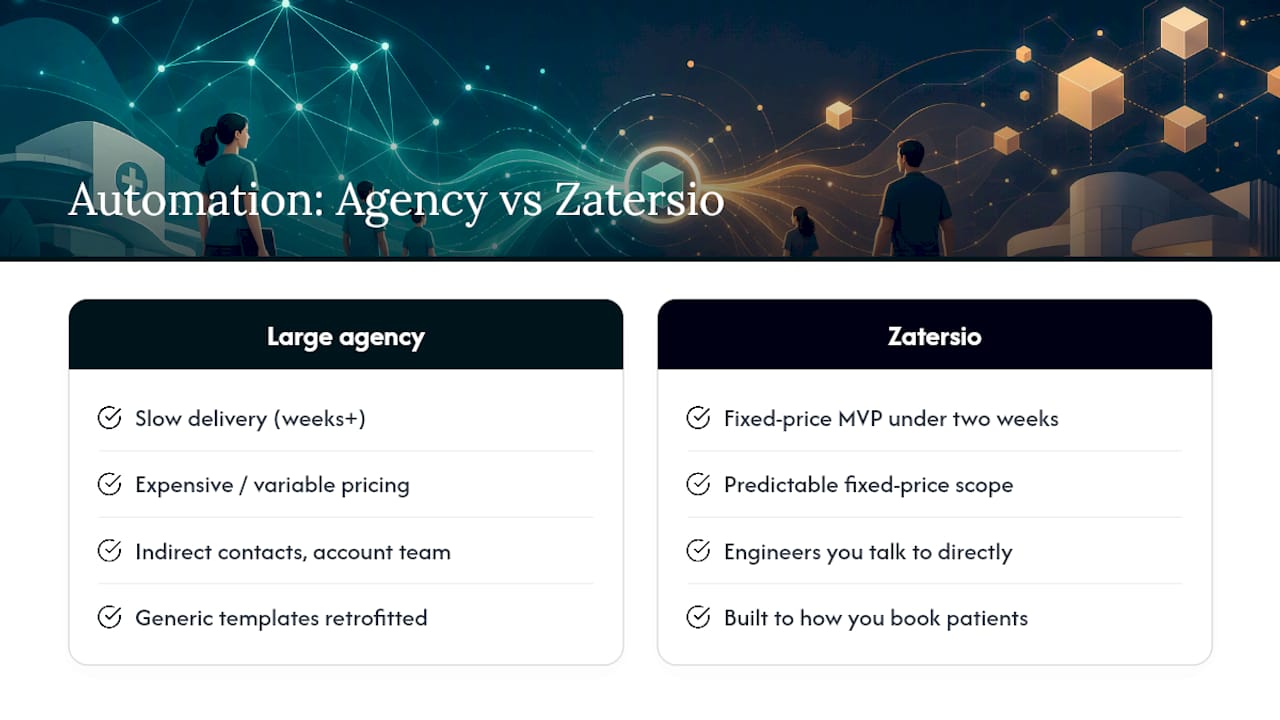
Zatersio replaces the slow, expensive path of hiring a large software agency for clinic automation with a fixed-price MVP delivered in under two weeks, built by engineers you can actually talk to directly. For clinics juggling EHR writeback, provider-level scheduling rules, and Australian data residency requirements, that speed matters more than a polished sales deck.

Zatersio’s approach centers on rapid MVP development tailored to how your clinic actually books patients, not a generic template retrofitted to fit. Eligible builds can also qualify for R&D Tax Incentive structuring, and every project includes your choice of data hosting to satisfy compliance review before it becomes a blocker. For clinics that need calendar sync, waitlist automation, or an AI receptionist handling after-hours calls, the healthcare automation page shows how the pieces fit together.
Ready to see what a two-week build could look like for your clinic? Book a discovery call and get a fixed-price scope back within days.
Sources
The systematic review of web-based appointment systems and the health economics research on automated reminders both back the core claims in this guide. For practical message templates you can adapt for reminder cadences, MyAirCare’s appointment reminder guide offers ready-to-use examples. For a vendor-specific look at operational savings, Zatersio’s Melbourne case study breaks down a real automation build.
- How scheduling systems with automated appointment reminders improve health clinic efficiency
- Web-Based Medical Appointment Systems: A Systematic Review