
Construction Document Control for Project Managers
Construction Document Control for Project Managers
Construction document control is the systematic process of creating, reviewing, approving, distributing, revising, and archiving every project document so that every team member always works from the current version. If you’re starting today, do three things first: designate one person as owner of the master document register, pick a single source of truth (a platform or shared drive, not email), and apply a naming convention before the first drawing goes out.
Immediate actions:
- Assign a document controller or PM as the register owner
- Choose one central repository and ban parallel copies
- Define your naming pattern (e.g.,
[Project]-[Discipline]-[Type]-[Number]-[Rev]) before issuing any documents
| Benefit | What it prevents |
|---|---|
| Reduced rework | Teams building from superseded drawings |
| Faster approvals | Bottlenecks from unclear review chains |
| Defensible audit trail | Disputes with no traceable revision history |
Table of Contents
- Who owns what: roles, handoffs, and the document control model
- Policies you must set before documents start flowing
- Operational best practices the field will actually follow
- What modern document control tools should actually do for you
- A practical 30–90 day implementation plan
- Common failures, audit readiness, and closeout preparation
- Concrete templates and sample entries you can copy today
- Key Takeaways
- The real reason document control fails is people, not process
- When a custom automation partner makes more sense than off-the-shelf software
- Authoritative sources and further reading
Who owns what: roles, handoffs, and the document control model
The master document register should be owned by a dedicated document controller on large programs, or by the PM on smaller projects. That ownership must be explicit and written into the project execution plan before documents start flowing.
Role matrix:
| Role | Primary Responsibility | Key Handoff Trigger |
|---|---|---|
| Document Controller / Admin | Maintains master register, logs all transmittals, manages revision status | Receives any new or revised document |
| Project Manager | Approves distribution lists, resolves access disputes, owns closeout checklist | Signs off on change orders and major submittals |
| Project Engineer | Reviews RFIs, tracks submittal status, coordinates with design team | Receives RFI response; logs approval in register |
| Superintendent | Confirms field receipt of current drawings, signs field reports | Notified on every drawing revision affecting active work |
| Design Lead | Issues revised drawings and specs, approves submittals | Issues revision; triggers transmittal to contractor |
| Subcontractors | Acknowledge receipt of current documents, submit shop drawings | Receive transmittal; return signed acknowledgment |
ProjectEngineer’s guide confirms that staffing patterns range from dedicated document controllers on large capital programs to PMs handling the role on smaller initiatives. The practical implication: on a project under $5M, the PM likely owns the register, but the policies and handoff triggers should be identical.
Practical handoff rules:
- When a drawing revision is issued, the document controller notifies the superintendent and affected subcontractors within 24 hours via a formal transmittal
- When a submittal is approved, the project engineer logs the approval status and revision in the register before returning the document to the contractor
- When an RFI response is received, the project engineer logs the response date, links it to the affected drawing or spec, and notifies the superintendent if field work is impacted
- Any document that changes scope, cost, or schedule triggers a PM review before distribution
Policies you must set before documents start flowing
Set these policies at project kickoff, not after the first drawing revision causes confusion. The five non-negotiable policies are naming conventions, versioning rules, permission tiers, distribution rules, and a transmittal log format.
Naming convention pattern:
[Project Code]-[Discipline]-[Document Type]-[Number]-[Rev]
Example: PROJ001-STR-DWG-0042-C
For BIM-integrated projects, ISO 19650 naming guidance adds fields for originator, volume/system, and level, which you can adopt partially without implementing the full standard.
Minimum required metadata fields:
- Document title and number
- Revision number/letter and date
- Author and reviewer names
- Status (draft, under review, approved, superseded, void)
- Distribution list
Versioning rules:
- Drafts use numeric suffixes:
Rev 0.1,Rev 0.2 - Issued-for-construction revisions use letters:
Rev A,Rev B,Rev C - Superseded documents are marked “SUPERSEDED” and moved to an archive folder, never deleted
- No document is re-issued without a revision number increment and a change description in the revision block
Permission tiers:
- Read-only: subcontractors and field crews (current issued documents only)
- Edit/upload: project engineers and document controller
- Approve/publish: PM and design lead
Adoption checklist:
- [ ] Naming convention documented and shared with all parties at kickoff
- [ ] Folder structure and permission tiers set up before first upload
- [ ] Transmittal template created and stored in the platform
- [ ] Revision log format agreed with the design team
- [ ] All team members trained on the upload and retrieval process
Procore’s best practices guide connects these policy components directly to project quality and audit readiness, which is the argument to use when a skeptical superintendent asks why the naming convention matters.
Pro Tip: Enforce naming conventions at the upload gate, not after the fact. Configure your platform to reject uploads that don’t match the naming pattern, or assign the document controller as the sole upload point. Chasing renames after 200 files are already in the system is a losing battle.
Operational best practices the field will actually follow
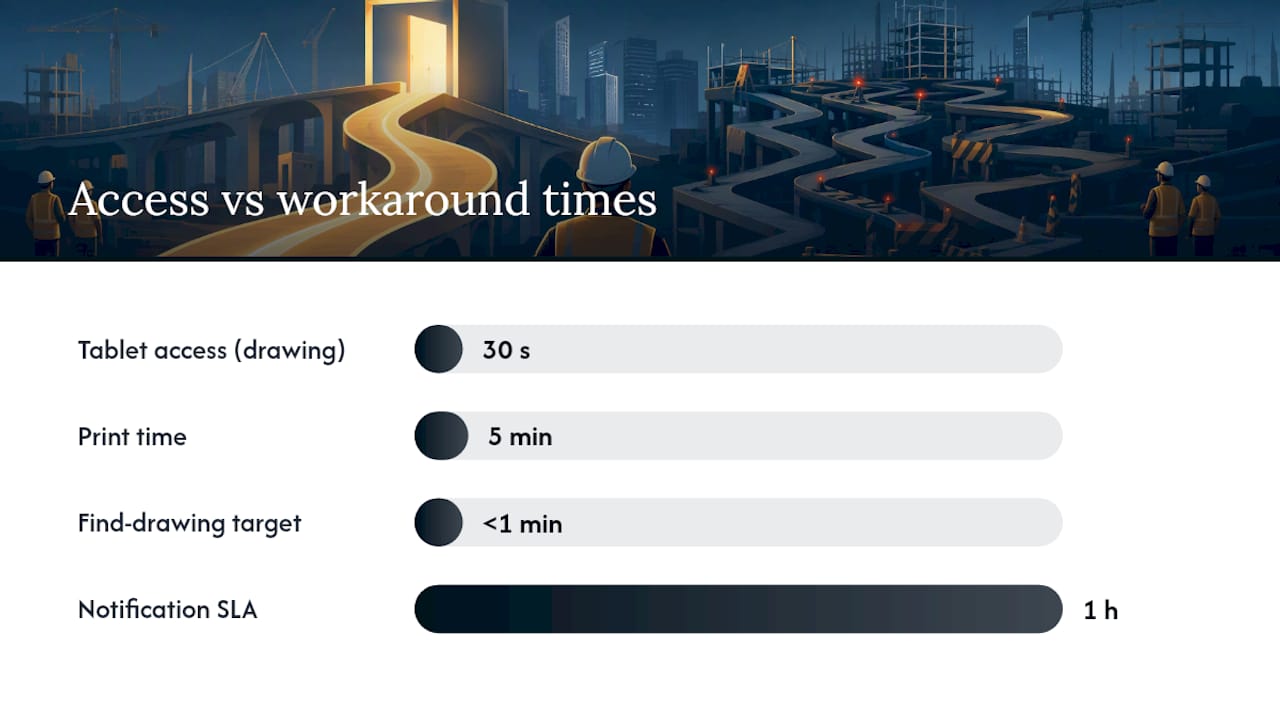
The single most important practice is maintaining one source of truth and making it easier to access than any workaround. If pulling up the current drawing on a tablet takes 30 seconds and printing takes 5 minutes, people will print. Your job is to close that gap.
Daily and weekly operational rules:
- All documents live in one platform; no parallel copies in personal drives or email attachments
- Automatic notifications go to affected parties within one hour of a new revision being published
- Transmittals are issued on a scheduled cadence (daily or per-event), never batched for convenience
- Field crews sign off on receipt of current drawings before work begins on any revised scope
- The document controller runs a weekly register audit to catch any documents sitting in “under review” status past their due date
Document controller weekly checklist:
- [ ] Review all open RFIs and submittals for overdue responses
- [ ] Confirm all transmittals from the past week have signed acknowledgments
- [ ] Archive any documents marked superseded in the prior week
- [ ] Run a version report and share with the PM
Linking documents to QA inspections is one of the most underused practices on mid-size projects. Visibuild’s platform documentation highlights that tying a specific revision to a sign-off record eliminates ambiguity about which version was in use when work was inspected. That traceability matters enormously during disputes or warranty claims.
For mobile and offline access: require that your platform supports offline checkout with automatic sync. Field crews in basements, tunnels, or remote sites can’t wait for connectivity to pull a current drawing. If they can’t get it, they’ll use whatever they have, which is usually yesterday’s print.
Pro Tip: When rolling out mobile access to the field, run a 15-minute “find the drawing” drill on day one. Give the crew a sheet number and ask them to pull it up on the tablet. If they can’t do it in under a minute, your UX is the problem, not their willingness.
What modern document control tools should actually do for you
Look for platforms that lock current versions, create a timestamped audit trail, and provide mobile and offline access. Everything else is secondary.
Feature requirements by capability:
Versioning and audit:
- Automatic version locking when a document is approved
- Full revision history with timestamps and user IDs
- Superseded documents archived but not deleted
Workflows and approvals:
- Configurable review and approval chains by document type
- Automated notifications at each workflow step
- RFI and submittal tracking with due-date alerts
Field access and offline:
- Native mobile app with offline document checkout
- Automatic sync when connectivity is restored
- Photo capture and markup tied to specific document revisions
BIM and QA integrations:
- Link drawing revisions to BIM model versions
- Connect approved documents to inspection and QA records
- Export to ERP or accounting systems for change order cost tracking
Reporting and exports:
- Transmittal logs exportable to PDF or CSV
- Open RFI and submittal aging reports
- Audit trail exports for dispute or legal review
Security and retention:
- Role-based access control with permission audit logs
- Configurable retention schedules by document category
- Encrypted storage with backup and disaster recovery
ProjectTeam’s platform documentation identifies audit trails, version control, role-based permissions, and configurable workflows as the core features that spreadsheets and email cannot reliably deliver.
Platform categories to evaluate:
| Platform Category | Best For | Pricing Shape | Key Integrations | Mobile/Offline | Deployment | Security |
|---|---|---|---|---|---|---|
| Entry-level file storage + manual register | Small projects, 1–5 users | Free to low monthly fee | Basic cloud storage | Limited | Cloud | Basic permissions |
| Purpose-built construction DMS | Mid-size GCs, 5–50 users | Per-user or per-project | BIM viewers, accounting | Full offline sync | Cloud | Role-based, audit trail |
| QA-integrated document systems | Quality-focused contractors | Module-based | Inspection, BIM, ERP | Native mobile | Cloud | Full audit, retention rules |
| Custom automation/integration builds | Complex programs, legacy systems | Fixed-price or retainer | Any system via API | Configurable | Cloud or on-prem | Custom, data residency options |
Three platforms worth evaluating directly: Newforma (strong on email management and project information management for design firms), Procore (broad construction management suite with deep document control and field tools), and Autodesk Construction Cloud (BIM-native with strong model-to-document linking and field access).
A practical 30–90 day implementation plan
A realistic goal: master register and naming convention live by day 30, workflows and team training complete by day 90. That’s achievable on most projects without disrupting active work.
30/60/90 day checklist:
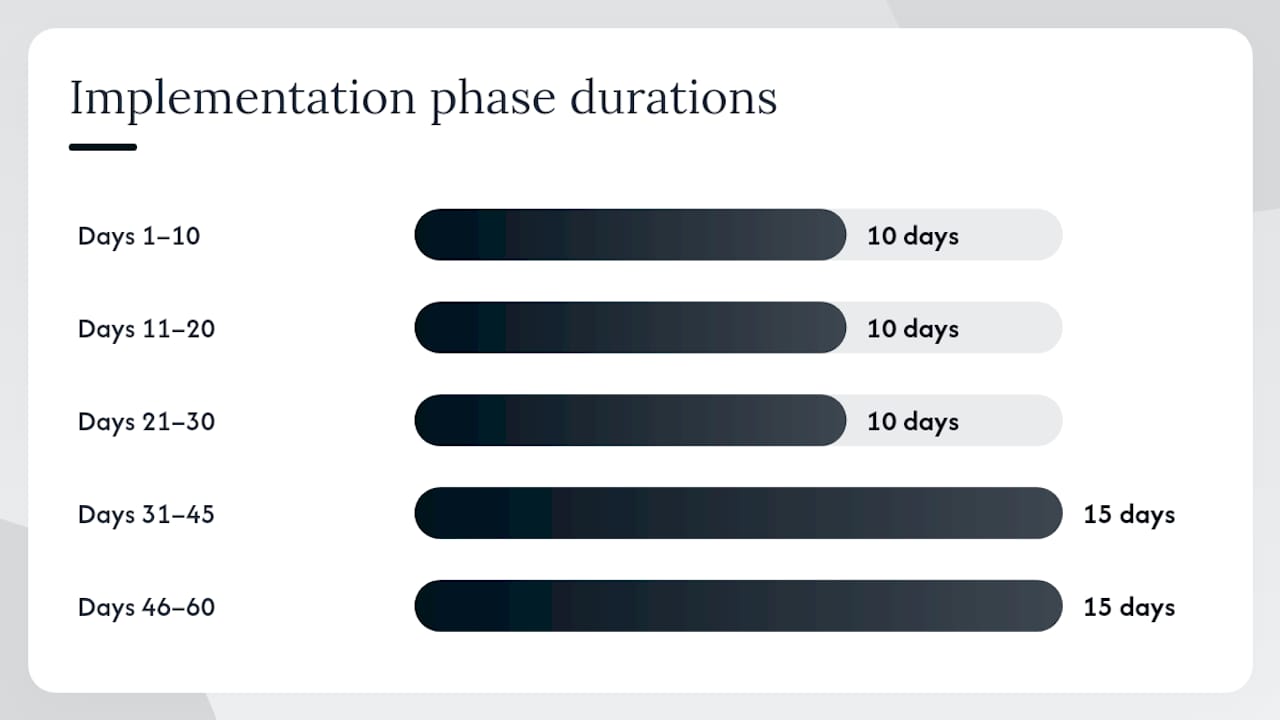
- Days 1–10: Audit existing documents; define naming convention, folder structure, and permission tiers
- Days 11–20: Select platform (or confirm existing tool); configure folder structure and upload templates
- Days 21–30: Migrate active documents; publish master register; issue first formal transmittals
- Days 31–45: Run pilot on one document type (e.g., submittals only); gather feedback from field and office
- Days 46–60: Expand to all document categories; train all team members on upload, retrieval, and transmittal process
- Days 61–75: Activate automated notifications and approval workflows; assign due dates to all open RFIs and submittals
- Days 76–90: Run first full register audit; confirm closeout document collection has started; document lessons learned
ProjectManager’s closeout guidance recommends starting to assemble O&M manuals, warranties, training records, and final approved submittals well before substantial completion. Build that into your day-60 checklist, not your day-85 panic.
Cost factors to budget for:
- Number of active projects and concurrent users (most platforms price per seat or per project)
- Integration complexity (connecting to BIM, ERP, or accounting adds setup cost)
- Training time (budget 4–8 hours per user for a purpose-built platform)
- Legacy record migration (scanning and indexing paper records is often the largest hidden cost)
- Offline capability and mobile licensing (some platforms charge extra for full offline sync)
When to hire a custom automation partner vs. buy off-the-shelf:
Buy off-the-shelf when your workflows match standard RFI/submittal/drawing review patterns and your team is under 50 users. Hire a custom partner when you need bespoke connectors to legacy ERP systems, custom offline sync logic, or process automation that goes beyond what a platform’s built-in workflow engine supports. The workflow automation results from teams that have made that shift show the administrative hours recovered can be significant.
Common failures, audit readiness, and closeout preparation
The three most common failure patterns are: mixing paper and digital records (fix: ban paper distribution after kickoff), allowing uncontrolled versions to circulate via email (fix: lock distribution to the platform only), and leaving document ownership undefined (fix: name the owner in the project execution plan on day one).
Compliance and audit controls to maintain:
- Timestamps on every document action (upload, review, approval, distribution)
- User IDs logged against every action, not just document-level metadata
- Distribution logs showing who received what, when, and in which revision
- Retention schedules documented and enforced by the platform, not manually
- Superseded documents archived with a clear “SUPERSEDED” status and the date of supersession
Sample audit log entry structure:
| Field | Example Value |
|---|---|
| Document ID | PROJ001-STR-DWG-0042 |
| Action | Approved |
| Revision | Rev C |
| User | J. Martinez (Project Engineer) |
| Timestamp | March 2026 |
| Distribution | Superintendent, GC, Subcontractor A |
| Notes | Supersedes Rev B issued February 2026 |
On legal admissibility: Digital records are generally admissible in US courts when they are authenticated and their integrity can be demonstrated. A complete, timestamped audit trail from a purpose-built platform is far stronger evidence than a folder of PDFs with no access log. Consult legal counsel for jurisdiction-specific requirements on your project.
ISO 19650 is worth mapping to when your project involves BIM deliverables or when the owner’s contract requires it. You don’t need to implement the full standard at once. A practical starting point is adopting the naming convention fields and the information delivery milestone structure, then expanding from there. The ISO 19650 guide for Revit teams walks through exactly which fields to prioritize for AEC workflows.
Concrete templates and sample entries you can copy today
Use standardized templates from day one. A template stored in the platform with pre-populated metadata fields eliminates the most common data-entry errors and cuts the time to issue a transmittal from 20 minutes to under 5.
Sample naming convention examples:
- Standard:
PROJ001-ARCH-DWG-A101-RevC - With area code:
PROJ001-ZONE2-MECH-DWG-M201-RevA - ISO 19650-friendly:
PROJ001-ZAT-ARCH-DWG-ZZ-A101-C - RFI:
PROJ001-RFI-0047-Open - Submittal:
PROJ001-SUB-0023-SpecSection-03300-Approved
Sample RFI workflow:
- Contractor logs RFI in platform with description, affected drawing, and requested response date
- Document controller assigns RFI number, notifies project engineer within 2 hours
- Project engineer reviews and routes to design lead if design clarification is needed (response due in 5 business days per contract)
- Design lead responds; project engineer logs response, links to affected drawing revision if applicable
- Document controller closes RFI, notifies contractor and superintendent, updates register
Sample submittal log row:
| Submittal # | Description | Spec Section | Submitted | Returned | Status | Rev |
|---|---|---|---|---|---|---|
| SUB-0023 | Concrete mix design | 03300 | March 3, 2026 | March 10, 2026 | Approved | 1 |
Sample transmittal template fields:
- Transmittal number and date
- From / To (company and contact name)
- Project name and number
- List of documents (ID, title, revision, copies)
- Purpose (for approval, for information, for construction)
- Response required by (date)
- Sent by (name and signature)
Fieldwire’s practical guide recommends planning closeout document collection from day one, which means your transmittal log should flag every submittal that will become a closeout deliverable at the time it’s first issued.
Pro Tip: Store your RFI, submittal, and transmittal templates inside the platform with locked metadata fields. When the document controller opens a new RFI, the project number, date, and numbering sequence should auto-populate. Manual entry is where errors live.
Key Takeaways
Effective construction document control comes down to three decisions made early: who owns the register, where documents live, and what the naming convention is. Every other practice builds on those three.
Next three actions:
- Name the document register owner today and put it in writing
- Pick one platform or repository and migrate all active documents before the next drawing revision goes out
- Run a pilot on submittals for 30 days, measure open/close cycle time, then expand
Quick reminder: your audit trail and closeout package are only as strong as the daily discipline behind them. A well-run register from day one is far easier to defend than a reconstructed one assembled under deadline pressure.
| Point | Details |
|---|---|
| Designate ownership early | Name one person as master register owner before the first document is issued. |
| Single source of truth | All documents live in one platform; parallel copies in email or personal drives defeat version control. |
| Naming and versioning rules | Apply a consistent naming pattern and revision scheme from kickoff to make every document findable and traceable. |
| Start closeout collection at day 60 | Assembling O&M manuals, warranties, and approved submittals before substantial completion prevents handover delays. |
| Zatersio for custom automation | When off-the-shelf tools don’t fit your integrations or scale, Zatersio builds bespoke document workflow automation with fixed pricing and fast delivery. |
The real reason document control fails is people, not process
The hardest part of document control isn’t the naming convention or the platform. It’s getting a superintendent who has run jobs for 20 years to stop texting drawings as JPEGs. That resistance is rational, not stubborn: the old way worked well enough, and the new way adds steps before it removes them.
The tactic that actually works is tying document control to something the field already cares about. When a superintendent can pull up the current drawing on a tablet in 30 seconds instead of calling the office, that’s a win they feel immediately. When an RFI gets a response in two days instead of two weeks because the routing is automated, the project engineer stops resisting the workflow. Small, fast wins convert skeptics faster than any training session.
On pilot projects, the most effective approach is to pick one document type, usually submittals, and run it perfectly for 30 days. When the team sees that the submittal log is always current and approvals aren’t getting lost, they start asking when the rest of the register will work the same way. That pull is worth more than any mandate from above.
Incentivizing timely closeout deliverables also helps. When subcontractors know that final payment processing is tied to submitting their O&M manuals and warranties through the platform, compliance rates go up. It’s not punitive; it’s just connecting the behavior to the outcome they already want.
When a custom automation partner makes more sense than off-the-shelf software
Off-the-shelf document control platforms cover the standard workflows well. But when your project involves legacy ERP integrations, custom offline sync requirements, or process automation that goes beyond what a platform’s built-in engine supports, a custom build delivers what a subscription tool cannot.

Zatersio builds bespoke document workflow automation for teams that have outgrown generic tools. The concrete difference: instead of adapting your process to fit a platform’s workflow engine, you get a system built around your actual approval chains, naming conventions, and integration requirements, delivered at a fixed price in under two weeks for an MVP. That means no long-term license lock-in before you’ve validated the approach, and no surprise scope creep on the build.
If you’re evaluating a custom partner, ask for: a migration plan for legacy records, clear data residency options, a defined pilot scope, a fixed price, and a delivery timeline in writing.
Automation reduces the administrative load on your document controller and PM, but it doesn’t replace the required human approvals in your contract or regulatory framework. The goal is to eliminate the busywork so your team can focus on the decisions that actually require judgment.
Ready to scope a pilot? Get your free automation blueprint or explore Zatersio’s workflow automation services to see what a custom build looks like for your project size and integration needs.
Authoritative sources and further reading
These are the references worth bookmarking for standards, platform documentation, and deep-dive workflows.
- Guide to project document control | ProjectEngineer
- Construction document control: A practical guide | Fieldwire by Hilti
- Construction Document Control Workflow: A Step-by-Step Guide
- Construction Document Control: Best Practices for Managing Project Files | Procore
- Construction Document Control Software | ProjectTeam.com
- Construction Document Management Software | Visibuild
- Construction Document Management: A Quick Guide | ProjectManager
- Construction Document Control for AEC Firms | Egnyte