
6 CRM automation workflows for Australia that stop silent MYOB syncs
6 CRM automation workflows for Australia that stop silent MYOB syncs
CRM automation workflows are rule sets that run on a trigger, check a condition, and fire an action, so the repeated steps of moving a lead or customer forward happen without a rep touching them. Done right, they cut response time, keep every deal following the same process, and stop leads from going cold. Sales, marketing, and customer success teams all lean on them, and the good news is you don’t need a developer to build the first one.
TL;DR:
- Most successful workflows start with a clear mapping of manual processes and edge cases to avoid silent failures.
- Automations should focus on small, high-impact processes like lead follow-up, renewal reminders, or re-engagement to prove ROI quickly.
- Proper safeguards such as step limits, message caps, and error logging are essential for reliable live operation at scale.
- Integration issues, especially with systems like MYOB requiring OAuth2 flow and proper field mapping, are the main cause of workflow failures.
- Designing escalation paths and rollback plans upfront is crucial, as most guides overlook designing for when automation encounters errors or ignored tasks.
Table of Contents
- What Are CRM Automation Workflows, Really?
- Six Workflow Recipes You Can Build This Week
- How Do You Design and Roll Out a New Workflow?
- Connecting Your CRM to Other Systems: What Actually Trips People Up
- What Keeps a Workflow Reliable Once It’s Live?
- How Zatersio Builds and Ships Workflow Automations Fast
- Where to Go Deeper on the Technical Details
- The Part Most Guides Get Wrong About CRM Automation
- Sources
What Are CRM Automation Workflows, Really?
A CRM workflow runs in three parts: a trigger, a condition, and an action. A trigger is the event that starts things, like a new lead entering your pipeline or a deal sitting untouched for five days. A condition (also called a filter) decides whether the action should fire at all, checking things like lead score, region, or deal value. The action is what actually happens: send an email, create a task, update a field, or notify a rep on Slack.
That trigger to condition to action chain is the backbone of every CRM workflow management system, from a two-step lead alert to a 40-node onboarding sequence. Once you can read that logic, you can build almost anything.
A few node types show up again and again once you start automating:
- Event triggers fire the instant something happens, like a form submission or a stage change. Scheduled triggers run on a clock, like “every Monday at 9 AM,” useful for weekly digest emails or renewal sweeps.
- Wait nodes pause a workflow for a set period, so a nurture sequence doesn’t email someone three times in one afternoon.
- Branch or If/Else nodes split the path based on a condition, sending high-intent leads one way and cold ones another.
- A/B split nodes divide contacts into test groups to compare subject lines or send times.
- Webhook and API nodes hand data off to outside systems, like an accounting platform or a booking tool.
- Enrollment rules and re-entry controls decide whether a record can enter the same workflow twice, which matters more than most people realize (a lead who unsubscribes and resubscribes shouldn’t restart a five-email sequence from scratch).
Advanced builders are increasingly stacking AI nodes into this same architecture. IBM points out that CRM platforms now use AI alongside workflow rules and triggers to draft follow-up emails, summarize call notes, or score leads dynamically, essentially adding a smart decision node into the same trigger, condition, action chain you already understand. Platform documentation lists these node categories, including If/Else branches, wait nodes, A/B splits, and webhook connections, as the standard toolkit most builders ship with today.
Six Workflow Recipes You Can Build This Week
Here are six workflow templates that map cleanly to trigger, condition, action logic. Adjust field names and timing to fit your CRM, but the structure holds across almost any platform.
- New lead follow-up with escalation. Trigger: new lead created. Condition: lead source equals “website” or “paid ad.” Action: auto-assign to the next rep in rotation, send an instant acknowledgment email, and create a “call within 1 hour” task. Wait 24 hours; if the task is still open, escalate to the sales manager with a Slack alert.
- Lead nurturing drip with scoring. Trigger: lead marked “not sales-ready.” Condition: engagement score under 40. Action: enroll in a five-email drip spaced three days apart. After each email, branch on click behavior: clicks push the score up and can trigger early exit into a sales queue; no engagement after five sends routes the lead to a re-engagement list instead of just deleting it.
- Re-engagement for dormant contacts. Trigger: scheduled check, monthly. Condition: no activity logged in 90 days and deal stage isn’t closed-lost. Action: send a “still interested?” email with a one-click reply option. If no response in 14 days, tag as dormant and remove from active sequences to protect your sender reputation.
- Deal stage automation with risk alerts. Trigger: deal stage changed. Condition: stage moved to “proposal sent.” Action: auto-create a follow-up task for day 3 and day 7. Separately, a scheduled trigger checks daily for deals sitting in the same stage past 14 days and flags them as “at risk” for manager review.
- Customer onboarding sequence. Trigger: deal marked “closed-won.” Action: fire a welcome email, generate an onboarding checklist task for the customer success team, and update the contact’s lifecycle stage. Wait 7 days, then check condition: onboarding checklist complete. If not, notify the account owner before the customer’s first invoice hits.
- Renewal and subscription reminders. Trigger: scheduled, 60 days before contract end date. Condition: auto-renew is off. Action: notify the account manager and send the customer a renewal notice. Repeat at 30 and 7 days if the deal record hasn’t moved to “renewed.”
Pro Tip: Build the escalation branch before the happy path. Most teams design what should happen when everything goes right and forget what happens when a rep ignores the task for three days. The escalation logic is usually where the real time savings live.
A platform like GrowthCRM is a useful reference point for seeing how technology sales teams structure similar recipes for lead routing and renewal tracking, particularly if you want to compare naming conventions before you build your own.
The common thread across all six recipes: every one of them combines a trigger, a filter that keeps it from firing on the wrong records, and an action that either moves the deal forward or surfaces a problem to a human. That’s the whole formula for automated CRM processes worth building.
How Do You Design and Roll Out a New Workflow?
Skipping straight to “build it in the CRM” is the fastest way to end up with an automation that creates more cleanup work than it saves. Here’s the sequence that holds up in practice.
- Map the manual process first, including every edge case. Write out what actually happens today, then list what breaks it: missing email addresses, duplicate leads, contacts who never respond, deals with two decision-makers. Automations that skip this step tend to fail quietly on exactly the record types nobody thought to test.
- Pick 2 to 3 high-impact automations, not twenty. Vendor guidance on workflow automation consistently points to starting with a small handful of processes, like demo follow-up, renewal reminders, or data cleanup, to prove value fast before expanding. Trying to automate everything in month one usually means nothing gets tested properly.
- Set naming and ownership standards before you build. Every workflow needs a clear owner, a documented purpose, and a consistent naming pattern (something like
[Team]-[Trigger]-[Action]-v1) so six months from now nobody is guessing what “Workflow 14” does. - Define re-entry rules and sending caps up front. Decide whether a contact can re-enter the same workflow, and set a maximum number of emails or tasks it can generate per record per day. This single decision prevents most of the “why did this customer get eight emails” incidents.
- Test in a sandbox or dry-run mode before anything touches real contacts. Run the workflow against a handful of test records and check every branch, not just the main path.
- Pilot with a small group before full rollout. Enroll a limited segment, watch it run for a few days, and check the actual output against what you expected.
- Monitor actively during the first two weeks, then set a review cadence. Watch enrollment counts, error rates, and completion rates daily at first, then move to weekly or monthly checks once the workflow proves stable.
- Document a rollback plan before you need one. Know exactly how to pause the workflow, who gets notified, and how to unwind any actions it already triggered.
Pro Tip: Get signoff from whoever owns the data the workflow touches, not just whoever requested it. A marketing automation that updates a “lead status” field sales relies on for reporting can quietly break a dashboard nobody thought to check until the end of the quarter.
This is exactly the phase where scope creep kills momentum. If you’ve mapped ten workflows and built zero, you’re not automating, you’re planning. Five signs your business needs automation is a useful gut check if you’re still deciding which process to tackle first.
Connecting Your CRM to Other Systems: What Actually Trips People Up
Most CRM workflow failures aren’t logic problems, they’re integration problems, and the accounting stack is where this shows up most in Australian businesses running MYOB alongside their CRM.
As of the third quarter of 2026, MYOB integrations require an OAuth2.0 flow with an HTTPS redirect URI, and only administrator users can authorize access to a company file. Miss the prompt=consent parameter during that flow, and the connection will fail to return a businessId, which is the single most common integration bug teams run into.
A few specifics worth building into your setup:
- The MYOB Business API uses a company-file GUID (the
businessId) directly in the endpoint URL, so every API call after authorization needs that value on hand. - Standard API calls also require an
Authorization: Bearerheader plus anx-myobapi-keyheader, not just the token alone. - If a client runs multiple company files, MYOB’s own documentation notes you’ll need to repeat the OAuth authorization for each file and store each returned
businessIdseparately, rather than assuming one token covers everything. - Avoid deprecated endpoints; MYOB’s developer docs flag which paths are legacy, and building against them means rework later.
- Choose webhooks for anything time-sensitive, like a payment status change, and reserve polling for lower-priority syncs where a delay of a few minutes doesn’t matter.
- Build retries with idempotency keys so a network hiccup doesn’t create a duplicate invoice or contact record.
Field mapping deserves its own pass, not an afterthought. Decide up front which CRM field maps to which MYOB field, what happens when a field is empty on one side, and where data residency requirements affect which region your integration server sits in. Getting this wrong doesn’t usually break the connection outright. It just quietly desyncs records until someone notices the numbers don’t match.
What Keeps a Workflow Reliable Once It’s Live?
A workflow that works in testing can still misbehave at scale, which is why execution safeguards matter as much as the logic itself.
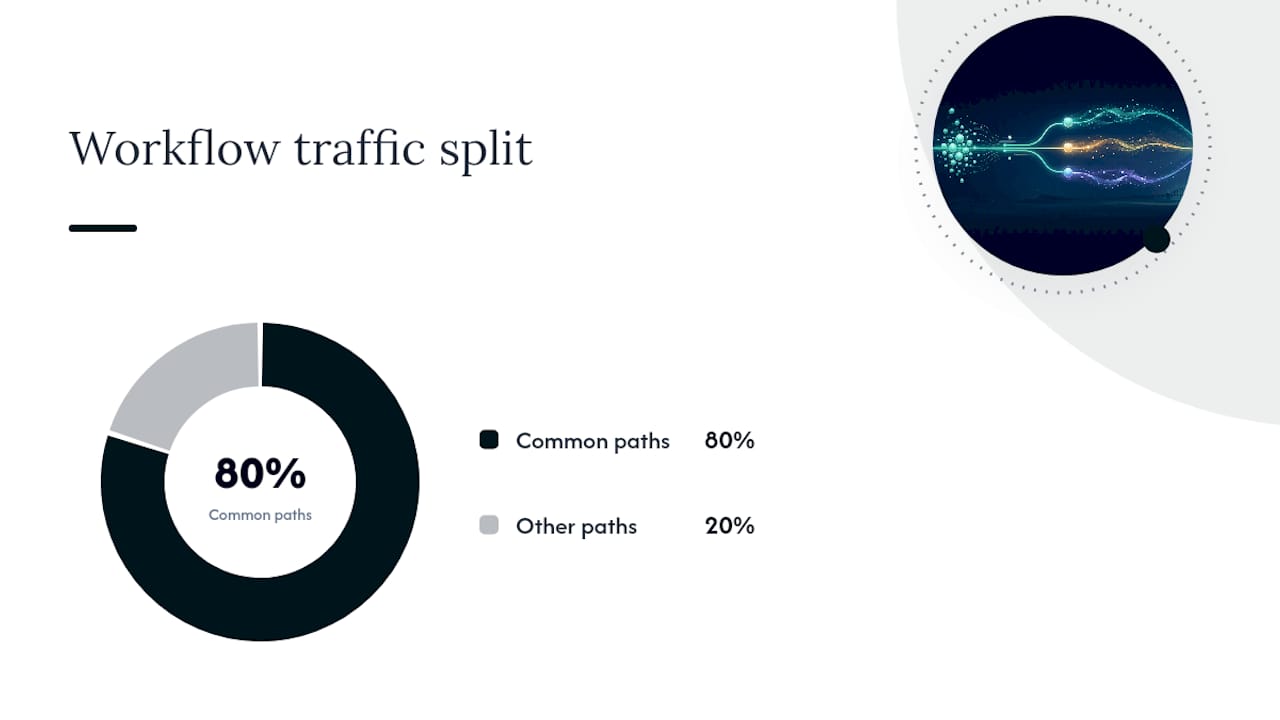
Start with a dry-run or sandbox mode before anything goes live, running the workflow against sample data and checking every branch, not just the obvious one. Platform documentation consistently recommends pairing this with smoke tests for the most common paths, the two or three scenarios that will represent 80% of real traffic.
Once live, a short list of safeguards does most of the protective work:
- Step limits cap how many actions a single record can trigger in one workflow run, preventing infinite loops.
- Message and send caps stop a misconfigured branch from emailing the same contact fifty times in an hour.
- Rate limits throttle how fast a workflow can fire against an external API, which also protects you from hitting that API’s own limits.
- Enrollment depth controls decide how many workflows a single record can be active in simultaneously, since three overlapping automations touching the same field is how data gets corrupted.
- Per-execution logging gives you a history to check when a customer says “I got the wrong email,” so you can trace exactly which branch fired and why.
Pro Tip: Set up a simple health dashboard that tracks enrollment counts and error rates per workflow. A sudden spike in either usually means something upstream changed, like a form field getting renamed, long before anyone files a support ticket about it.
When something does go wrong, having a playbook beats improvising. Pause the workflow first, roll back any bad actions you can reverse, fix the root cause, then re-run against the affected records rather than starting over from scratch.
How Zatersio Builds and Ships Workflow Automations Fast
Zatersio approaches CRM workflow projects the same way it approaches every build: prototype fast, test in the real system, then hand over documentation the client’s team can actually maintain. Because the engineering team works on fixed pricing, clients know the cost of a workflow build before development starts, and because Zatersio offers Australian data residency options, businesses in regulated industries like healthcare and finance can automate without the compliance headache that usually comes with offshore tooling.
The build process typically starts with the same manual process mapping covered earlier, since a rushed workflow build without that step tends to automate the wrong thing. From there, Zatersio’s engineers stand up a working prototype in days rather than months, test it against real (or realistic sandbox) data, and deliver the finished automation along with the documentation a non-technical team member needs to adjust it later without calling a developer every time a field name changes.
One Melbourne-based client automated their lead intake and follow-up process this way and, according to Zatersio’s own case summary of the project, reported saving more than 20 hours a week previously spent on manual data entry and follow-up scheduling. That kind of result tends to come less from clever code and more from the discipline of mapping every edge case before automating it, which is precisely where most DIY workflow attempts fall short.
Where to Go Deeper on the Technical Details
If you’re building the MYOB side of an integration, start with MYOB’s OAuth2.0 Authentication Guide and the MYOB Business API developer docs, both of which cover token exchange, header requirements, and the businessId parameter in more depth than any third-party guide will. For workflow logic and node types, Seedly’s automation documentation is a solid reference for execution safeguards, and HubSpot’s workflow automation product page is worth a look for how a mature platform frames prioritization.
The Part Most Guides Get Wrong About CRM Automation
Most advice on this topic treats workflow building as a technical exercise: pick your triggers, configure your actions, hit publish. That’s backwards. The businesses that get real value from CRM automation workflows spend more time mapping edge cases than building logic, because an automation that ignores the messy 20% of real-world data creates more cleanup than it saves.
The conventional wisdom also oversells volume. Automating twelve processes badly is worse than automating three well, and the evidence for starting small isn’t just caution, it’s the fastest path to proving ROI before you ask for budget to expand. The integration layer, especially with a system like MYOB where a missing OAuth parameter can silently break a sync, is where I’d tell any business professional to spend their testing time first, not their workflow logic.
If you take one thing from this guide: build the escalation path and the rollback plan before you build the happy path. Everyone designs for when things go right. Almost nobody designs for when a rep ignores a task or a field comes through blank, and that gap is where automations quietly lose their value.
— Lakitha
Sources
- MYOB OAuth2.0 Authentication Guide – Support for the MYOB family of SME product APIs
- MYOB Business API
- Workflow automation | HubSpot
- Automation & Workflows - Seedly CRM Docs