
Document Data Extraction: A Practical Implementation Guide
Document Data Extraction: A Practical Implementation Guide
Document data extraction turns documents — PDFs, scanned forms, emails, contracts — into structured fields your systems can actually use: JSON payloads, CSV rows, database records, or API responses. If you’re evaluating whether to automate this process, start here:
- Sample selection: Pull a representative sample of real documents from your highest-volume source (invoices, intake forms, whatever costs you the most time).
- Field list: Write down every data point you need to capture — vendor name, invoice total, line items, dates. Be specific.
- Run a pilot: Test at least two extraction approaches on that sample before committing to a platform or build.
Involve ops to define the fields, IT to scope integrations and security, and legal or compliance early if the documents contain PHI, financial data, or attorney-client materials. Skipping any of these stakeholders is the most common reason pilots stall before production.
Table of Contents
- What technologies actually power document data extraction?
- Which document types and industries benefit most?
- How does an extraction pipeline work from start to finish?
- Accuracy, error handling, and what “production ready” actually means
- Build vs. buy vs. hire: when does a custom engineering partner make sense?
- What integrations and export formats should you require?
- Security, privacy, and compliance for U.S. organizations
- How to choose the right document extraction solution
- Key Takeaways
- The case for hiring a specialist before you build
- What a Zatersio pilot delivers for your document workflows
- Further reading and authoritative resources
What technologies actually power document data extraction?
The term “document data extraction” covers several distinct technologies, and picking the wrong one for your document mix is expensive. Here’s how they stack up.
OCR (Optical Character Recognition) converts scanned images or image-based PDFs into machine-readable text. Zonal OCR goes further: you define fixed regions on a page (the invoice number always lives in the top-right corner, for example), and the engine reads only those zones. Zonal OCR is fast and cheap when your documents are highly templated, but it breaks the moment a supplier changes their invoice layout.

Intelligent Document Processing (IDP) layers machine learning on top of OCR. Instead of fixed zones, an IDP platform learns document structure — headers, tables, line items — and classifies fields by context rather than position. This handles moderate layout variation well, though it still needs training data and periodic retraining as document formats evolve.
LLM-assisted extraction uses large language models to parse documents with near-zero setup. You describe what you want in plain language, and the model returns the fields. The flexibility is real, but LLMs alone lack schema enforcement: outputs can drift in format, hallucinate values, or omit fields without flagging an error. For production use, that’s a problem.
Hybrid systems combine AI flexibility with deterministic guardrails. A rule engine handles the predictable fields; the AI handles the ambiguous ones; a confidence threshold routes low-confidence results to a human review queue. Sensible describes this architecture as the standard for production-grade extraction, citing a large volume of documents processed with enterprise attestations. That combination is what most serious deployments actually run.
- Zonal OCR: best for fixed-template, high-volume documents
- IDP with ML: best for moderate layout variation across known document types
- LLM-assisted: best for exploratory pilots or low-volume, high-variety documents
- Hybrid AI + rules: best for production at scale where accuracy and auditability matter
Pro Tip: If your document set has more than three or four distinct layouts for the same document type, skip pure zonal OCR. Start with an IDP or hybrid approach — the setup cost is higher, but you won’t be rebuilding templates every quarter.
Which document types and industries benefit most?
Most organizations have more extractable documents than they realize. The ones that deliver the fastest ROI are the ones processed at high volume with predictable fields.
High-frequency document types:
- Invoices and purchase orders: Line items, totals, vendor details, payment terms — feeds directly into ERP and accounts payable systems.
- Receipts: Merchant, amount, date, category — feeds expense management and accounting tools.
- Bank statements: Transactions, balances, account numbers — used in KYC, lending, and financial reconciliation.
- Contracts: Parties, dates, key clauses, renewal terms — feeds CLM (contract lifecycle management) and legal intake systems.
- Forms: Insurance applications, patient intake, loan applications — feeds CRM, underwriting, and onboarding workflows.
- Resumes and CVs: Name, skills, work history, education — feeds ATS (applicant tracking systems) and recruitment automation.
- Insurance claims: Claimant details, policy numbers, incident descriptions — feeds claims management platforms.
- Clinical notes: Diagnoses, medications, procedure codes — feeds EHR systems and billing workflows.
By difficulty: Structured documents (standard invoices, government forms with fixed fields) are the easiest starting point. Semi-structured documents (contracts, bank statements with variable layouts) require more model training. Unstructured documents (clinical notes, legal correspondence, free-form emails) are the hardest and typically need LLM-assisted or hybrid approaches.
Embedding extraction directly into ITSM or CRM surfaces data at the moment of need rather than dumping it into a staging table nobody checks. That’s the difference between automation that changes behavior and automation that just moves data around.

How does an extraction pipeline work from start to finish?
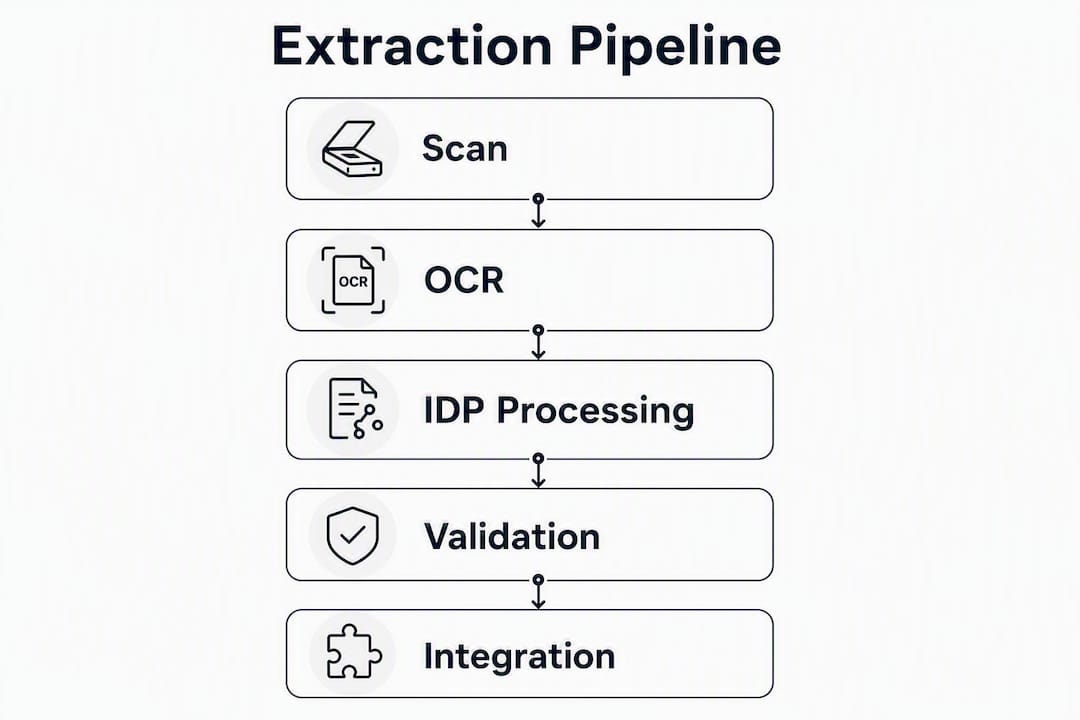
A production pipeline has five stages. Each one has a distinct failure mode, so understanding where effort concentrates helps you allocate engineering time correctly.
-
Ingest: Documents arrive via email attachment, file upload, SFTP drop, or API push. Batch processing works for overnight runs; streaming connectors handle real-time needs (a new invoice arriving and triggering immediate processing). Define your ingest connectors early — they determine what formats you can accept and how quickly you can act on new documents.
-
Preprocess: Raw files are rarely clean. This stage handles PDF-to-image conversion, deskewing (straightening scanned pages), contrast enhancement, and noise removal. For long or multi-column documents, preserving reading order and nested table structure at this stage is critical. Open-source parsers like OpenDataLoader output structured JSON with bounding boxes and preserve heading hierarchy, which matters when you’re feeding downstream RAG pipelines or structured databases. Flattening a multi-column document into raw text here causes stitching errors that no downstream model can fix.
-
Extract: The preprocessed document hits your extraction engine — template rules, ML model, LLM, or a hybrid router that sends simple pages to deterministic parsing and complex pages to AI. This is where field values are pulled and confidence scores are assigned to each extracted field.
-
Validate: Extracted fields pass through business rules (is this date in a valid range? does the invoice total match the sum of line items?) and confidence thresholds. Fields below the threshold go to a human review queue. Starting with human review for AI-generated outputs during initial deployment is standard practice — it builds the correction dataset you’ll need for retraining and catches edge cases before they corrupt downstream systems.
-
Export: Validated data is transformed into the target format (JSON, CSV, XML) and pushed to its destination: an ERP, a spreadsheet, a SQL database, an RPA platform, or a knowledge base automation system. Tools like PDF Parser support JSON and CSV export with a no-code field-definition UI, which works well for quick pilots before you commit to a full build.
Example workflow: A vendor invoice arrives by email. The ingest connector pulls the attachment, the preprocessor converts it to a clean image, the hybrid extractor pulls vendor name, invoice number, line items, and totals with confidence scores. Any field below 0.85 confidence goes to a reviewer. Approved records push to the ERP via REST API, with line items mapped to the correct ledger codes. The whole cycle runs in under two minutes per invoice.
Common export targets:
- Google Sheets and Excel/CSV for teams not yet on a full ERP
- SQL databases (PostgreSQL, MySQL) for internal applications
- ERP connectors (SAP, NetSuite, QuickBooks) for finance workflows
- RPA platforms (UiPath, Power Automate) for multi-step process automation
- REST APIs and webhooks for real-time downstream triggers
Accuracy, error handling, and what “production ready” actually means
A proof-of-concept that hits 85% accuracy on a demo set is not a production system. The gap between “it mostly works” and “we trust it with live data” is where most projects stall.
The core metrics:
| Metric | What it measures | How to calculate |
|---|---|---|
| Precision | Of all fields the model extracted, how many were correct? | True positives / (True positives + False positives) |
| Recall | Of all fields that should have been extracted, how many did the model find? | True positives / (True positives + False negatives) |
| F1 Score | Harmonic mean of precision and recall — the single-number summary | 2 × (Precision × Recall) / (Precision + Recall) |
| Field-level accuracy | Accuracy broken down per field type (e.g., invoice total vs. line items) | Correct extractions per field / Total extractions per field |
Measure these on a held-out validation subset of at least 200 documents that the model has never seen. F1 on your training set tells you nothing useful.
Production readiness checklist:
- Confidence thresholds set per field type (totals may need a higher threshold than vendor names)
- Human-in-the-loop queue for exceptions, with a target review SLA
- Monitoring dashboard tracking daily F1, exception rate, and throughput
- Retraining plan triggered by either a time interval or a performance drop threshold
- Audit log capturing raw outputs, confidence scores, and human corrections
Pro Tip: Log everything: the raw extracted value, the confidence score, the human-corrected value, and the timestamp. That correction history is your retraining dataset. Without it, you’re rebuilding from scratch every time accuracy drifts.
Hybrid systems with deterministic rules and agentic review layers are specifically designed to prevent schema drift — the slow degradation that happens when document formats change and nobody notices until the ERP starts receiving garbage data. Production deployments need monitoring and retraining plans baked in from day one, not bolted on after something breaks.
Build vs. buy vs. hire: when does a custom engineering partner make sense?
Off-the-shelf data extraction software handles standard document types well. The decision to build custom, buy a platform, or hire an engineering partner comes down to five factors:
- Document variability: If you process five distinct invoice layouts from five suppliers, a template tool works. If you process 200 layouts from 200 suppliers, you need ML or a custom build.
- Integration complexity: Pushing to a spreadsheet is easy. Mapping line items to ERP ledger codes with conditional logic is not. Custom integrations almost always require engineering.
- Internal capacity: Do you have engineers who can train models, build connectors, and maintain the system? If not, a managed partner is faster and cheaper than hiring.
- Time to production: A fixed-price pilot with an engineering partner can deliver a working system in two weeks. Evaluating, procuring, and configuring an enterprise IDP platform takes longer.
- Total cost of ownership: Licensing fees for enterprise platforms add up. A custom build has higher upfront cost but lower ongoing cost at scale — and no per-document pricing surprises.
What a good engineering partner delivers in a scoped pilot:
- Sample document analysis and field mapping
- Extraction model or hybrid pipeline configured to your document set
- Validation UI for human review and correction
- Integration into your target system (ERP, CRM, spreadsheet)
- Accuracy baseline report with precision, recall, and F1 on your real documents
- Maintenance and retraining agreement
A Melbourne-based firm working with Zatersio recovered more than 20 hours per week of staff time by automating their document capture workflow. The pilot started with a sample set, defined the exact fields needed, and delivered a working integration in under two weeks — with a human-in-the-loop validation queue built in from the start.
See the full workflow automation case study for the specifics on what that engagement covered and how the hours were calculated.
On pricing: fixed-price pilots work well for defined document types with clear field lists. Time-and-materials engagements make more sense for complex edge cases — multi-document packets, handwritten annotations, or documents that mix structured tables with free-form narrative. Get a fixed-price quote for the pilot, then negotiate the maintenance model separately.
What integrations and export formats should you require?
The extraction engine is only as useful as what you do with its output. Before signing any contract or starting a build, nail down the integration requirements.
Export formats to require:
- Typed JSON with a published schema: Field names, data types, and enumerations defined upfront. This is what your developers need to build reliable downstream integrations.
- CSV/Excel: For teams that live in spreadsheets or need a quick audit trail.
- XML: Required by some legacy ERP and EDI systems.
- Direct database connectors: PostgreSQL, MySQL, or SQL Server for internal applications that read from a database rather than an API.
Integration patterns:
- Push via webhook: The extraction system calls your endpoint the moment a document is processed. Best for real-time workflows.
- Pull via scheduled batch API: Your system polls for completed extractions on a schedule. Better for overnight batch runs.
- Prebuilt ERP connectors: Some platforms ship connectors for SAP, NetSuite, or QuickBooks. Verify these work with your specific version and configuration before relying on them.
- RPA integration: If you’re running UiPath or Power Automate, extraction output can trigger downstream bots for multi-step processes.
Developer considerations worth flagging early: API rate limits (know the per-minute and per-day caps before you design your batch jobs), idempotency (can you safely resubmit a document without creating duplicate records?), webhook security (require HMAC signature verification), and schema migration handling (what happens when you add a new field to your extraction schema?).
Pro Tip: Before any integration work starts, ask the vendor or your engineering partner for a typed JSON schema and at least five sample payloads from real documents. If they can’t produce those in the first week, the integration will be painful.
Security, privacy, and compliance for U.S. organizations
Document extraction pipelines touch some of the most sensitive data in your organization. Security and compliance can’t be an afterthought.
Deployment options and data residency:
- Cloud SaaS: Fastest to deploy, lowest upfront cost. Acceptable for most business documents. Requires careful vendor vetting for regulated data.
- On-premises or private cloud: Required for PHI under HIPAA, attorney-client privileged materials, and any data subject to strict residency requirements. On-premises AI deployment trades deployment speed for control — the right trade for regulated industries.
- Hybrid: Deterministic parsing runs locally; only complex pages route to a cloud AI model. This limits cloud exposure while preserving AI capability for hard cases.
Security controls to require from any vendor or partner:
- Encryption at rest (AES-256) and in transit (TLS 1.2+)
- Role-based access controls with audit logs
- Data deletion policies with defined retention periods
- SOC 2 Type II or ISO 27001 attestation
- HIPAA Business Associate Agreement (BAA) if processing PHI
Compliance touchpoints:
- HIPAA: Any pipeline processing protected health information needs a signed BAA and documented safeguards.
- PCI DSS: If documents contain card numbers, the extraction system may fall in scope. Tokenize or redact card data before it enters the pipeline where possible.
- CCPA/CPRA: California residents’ personal data in extracted documents triggers notice and deletion rights. Confirm your vendor supports deletion requests at the record level.
Pro Tip: For any regulated document type, get a legal review of the vendor’s data processing agreement before you go live. A BAA that doesn’t cover your specific use case is not a BAA.
How to choose the right document extraction solution
The right solution depends on your document mix, integration needs, and internal capacity. Use this checklist to evaluate any option.
Evaluation checklist:
- Accuracy on your actual documents (not vendor demo sets)
- Support for your specific document types and layouts
- Human-in-the-loop workflow for exceptions
- Integration with your target systems (ERP, CRM, database)
- Deployment options that match your compliance requirements
- Defined SLAs for uptime and support response
- Transparent pricing (per-document, per-page, or flat license)
- Maintenance and retraining plan post-deployment
Vendor questions to ask:
- Can you run your extraction model on a sample of our actual documents before we sign?
- What happens when a document type we haven’t seen before comes through?
- How do you handle exceptions — is there a built-in human review queue?
- What monitoring and alerting do you provide for accuracy degradation?
- What does your retraining process look like, and who initiates it?
- Can you provide a typed JSON schema and sample payloads for our integration team?
- What compliance certifications do you hold, and do you sign BAAs?
Red flags:
- No production references from organizations with similar document volumes
- No human-in-the-loop support (“our AI is accurate enough”)
- Opaque per-document pricing with no volume caps
- No published export schema or sample payloads
- Retraining requires a new contract rather than being part of the service
Solution comparison:
| Category | Best for | Accuracy & error handling | Setup effort | Customization | Integrations | Pricing | Deployment | Security & compliance |
|---|---|---|---|---|---|---|---|---|
| Entry-level field apps | Simple, low-volume forms | Basic; limited error routing | Minimal | Low; fixed templates | Spreadsheets, basic webhooks | Low flat fee | Cloud only | Basic; limited certifications |
| Template-based tools | Fixed-layout, high-volume docs | Good on known layouts; breaks on variation | Low to medium | Medium; template editor | CSV, some ERP connectors | Per-document or subscription | Cloud | Varies; check SOC 2 |
| AI/IDP platforms | Mixed layouts, enterprise volume | High with training; needs retraining plan | Medium to high | High; model training UI | ERP, RPA, REST API | Enterprise licensing | Cloud or hybrid | SOC 2, HIPAA BAA available |
| Custom-engineered solutions | Complex integrations, regulated data, multi-doc workflows | Highest when built to spec; full control | High upfront; faster long-term | Full | Any target system | Fixed-price pilot + maintenance | Cloud, on-prem, or hybrid | Built to your requirements |
Key Takeaways
Automated document data extraction delivers production value only when accuracy metrics, human-in-the-loop validation, and integration requirements are defined before deployment, not after.
| Point | Details |
|---|---|
| Start with a sample pilot | Test 50–100 real documents with a defined field list before committing to any platform or build. |
| Hybrid systems outperform in production | Combining AI extraction with deterministic rules prevents schema drift and handles layout variation at scale. |
| Accuracy needs measurement | Track precision, recall, and F1 on a held-out validation set — not on training data — before going live. |
| Compliance is non-negotiable | Require SOC 2, HIPAA BAA, and data deletion policies from any vendor processing regulated documents. |
| Zatersio delivers handled pilots | Zatersio builds fixed-price extraction MVPs with field mapping, validation UI, and integration in under two weeks. |
The case for hiring a specialist before you build
The most common failure mode in DIY extraction projects isn’t the extraction itself — it’s what happens three months later. Schema drift creeps in as suppliers update their invoice templates. Long documents get stitched incorrectly because the preprocessing stage flattened the structure. The human review queue fills up because nobody defined the exception workflow before go-live. And the engineer who built the original pipeline has moved on.
LLMs alone won’t solve this. As the deep knowledge on production extraction makes clear, typed outputs, deterministic rules, and auditable correction paths are what separate a proof-of-concept from a system you can trust with live data. Flexibility without guardrails is a liability in production.
Where a specialist engagement genuinely accelerates value: complex integrations into ERP or CRM systems, regulated data that requires a BAA and audit logs, multi-document packets where reading order and nested table structure must be preserved, and any situation where you need SLA-backed maintenance rather than hoping the original build holds up. Running a scoped pilot with your actual documents and keeping human-in-the-loop review for the first four to eight weeks isn’t just good practice — it’s how you build the correction dataset that makes the system better over time.
The businesses that get the most out of automated document processing are the ones that treat it as an operational capability, not a one-time IT project.
What a Zatersio pilot delivers for your document workflows
If you’ve read this far and your document volumes are real, your integration requirements are specific, or your data is regulated, a self-serve tool probably isn’t the fastest path to production. Zatersio builds fixed-price extraction MVPs that go from sample documents to a working, integrated system in under two weeks — with field mapping, a validation UI for human review, and your choice of data residency built in from the start.

The pilot proves three things before you commit to a full build: your accuracy baseline on real documents, a working connector to your target system, and a defined exception workflow your team can actually use. From there, Zatersio’s maintenance packages cover retraining, monitoring, and schema updates as your document mix evolves — no surprise invoices, no scope creep.
Ready to stop estimating and start measuring? Request a free automation blueprint to map your highest-value document workflows, or scope a fixed-price extraction pilot with your sample documents today.
Further reading and authoritative resources
- OpenDataLoader PDF on GitHub — Open-source PDF parser that preserves bounding boxes, reading order, and heading hierarchy. Practical starting point for teams building their own preprocessing pipeline for RAG or structured databases.
- Experis: Knowledge Base Automation for Improved IT Managed Services — Industry perspective on embedding AI extraction into ITSM and CRM workflows so data surfaces at the moment of need.
- Landing AI: Document Extraction Practitioner Guidance — Technical notes on long-document stitching, structural context preservation, and common failure modes in production pipelines.