
Document Generation Automation: A Practical Guide for Teams
Document Generation Automation: A Practical Guide for Teams
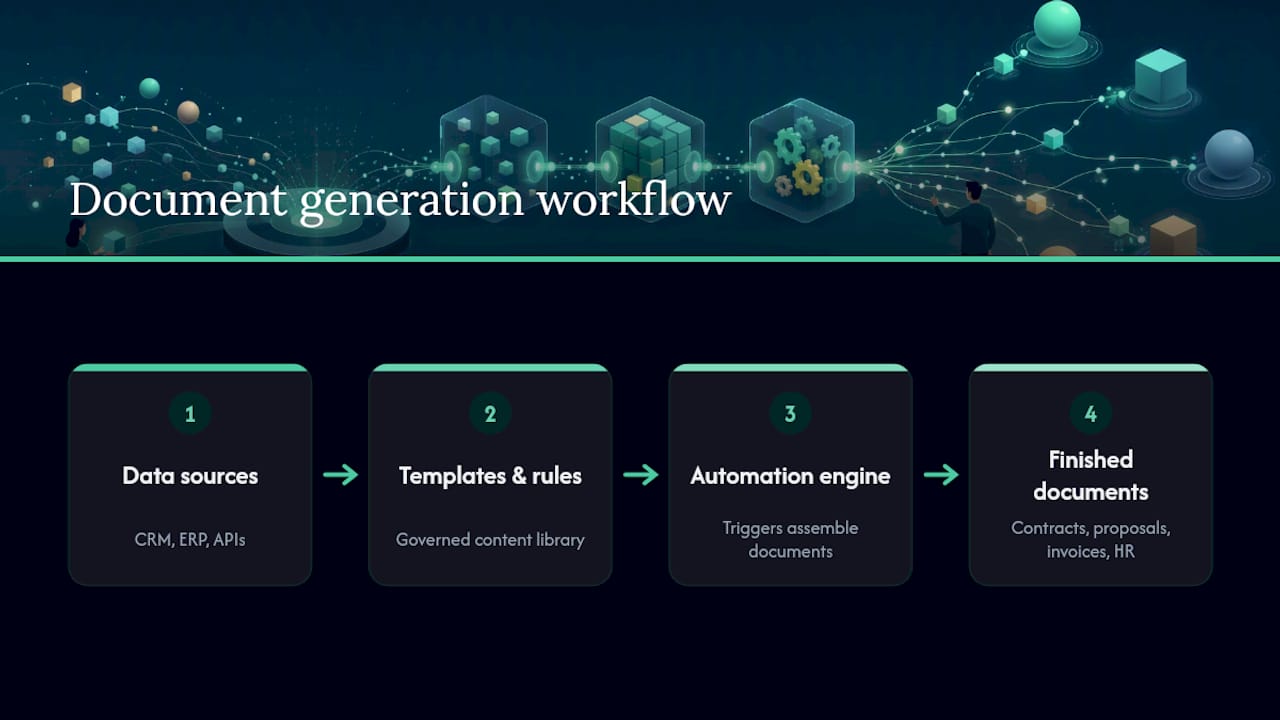
Document generation automation is software that assembles final, branded documents (proposals, contracts, invoices, HR letters) from your business data and templates, without a person manually typing or formatting each one. The payoff shows up fast: fewer errors, faster close cycles, and hours back on your team’s calendar every week.
- Time saved: hours per document drop to minutes once templates and data mapping are set up
- Fewer errors: conditional logic and locked templates remove copy/paste mistakes
- Fastest to benefit: sales and proposals, legal and contracts, finance and invoicing, and HR teams generating repetitive paperwork
Key Takeaways
Document generation automation succeeds when template fidelity, clean source data, and workflow orchestration are treated as equally important, not as an afterthought to the merge engine.
| Point | Details |
|---|---|
| Data quality comes first | Clean, canonical source fields prevent most downstream formatting and merge errors. |
| Template fidelity is non-skippable | Test a vendor against your actual brand template before committing to a pilot. |
| Start with one flow | Build a single end-to-end template and trigger before expanding to others. |
| Confirm security up front | Verify data residency, encryption, and audit logs before signing, not after. |
| Zatersio builds fast and fixed-price | Zatersio delivers custom document automation builds in under two weeks with fixed pricing and Australian data residency options. |
Table of Contents
- What Capabilities Should You Expect From Document Generation Software?
- How Does Document Generation Automation Actually Work?
- Where Does Document Automation Deliver the Fastest Payback?
- How Do You Choose the Right Document Generation Tool?
- How Do You Run a Pilot and Scale It to Production?
- What Integrations and eSignature Options Should You Confirm?
- What Security and Compliance Checks Belong in Your Pilot?
- Who Delivers Document Automation Builds That Actually Ship?
- What Most Guides Get Wrong About Document Automation
- Ready to Automate Your Document Workflow?
- Frequently Asked Questions
- Sources
What Capabilities Should You Expect From Document Generation Software?
Not every tool on the market does the same job well, and the gap between “generates a PDF” and “runs your document workflow” is bigger than most buyers expect. Before you evaluate any document generation software, check it against this list.
- Template authoring across formats. You need reliable output in DOCX, PPTX, PDF, and HTML, with formatting, fonts, and branding preserved exactly. Templafy’s breakdown of document generation stresses this brand and compliance control as a core requirement, not a nice extra.
- Dynamic fields and conditional logic. A contract that changes its termination clause based on deal size, or a proposal that adds a section only for enterprise clients, needs real conditional logic and repeating table sections, not just find-and-replace.
- Data mapping from multiple sources. Your CRM, ERP, and raw JSON or CSV exports all speak different dialects. Conga’s platform documentation describes merging data from any of these sources into one document without manual reformatting.
- AI-assisted drafting with governance. AI can draft clauses or summarize inputs, but it needs a content library and approval rules behind it, or you get inconsistent, off-brand language creeping into legal documents.
- Workflow orchestration. Triggers, approval chains, eSignature, and distribution all need to connect, or you have just automated the easy 20% of the job.
Pro Tip: Test template fidelity first, before anything else. If a vendor can’t reproduce your exact letterhead, table borders, and page breaks on the first try, no amount of clever logic downstream will save the pilot.
How Does Document Generation Automation Actually Work?

Underneath the marketing language, every document generation platform follows the same basic architecture: a template layer, a data mapping and merge engine, an orchestration layer that handles triggers and approvals, and an output layer that produces the final file and routes it.
Triggers fall into four buckets: manual (someone clicks “generate”), API-driven (another system calls for a document), event-based (a deal closes, a form submits), and scheduled (monthly reports, recurring invoices). Smartsheet’s workflow documentation shows a common pattern: a form submission automatically triggers a purchase order or contract from a template, with no manual handoff.
- Messy or duplicated CRM fields produce broken merge fields and inconsistent documents downstream
- Inconsistent date formats or currency symbols across source systems create silent formatting errors
- Missing required fields cause templates to render blank sections instead of failing loudly
Teams that skip data cleanup rarely notice until dozens of generated contracts already contain the wrong client name format. Practical experience across implementation projects shows that most failures trace back to unstandardized source data rather than the merge engine itself, so budgeting time to define canonical fields before automation goes live prevents the bulk of downstream rework.
Microsoft’s own Power Automate documentation illustrates this well: it supports SharePoint connectors and a “generate document using Syntex” action that turns a modern Word template into a finished .docx or .pdf, but only once the source list or library data is clean and structured.
Where Does Document Automation Deliver the Fastest Payback?
Not all use cases return value at the same speed. Some pay for themselves within a single sales cycle; others take longer to show up on a P&L.
- Proposals and RFP responses. Parsing incoming RFPs against a content library and generating a compliant, formatted response cuts hours off every bid and is well supported by best proposal software for sales teams. Buyer guides on proposal automation point to RFP parsing and template-compliant output as the two capabilities that separate serious platforms from glorified mail merge.
- Contract assembly. Clause libraries with conditional terms let legal teams generate compliant first drafts in minutes instead of starting from a blank document every time.
- Sales quotes and invoices. CPQ handoffs into automatic invoice generation shrink the gap between a closed deal and a paid invoice.
- HR packs and recurring communications. Offer letters, onboarding packets, and renewal notices are high-volume, low-variance documents, which makes them easy early wins.
Responsive’s research on proposal automation found that automating the content search, formatting, and coordination steps lets teams submit more bids without adding headcount, which is usually the clearest ROI signal in a pilot.
How Do You Choose the Right Document Generation Tool?
Most failed pilots trace back to skipping this evaluation step, not to a bad product. Work through these questions before you sign anything.
- Speed versus customization. No-code platforms get you running in days but hit ceilings fast on complex logic. Engineer-built automation costs more upfront but handles conditional branching and legacy system integration that no-code tools choke on.
- Integration and data residency. Confirm exactly where your data processes and stores, especially if you’re in a regulated industry or a market with residency requirements.
- Template fidelity at scale. Ask for a live demo using your actual template, not a stock one, and check what happens at 500 documents a month, not five.
- Security and audit trail. Every generated document should have a traceable audit log: who triggered it, when, and from what data.
- Pricing shape. Per-document fees can balloon fast at volume; per-seat pricing punishes teams that only need occasional access.
- Red flag: the vendor cannot demonstrate your exact template format in the sales call
- Red flag: pricing requires a call instead of a public range for standard tiers
- Red flag: no clear answer on where data physically resides
- Red flag: “AI-powered” with no mention of governance or brand controls
How Do You Run a Pilot and Scale It to Production?
- Pick a high-impact, low-complexity pilot. One document type, one team, clear before/after metrics like hours spent or turnaround time.
- Prepare your data first. Define canonical fields, clean duplicate records, and standardize formats before touching a template.
- Build one template end-to-end. Resist the urge to build five templates at once. Get one flow working from trigger to final output.
- Set acceptance criteria. Format fidelity matching the original brand template, an error rate near zero on test runs, and a measurable drop in cycle time.
- Scale with ownership in place. Someone needs to own template updates and content library maintenance, or quality drifts within a few months.
Pro Tip: Run your pilot on the document type your team complains about most, not the easiest one. A painful use case makes the ROI numbers obvious to everyone, including the person who has to approve the budget for phase two.
What Integrations and eSignature Options Should You Confirm?
The most common connectors are CRM systems, ERP platforms, SharePoint, RPA tools, and form builders. Prefer direct APIs when you need real-time triggers; use iPaaS tools when you’re connecting many systems with lower complexity.
- eSignature should sit inside the automated flow, not as a separate manual step after document generation
- Confirm your eSignature provider meets legal validity standards in your jurisdiction before relying on it for contracts
- Set a version control and archival policy from day one, since regenerated documents without clear versioning create audit headaches later
What Security and Compliance Checks Belong in Your Pilot?
Security review should happen before the pilot, not after it succeeds.
- Confirm data residency and processing location options match your regulatory requirements
- Verify encryption in transit and at rest, role-based access control, and audit logging are standard, not add-ons
- Check retention and archival policies against your industry’s document retention rules
- Loop in your security or compliance team the moment a pilot touches contracts, health data, or financial records, not after it’s already in production
Who Delivers Document Automation Builds That Actually Ship?
Zatersio builds custom automation and MVP software in under two weeks, engineered around the specific data mess most teams have rather than a generic template library.
- Fixed-price project scoping, so a pilot doesn’t turn into an open-ended engagement
- Direct access to the engineering team building your automation, not a support queue
- Data residency options for teams with compliance requirements
- R&D Tax Incentive structuring for eligible software projects, reducing net build cost
A Melbourne firm using workflow automation saved more than 20 hours a week after automating document and administrative workflows that had previously eaten into billable time.
Discovery maps the exact data and template requirements first. Build focuses on one working flow before adding complexity. Handover includes measuring the actual hours saved against the pilot’s original baseline.
What Most Guides Get Wrong About Document Automation
The conventional advice treats document generation as a template problem: pick software with a good template editor and you’re done. That’s backward. The template editor is almost always the easy part. The real work, and the part that determines whether a pilot succeeds or dies quietly after month two, is data normalization and ongoing content governance.

Most vendor demos hide this by using pre-cleaned sample data. Your actual CRM export will not look like that demo. Teams that budget their implementation effort assuming the merge engine is the hard part consistently get blindsided by the data cleanup phase instead.
The other overlooked piece: nobody plans for who owns the templates six months after launch. A pilot that ships fast and then rots because no one updates the clause library when pricing changes isn’t a success story, it’s a slow failure with good documentation. Prioritize data hygiene and a named owner before you prioritize which platform has the nicest interface. Get those two things right, and engineer-built automation built around your actual mess will outperform any generic template tool.
Ready to Automate Your Document Workflow?
Most document automation tools ask you to reshape your business around their template system. Zatersio does the opposite: it builds the automation around the documents, data, and workflow you already have, engineered by a dedicated team instead of configured through a generic no-code editor.

That means no months-long implementation slog and no per-seat pricing surprise at renewal. Zatersio delivers a working document automation build, proposals, contracts, invoices, or HR packs, in under two weeks, at a fixed price, with direct access to the engineers doing the work. If your project qualifies, R&D Tax Incentive structuring can reduce the net cost further. Start with a scoping conversation about your highest-volume document type and get a fixed quote before committing to anything.
Frequently Asked Questions
What is document generation automation, exactly? It’s software that assembles finished, formatted documents (contracts, proposals, invoices, HR letters) directly from your business data and templates, triggered automatically instead of built by hand each time.
How long does it take to implement document generation software? A focused pilot covering one document type and one workflow typically launches within a few weeks once source data is clean; full production scale-up across multiple document types usually takes a few months as templates and governance mature.
What does document generation automation typically cost? Costs vary by approach. No-code platforms often run on per-document or per-seat subscription pricing, while custom-engineered builds use fixed project pricing that covers licensing, implementation, and initial maintenance in one figure.
Can AI fully replace manual document drafting? AI can draft clauses and summarize inputs reliably, but it works best inside a governed content library with approval rules, not as an unsupervised replacement for legal or compliance review.
Does document automation work with existing CRM and ERP systems? Yes. Most platforms connect through native connectors or APIs to pull data from CRM and ERP systems directly into templates, though the quality of that integration depends heavily on how clean your source data is going in.
Sources
- Automate document generation with document processing and Power Automate | Microsoft Learn
- What is document generation? (The 5 best tools in 2026)
- Document Automation Software Platform
- Proposal Automation Software: Complete Buyer’s Guide (2026) | contrl
- Automatically generate documents with workflows