
Managers: Request These 8 Patterns in a Fixed Price Email Workflow MVP
Managers: Request These 8 Patterns in a Fixed Price Email Workflow MVP
Commission a bespoke email workflow automation MVP the moment email tasks become repetitive, touch more than one system, or need an audit trail you cannot reconstruct from a crowded inbox. Done right, a fixed-price MVP replaces manual handoffs with durable, traceable records, and most businesses see the time savings inside the first month. The next step is simple: get a scoping call or a fixed-price blueprint before the busywork eats another quarter.
TL;DR:
- Businesses processing over 20 to 30 similar emails weekly with cross-system updates or compliance requirements are prime candidates for a custom automation build.
- A fixed-price MVP should include role-based routing headers, thread preservation, webhook delivery confirmation, and robust deduplication to ensure reliable automation.
- Building the MVP with narrow scope, such as one or two workflows, typically takes weeks and requires clear technical deliverables and stakeholder questions upfront.
- Avoid common failures like untracked sends, missing inbound routing, and unhandled failures by designing durable, policy-driven email infrastructure from the start.
- Operational, deliverability, and business impact metrics, especially hours saved and inbox success during warm-up, help measure ROI within 30 to 90 days.
Table of Contents
- When Should You Build Custom Email Workflow Automation?
- What Should a Fixed-Price MVP Include?
- How Long Does a Fixed-Price Email Automation MVP Take?
- What Are the Most Common Email Automation Failures?
- How Do You Measure ROI on Email Workflow Automation?
- Why Most Businesses Underestimate the Engineering Behind Email Automation
- Get a Fixed-Price MVP Built Around Your Email Workflows
- Sources
- FAQ
When Should You Build Custom Email Workflow Automation?
Not every inbox problem needs custom engineering. If you’re forwarding three invoices a week to your bookkeeper, a Gmail filter will do the job. The calculation changes once email stops being communication and starts being a business process.
Ask yourself these questions before you commission anything:
- Volume: Are you or your team processing the same type of email more than 20 to 30 times a week?
- Cross-system reach: Does handling that email require updating a CRM, a ticketing system, or accounting software, not just replying?
- Audit trail: If a client, auditor, or regulator asked “who approved this and when,” could you answer in under a minute?
- Compliance sensitivity: Does the workflow touch client data, financial approvals, or anything covered by privacy law?
- Judgment frequency: Is a human making a real decision on most of these emails, or just copying data from one place to another?
Businesses that check three or more of those boxes are strong candidates for a bespoke build. Common examples include invoice intake and approval routing, client scheduling with automatic confirmations, compliance escalations in healthcare or legal practices, and multi-step vendor onboarding. A practical rule of thumb puts custom builds ahead of off-the-shelf tools once several thousand dollars of manual labor is at stake and the workflow spans multiple systems. Below that threshold, no-code tools like Google Workspace Studio can handle low-risk filing and notifications without a custom build.
The clearest ROI signal is time. If a single role is spending five or more hours a week triaging the same category of email, that’s your build trigger.
What Should a Fixed-Price MVP Include?
Most email automation fails not because the logic is wrong, but because the plumbing treats email like a casual notification channel instead of infrastructure. A production-grade MVP is built differently from day one.
- Role-based routing with custom headers. Every automated message should carry an
X-Agent-Roleheader identifying which system or process generated it, and anX-Pipeline-IDtying it to a specific case. This header schema pattern prevents the chaos of unlabeled automated mail flooding a shared inbox. - Thread preservation. The build must carry
Message-IDandIn-Reply-Tovalues forward so replies land on the right case instead of starting a new, orphaned thread. - Webhook-driven delivery confirmation. Never treat an SMTP 250 response as proof a message arrived. A delivery event only counts once a webhook confirms it, and pipeline state should only update on that signal.
- Idempotency and dedupe keys. Every send needs a durable, atomic dedupe check so a retry, a crash, or a double-click never produces two invoices in someone’s inbox.
- Suppression and policy enforcement. Blocked sends (unsubscribed contacts, bounced addresses, compliance holds) should be deliberate decisions the system logs, not silent failures.
- Dead-letter queues with human escalation. Anything the system can’t confidently classify or deliver drops into a review queue a real person checks, not a void.
- Structured inbound parsing. Replies get parsed and attached to the correct case record in your CRM, ticketing system, or accounting software, not left sitting in a shared mailbox.
- Programmatic warm-up and DNS setup. SPF, DKIM, and DMARC configuration plus a staged sending ramp protect your domain reputation from day one.
Pro Tip: Ask your vendor to show you the dead-letter queue during the demo, not just the happy path. If they can’t show you what happens when something fails, the build isn’t finished.
Naïve implementations that skip these patterns tend to duplicate sends and lose track of suppressed contacts within the first few weeks of real use.
How Long Does a Fixed-Price Email Automation MVP Take?
A well-scoped MVP for one or two email workflows typically moves through discovery, a working prototype, delivery, and warm-up in a matter of weeks, not months. Keep the scope narrow. Trying to automate five workflows at once is how projects blow past their fixed price and their deadline.
Scope it right: Choose one or two workflows with clear, repeatable steps, such as invoice intake or appointment confirmations, to keep the scope manageable.
- List the minimum technical deliverables up front: routing headers, webhook handling, a dead-letter queue, and a suppression list.
- Confirm which existing systems (CRM, accounting, ticketing) the MVP needs to write into, not just read from.
Expect this rhythm:
- Discovery and scoping conversation to nail down the one workflow that matters most.
- A working prototype or demo inside two weeks, so you’re reviewing something real, not a slide deck.
- Delivery with a documented handover, followed by a staged warm-up period before full volume.
Ask your vendor these questions before you sign anything:
- How do you record every send, and how do retries avoid creating duplicates?
- What happens to a bounced or suppressed address, and who reviews the exceptions?
- Where does our data live, and can we choose data residency?
- Is this project structured to qualify for the R&D Tax Incentive?
Acceptance criteria should include passing tests for the failure paths, documented warm-up metrics, and a handover document your team can actually read. A vendor who can’t answer the retry question clearly is a vendor who hasn’t built one of these before.
What Are the Most Common Email Automation Failures?
Most breakdowns trace back to a handful of repeatable mistakes, and all of them are avoidable at the design stage.
- Fire-and-forget sending. No durable send record means no way to know if a message went out once, twice, or not at all.
- No inbound routing. Replies pile up in a generic mailbox instead of attaching to the case that triggered them.
- Missing escalation paths. Ambiguous failures vanish silently instead of landing in front of a human.
- Skipped warm-up. Sending at full volume from day one tanks deliverability before the system proves itself.
- Fragmented suppression lists. One system respects an unsubscribe request while another keeps emailing the same contact.
Pro Tip: If your current setup can’t tell you, right now, how many emails it sent last Tuesday and to whom, you have a fire-and-forget problem. Fix that before adding any new workflow.
These are exactly the gaps a proper policy and idempotency layer is designed to close.
How Do You Measure ROI on Email Workflow Automation?
Track three categories from week one: operational, deliverability, and business impact.
- Operational: manual hours saved per week, time-to-action on each case, and case closure rate.
- Deliverability: bounce rate, complaint rate, and inbox placement during the warm-up window.
- Business: staffing cost avoided, faster invoice turnaround, and any measurable lift in conversion or response rate.
Run a 30 to 90 day validation window. One Melbourne firm using a targeted automation build recovered more than 20 hours a week within that kind of timeframe, which is the scale of return worth benchmarking against.
Why Most Businesses Underestimate the Engineering Behind Email Automation
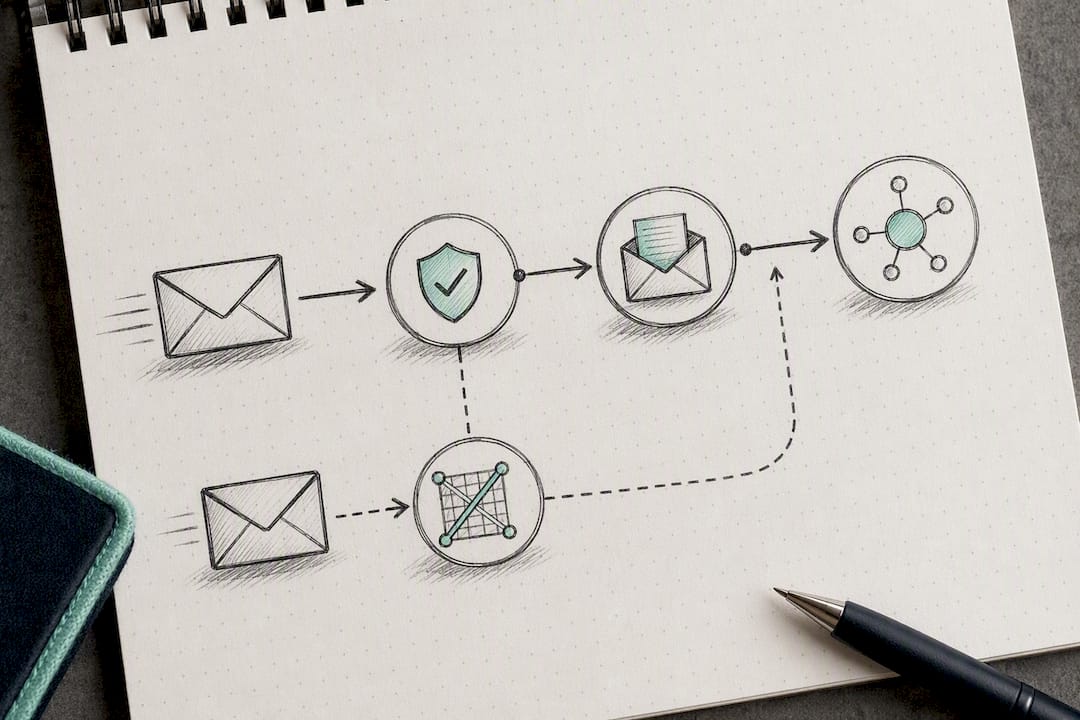
Email looks simple from the outside: type a message, hit send. That’s exactly why so many businesses underestimate what it takes to automate it safely at scale. The interesting failures don’t happen at the sending step. They happen at the boundary between “the email left our system” and “the email actually arrived, and now the next step needs to trigger correctly.”
That boundary is where fire-and-forget builds fall apart, and it’s the part a generic automation tool or a rushed freelance job almost always skips. A workflow that duplicates an invoice email because nobody built a dedupe key isn’t a minor bug. It’s a client relationship problem waiting to happen.
Zatersio’s engineering approach treats email as infrastructure that needs the same rigor as any other production system: rapid MVP delivery built around durable case records, R&D Tax Incentive readiness, and automation aimed squarely at repetitive administrative work in trades, professional services, and healthcare. The Melbourne firm that recovered 20-plus hours a week after a targeted build didn’t get there through a clever prompt. They got there through architecture that assumed things would fail and planned for it.
That’s the gap between advice that sounds good and a build that actually holds up under real volume.
— Lakitha
Get a Fixed-Price MVP Built Around Your Email Workflows
The fixed-price MVP is engineered with the routing headers, webhook confirmations, and dead-letter queues covered above, delivering a working system instead of a stitched-together set of filters. Clients have a dedicated engineering team, a fixed price agreed before work starts, data residency options, and eligibility guidance for the R&D Tax Incentive on qualifying projects.

If you’re still mapping out which workflow to automate first, the free AI automation blueprint gives you a scoping deliverable before you commit to a paid build. If you already know the workflow and want it built, the workflow automation service page is the direct next step, and the MVP development page covers timelines and R&D Tax Incentive structuring in more detail. Either way, request a scoping call and get a firm price before the next invoice cycle piles up.
Sources
- Multi-Agent Email Orchestration Architecture Guide 2025
- AI-Native Email Infrastructure: Complete Developer Guide
- How AI agents send email today (and why it’s broken) - Molted Email
FAQ
What Is Email Workflow Automation?
It’s custom software that automates business email tasks, like approvals, reminders, and internal notifications, as part of a bespoke operational process rather than an off-the-shelf marketing tool.
How Long Does a Fixed-Price MVP Take to Build?
A narrowly scoped MVP covering one or two workflows typically reaches a working prototype in under two weeks, with full delivery and warm-up following shortly after.
How Do You Prevent Duplicate Emails in an Automated Workflow?
You enforce idempotency with durable dedupe keys and atomic send-and-record operations, so a retry or a system crash never produces a second copy of the same message.
What Happens When an Automated Email Fails to Deliver?
It should route into a dead-letter queue for human review rather than disappearing, with delivery confirmed only through webhook events, never an SMTP 250 response alone.
Can a Custom Email Automation Build Qualify for the R&D Tax Incentive?
Eligible software development projects, including custom automation builds like those Zatersio delivers, can potentially qualify. It’s worth confirming eligibility with your vendor during scoping.