
Engineers: Prototype Event Driven Workflows in 2 Weeks With Case Wins
Engineers: Prototype Event Driven Workflows in 2 Weeks With Case Wins
Event-driven workflows are sequences of automated steps triggered by events, not by a schedule or a person clicking a button. They give you scalable, decoupled systems that react in real time to whatever just happened, whether that’s a payment clearing, a form submission, or a sensor reading. The payoff shows up most in webhooks, order pipelines, third-party integrations, and long-running business processes that used to require constant polling or manual handoffs.
TL;DR:
- Most event-driven workflows should implement idempotency, retries, and dead-letter queues to prevent silent failures and duplicate processing.
- Durable workflow engines are necessary only for processes that require waiting on external signals or approvals over extended periods.
- Security should include authentication, encryption, and audit logs at every hop to protect sensitive data and prevent tampering.
- Event delivery guarantees like at-least-once delivery are common; handling duplicates with idempotency is essential for data consistency.
- Start small with prototypes, focusing on scope and confidence, before deploying full-scale durable event-driven systems in production.
Table of Contents
- What Is Event-Driven Architecture vs. an Event-Driven Workflow?
- The Core Building Blocks of Event Processing
- How an Event-Driven Workflow Actually Runs
- What You Gain and What It Costs You
- Choosing the Right Implementation Pattern
- Operational Habits That Prevent 3 AM Pages
- What Event-Driven Automation Looks Like in Practice
- Event-Driven vs. Traditional Workflow Architectures
- Keeping Data Consistent When Everything Happens Asynchronously
- Locking Down Security in an Event-Driven System
- When to Actually Commit to Event-Driven Workflows
- Build Your Event-Driven Workflow Without the Guesswork
- Sources
- FAQ
What Is Event-Driven Architecture vs. an Event-Driven Workflow?
An event is a fact that something happened: an order was placed, a file landed in storage, a user clicked “submit.” Event-driven architecture (EDA) is the broader pattern where independent services produce and react to these events instead of calling each other directly. Microsoft’s own architecture guidance describes EDA as a style built for decoupling and asynchronous processing between components that otherwise wouldn’t need to know about each other.
An event-driven workflow is what you build on top of that architecture: a specific, often stateful sequence of handlers, checks, and actions that responds to one event or a chain of them. EDA is the philosophy; the workflow is the implementation.
This differs sharply from older patterns:
- Polling checks a source repeatedly for changes, wasting compute and adding latency between the change and the reaction.
- Synchronous request-response ties two services together in real time, so if one is slow or down, the other stalls too.
- Event-driven flips this: the producer fires and forgets, and consumers react whenever they’re ready.
Request-response still wins for anything needing an immediate answer, like checking a password. Event-driven wins when the work can happen a second, a minute, or a month later.
The Core Building Blocks of Event Processing
Every event-driven workflow rests on the same four pieces, no matter the industry: producers, event formats, brokers, and consumers.
- Producers emit events the moment something happens. A checkout service, a CRM update, or an IoT sensor can all be producers.
- Event schemas define the event’s shape. Many teams now standardize on CloudEvents, a common envelope format that keeps event structure consistent across producers and clouds.
- Brokers route events between producers and consumers. This covers pub/sub systems, Kafka topics, and traditional message queues.
- Consumers and handlers subscribe to relevant events and execute the actual business logic.
Delivery semantics matter more than most teams realize early on. At-most-once delivery can silently drop events. At-least-once guarantees delivery but risks duplicates. Exactly-once is the gold standard but is expensive and rarely fully achievable across distributed systems, so most real-world workflows design for at-least-once and handle duplicates with idempotency instead. Routing, filtering, and schema evolution rules need to be planned upfront, or a single format change downstream can quietly break every consumer subscribed to that topic.
How an Event-Driven Workflow Actually Runs
Here’s the execution sequence behind a typical webhook-to-fulfillment workflow, like an order that needs to trigger inventory checks and a shipping API call:
- Event creation and validation — the source system (a payment processor, a form, a sensor) generates the event and validates its structure against the schema.
- Publish — the event is pushed to a broker or topic. Cloud platforms increasingly support triggering directly from diverse event sources like audit logs and storage changes, using standardized delivery with built-in retry behavior.
- Route and filter — the broker applies rules to send the event only to interested consumers, sometimes with a durable wait if a downstream step depends on a human approval or an external callback.
- Consume and process — the handler runs the business logic: checking inventory, calling a shipping API, updating a CRM record.
- Acknowledge or error-handle — on success, the consumer acks the message. On failure, it retries with backoff or routes the event to a dead-letter queue for manual review.
Durable workflow engines add a critical capability here: they can pause execution and resume it later, preserving full state so a workflow waiting on a callback for three days doesn’t lose progress if a server restarts.
Pro Tip: Design your acknowledgment logic before you design your business logic. If you don’t know exactly when an event counts as “handled,” you’ll end up either reprocessing it forever or losing it silently.
What You Gain and What It Costs You
The scalability argument is real: producers and consumers scale independently, so a traffic spike on the ordering side doesn’t require scaling your inventory service in lockstep. Decoupling means you can swap out or upgrade a consumer without touching the producer at all, which is a genuine architectural freedom monolithic systems don’t offer.
But the costs are just as real:
- Observability gets harder. A request that used to be one stack trace is now scattered across producers, brokers, and consumers.
- Testing complexity rises. You’re no longer testing a function call; you’re testing a distributed system’s timing and ordering.
- Cognitive load increases for teams used to linear, synchronous code.
- Latency vs. consistency becomes a live tradeoff. Asynchronous processing usually means eventual consistency, not instant consistency.
A useful framing: durability requires a persistent state store and a runtime that can reconstruct execution context, which changes your testing, deployment, and rollback strategy. Longer event retention windows for replay and audit also mean higher storage costs. None of this is a reason to avoid the pattern. It’s a reason to budget for it.
Choosing the Right Implementation Pattern
Not every event needs a durable workflow engine. Stateless handlers work fine for short, fire-and-forget tasks, like logging or sending a notification. Durable engines earn their complexity when a process needs to wait, potentially for months, on an external signal, a human approval, or a scheduled follow-up.
A few patterns matter more than the specific tool you choose:
- Queue and topic design determines whether events get processed in order, in parallel, or batched for efficiency.
- Event chaining lets one event trigger another, which is powerful but needs deduplication windows to avoid runaway loops.
- Integration points typically include webhooks, database change triggers, pub/sub topics, and increasingly, calls out to AI models for classification or extraction steps mid-workflow.
- Observability and replay testing let you reconstruct exactly what happened during an incident, which is far harder with ad-hoc message handlers than with a system that logs every step, input, and output automatically.
For early-stage validation, low-code tools like n8n let you prototype an event-driven automation, testing event shapes and routing logic, before committing engineering time to a fully durable, production-grade version.
Operational Habits That Prevent 3 AM Pages
Event-driven systems fail quietly if you skip these controls. In order of importance:
- Build idempotency in from day one. Store a unique dedupe ID with every event so reprocessing a duplicate message doesn’t double-charge a customer or double-ship an order.
- Apply retry and backoff policies everywhere. Immediate retries hammer a struggling service; exponential backoff gives it room to recover.
- Route failures to a dead-letter queue. Don’t let a bad event vanish or crash your whole consumer.
- Guard against infinite loops and event storms. One event triggering another, which triggers another, can spiral fast without deduplication windows and circuit breakers to catch cycles in the causal graph.
- Instrument tracing end-to-end. Attach a trace ID to every event so you can follow it across every hop, ideally with OpenTelemetry, from producer to final acknowledgment.
Established playbooks consistently point to the same core set: queues for async work, idempotency, retry logic, and active monitoring as the non-negotiable operational floor.
Pro Tip: Treat your dedupe and tracing IDs as design-level artifacts, decided before a single line of handler code is written, not bolted on after your first production incident.
What Event-Driven Automation Looks Like in Practice
Event-driven automations are effective across trades, professional services, and healthcare, and the patterns above hold up consistently in production.
- A Melbourne services firm automated its intake and job routing and saved more than 20 hours a week of manual admin work.
- A CRM automation project built six distinct event-driven workflows specifically to catch silent MYOB sync failures that had been going unnoticed for months.
- Automation platforms can reflect a rapid MVP philosophy: validate the event flow and routing logic with a working prototype fast, then invest in durable infrastructure once the design proves out.
These aren’t theoretical patterns. They’re the same producer, broker, consumer, and dead-letter logic described above, applied to invoices, job assignments, and customer records that businesses actually depend on.
Event-Driven vs. Traditional Workflow Architectures
Monolithic and request-driven architectures build workflows as a single, linear chain of function calls inside one application. Step two can’t start until step one returns, and if the process crashes midway, you often lose the whole transaction unless you’ve built custom checkpointing yourself.
Event-driven workflows break that chain apart. Each step reacts to an event rather than to a direct call, so services can be deployed, scaled, and even rewritten independently. A monolith that processes an order, updates inventory, and emails a receipt all in one function call has to do all three or roll back all three. An event-driven version publishes an “order placed” event and lets separate consumers handle inventory and email on their own schedules, succeeding or retrying independently.
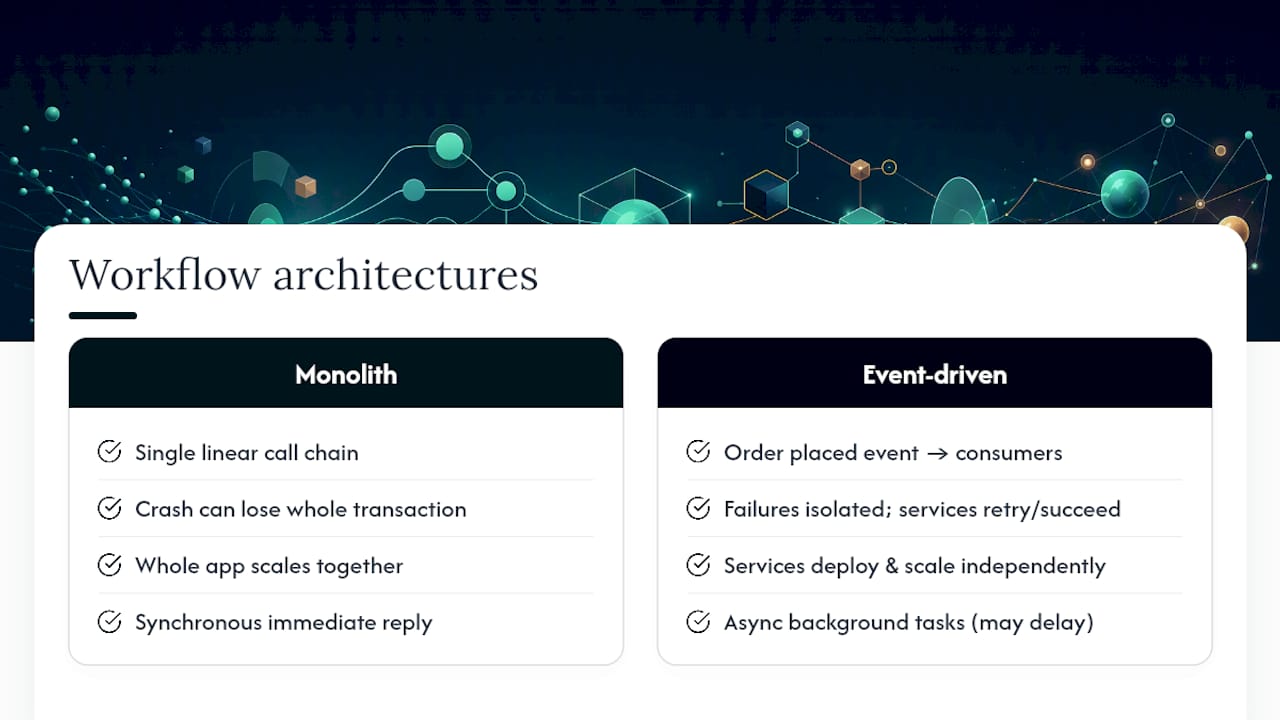
The tradeoff is complexity. A monolith’s stack trace is one file. An event-driven system’s trace spans multiple services, and a bug might live in the routing rule, not the code. Request-driven systems also give you immediate, synchronous answers, which matters for anything a user is actively waiting on, like a login check or a price quote.
Most production systems today aren’t purely one or the other. Many use request-driven APIs for user-facing reads and writes, while publishing events for anything that can happen asynchronously in the background, order fulfillment, notifications, analytics, and audit logging. The architectural decision isn’t “monolith or events.” It’s picking, feature by feature, which parts of the system genuinely need an instant response and which can tolerate a short delay in exchange for resilience and independent scaling.
Keeping Data Consistent When Everything Happens Asynchronously
Event-driven systems trade strong, immediate consistency for eventual consistency: every service will eventually reflect the same state, but not necessarily at the same instant. That gap is where most production bugs live.
The classic failure mode is an inventory count that briefly disagrees with the order system because the “item reserved” event hasn’t reached the warehouse consumer yet. If a customer refreshes the page in that window, they might see stock that’s technically already sold. This isn’t a bug in the strict sense; it’s the nature of asynchronous propagation, but it needs to be designed around, not discovered in production.
A few strategies keep the gap manageable:
- Idempotent consumers so replayed or duplicate events don’t corrupt state further.
- Versioned events so a consumer can detect it received an out-of-order update and reconcile rather than overwrite.
- Compensating transactions (the saga pattern) to undo a partial sequence of steps if a later step fails, rather than assuming every step will always succeed.
- Read-your-own-writes patches at the UI layer, where the system shows a pending state (“processing your order”) instead of pretending consistency is instant.
Durable workflow engines help here because they persist execution state, so a workflow waiting for a downstream confirmation can resume exactly where it left off rather than guessing at what already happened. The discipline that matters most is deciding, per workflow, how much staleness is acceptable, and building your retry and reconciliation logic around that answer instead of hoping events always arrive in order.
Locking Down Security in an Event-Driven System
Every event that moves between services is a new opportunity for something to go wrong, which is why security in event-driven workflows needs deliberate design, not an afterthought bolted on after launch.
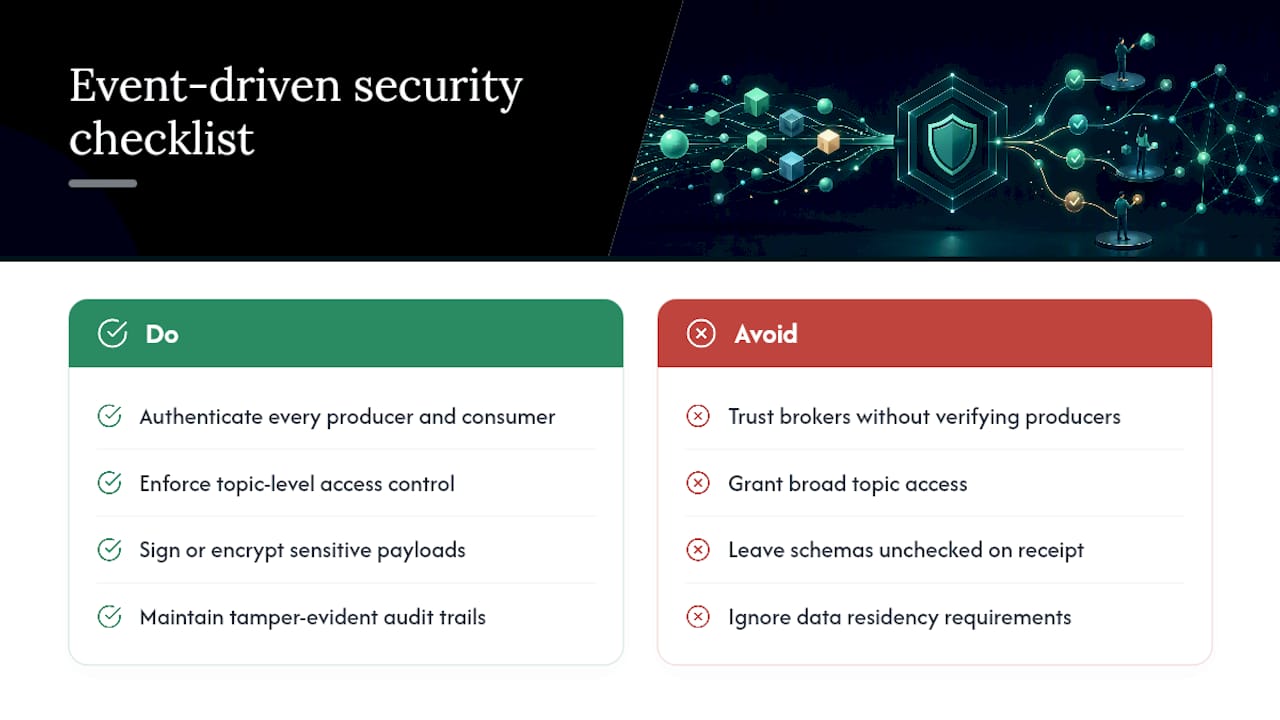
Authentication and authorization need to happen at every hop, not just at the system’s edge. A broker that trusts any producer without verifying its identity is an open door. Each producer and consumer should authenticate with the broker, and access control should scope exactly which topics or event types a given service can publish or subscribe to. A billing consumer has no business reading events meant for the marketing pipeline.
Event tampering is a real risk once events are in transit or sitting in a queue. Signing events, or at minimum encrypting sensitive payloads, prevents a compromised intermediate service from altering an order amount or a user ID mid-flight. Schema validation on receipt also catches malformed or malicious payloads before they reach business logic.
Audit trails matter more here than in synchronous systems. Because events can be processed minutes or months after they’re created, you need a durable, tamper-evident log of what happened, when, and who triggered it, both for debugging and for compliance in regulated sectors like healthcare and finance.
Data residency is a related and often overlooked concern. If events carry personal or financial data, where that data is stored and processed while it sits in a queue or broker matters for privacy compliance, not just where the final database lives.
Treat your event bus with the same security posture as your API layer. It carries the same sensitive data; it just moves it differently.
When to Actually Commit to Event-Driven Workflows
Move from a synchronous prototype to durable event-driven workflows once you see a real signal: a process that needs to wait on an external party, a step that fails often enough to need automatic retries, or a workload that spikes unevenly. Keep an MVP synchronous while you’re still validating whether anyone wants the feature at all. Scope the first event-driven experiment narrowly, one event type, one consumer, so you learn the failure modes before you’re depending on them in production.
— Lakitha
Build Your Event-Driven Workflow Without the Guesswork
If you’ve read this far, you already know that the hard part of event-driven workflows isn’t the concept. It’s the execution: getting idempotency, retries, and observability right the first time instead of discovering the gaps during an outage. Bespoke automation and rapid MVPs can be built with a dedicated engineering team and fixed pricing agreed before work starts, so there’s no surprise invoice for scope you didn’t ask for.

Projects can be structured around the R&D Tax Incentive and builds can be configured with Australian data residency where compliance requires it. The typical path starts small: a working pilot in under two weeks that proves the event flow and routing logic before you commit to a full production build, similar to how Zatersio’s own automation projects and DivertPro platform get built and validated. If you have a manual process that’s really a chain of events waiting to be automated, start scoping your MVP with Zatersio’s engineering team.
Sources
For deeper implementation detail beyond what fits here, these sources cover specific mechanics well: Microsoft’s event-driven architecture guide for the architectural fundamentals, Vercel’s Workflows documentation for durable execution, Google Cloud’s Eventarc triggering guide for CloudEvents-based triggers, and the Ensemble Conductor playbook for operational patterns like retries and dead-letter handling.
- Event-driven architecture (Microsoft Learn)
- Vercel Workflows docs
- Ensemble Conductor playbook: Event-driven workflow
- Trigger workflows from Eventarc (Google Cloud)
- n8n — workflow automation
FAQ
What are the four types of workflows?
Workflows are commonly grouped into sequential, parallel, state-machine, and event-driven types, with event-driven workflows distinguished by reacting to triggers rather than following a fixed, predetermined order.
Is Kafka an event-driven system?
Kafka is a distributed event streaming platform that acts as the broker layer in an event-driven architecture, handling publish and subscribe messaging between producers and consumers at high throughput.
What does event-driven mean?
Event-driven means a system’s components act in response to events, such as a state change or a user action, rather than running on a fixed schedule or waiting for a direct synchronous call.
Can you give an example of event-driven programming?
A common example is a webhook: when a payment provider sends a “payment succeeded” event, a consumer picks it up, updates the order status, and triggers a shipping workflow, all without the payment provider ever calling that workflow directly.
Do I need a durable workflow engine for every event-driven project?
No. Short, stateless tasks like sending a notification usually don’t need one; durable engines are worth the added complexity mainly when a process must wait on an external signal for an extended period, as Zatersio’s teams weigh during early MVP scoping.