
Get a Working Field Service Scheduling Automation Pilot in Two Weeks
Get a Working Field Service Scheduling Automation Pilot in Two Weeks
Field service scheduling automation assigns the right technician to the right job, cuts dispatcher hours spent on manual matching, and tightens on-time arrival windows by re-optimizing routes as conditions change. The fastest way to see whether it works for your team is a short pilot with human-in-the-loop controls, not a full rip-and-replace rollout. Run one job type, keep dispatchers approving suggestions for the first weeks, and let the results tell you whether to scale.
TL;DR:
- Scheduling automation is most effective when tested with a short pilot focusing on one job type and keeping dispatchers involved in approving suggestions.
- Key pre-implementation checks include system scalability, integration compatibility, observability features, offline mobile functionality, and data security measures.
- Successful pilots require accurate baseline data on job durations, technician skills, parts inventory, and realistic KPIs like dispatch time and on-time rates.
- Common failure modes involve inaccurate duration estimates, resistance from staff, inventory mismatches, and connectivity issues, which can be mitigated through calibration and fallback processes.
- Rapid two-week pilots reveal real edge cases and improve trust, serving as a better alternative to big-bang rollouts for deploying scheduling automation.
Table of Contents
- What Does Field Service Scheduling Automation Actually Do?
- What Should You Check Before Buying or Building a Scheduling System?
- How Do You Roll Out Scheduling Automation Without Losing Control?
- What Results Should a Pilot Actually Deliver?
- What Goes Wrong With Scheduling Automation, and How Do You Avoid It?
- Why Rapid Pilots Beat Big-Bang Rollouts
- Get a Working Pilot Running in Two Weeks
- Sources
- FAQ
What Does Field Service Scheduling Automation Actually Do?
Automated job scheduling replaces the whiteboard, the spreadsheet, and the dispatcher’s gut instinct with a system that matches jobs to technicians based on skill, location, and availability, then keeps adjusting as the day unfolds. Modern schedulers combine two disciplines: dispatch automation (who goes where) and workflow orchestration (what triggers a job and what happens next).
Here’s what a properly built system handles on its own:
- AI dispatch and continuous re-optimization — jobs get reassigned automatically when a technician runs late or a higher-priority call comes in.
- Skill and equipment matching — the system won’t send a plumber to a job that needs an electrician with a specific certification.
- Routing and ETA calculation — customers get a real-time window, not a vague “sometime this afternoon.”
- Multiple scheduling modes — recurring cron-style jobs, one-shot bookings, interval-based check-ins, and event-triggered dispatch fired by a webhook or a new inbound request.
- Operational primitives — priority queues, retry and backoff logic for failed notifications, dependency chains for multi-step jobs, and reusable job templates.
These aren’t abstract features. Modern workflow schedulers increasingly unify time-based triggers with event-driven ones inside a single declarative system, which means a scheduling platform can react to a customer cancellation the same way it reacts to a Monday morning recurring maintenance run.
What Should You Check Before Buying or Building a Scheduling System?
Before you sign anything or brief an engineering team, run the software through a checklist that separates a genuinely capable platform from a glorified calendar app. Most field service scheduling software looks the same in a sales demo. It stops looking the same once you load 40 technicians and 200 jobs into it.
Work through these points in order:
- Scalability and concurrency. Ask how many simultaneous jobs and agents the system handles before performance degrades, and whether it scales horizontally as your crew grows.
- Integration breadth. Confirm it connects to telematics and GPS feeds, your CRM or ERP, parts and inventory systems, calendars, and SMS or email gateways, since a scheduler that can’t talk to your existing stack just creates another silo.
- Observability. Look for dashboards, execution history, alerting, and audit trails. Job scheduling and orchestration tools cut manual errors specifically because they centralize error handling and give you a record of what happened and why.
- Mobile UX and offline behavior. Technicians in poor signal areas need a mobile field service app that queues updates locally and syncs when connectivity returns.
- Security and data residency. Ask where the data lives, who can access it, and how API and webhook endpoints are authenticated.
Pro Tip: Ask any vendor or engineering team to show you a live preview of the next 10 scheduled runs for a sample job, in plain language. If they can’t produce that instantly, the underlying scheduling logic probably isn’t as mature as the pitch deck suggests.
How Do You Roll Out Scheduling Automation Without Losing Control?
The rollout that works is small, measured, and keeps a human approving decisions until the system earns trust. Skipping straight to full automation is the single biggest reason pilots fail, because dispatchers who feel bypassed will quietly route around the tool.
Follow this sequence:
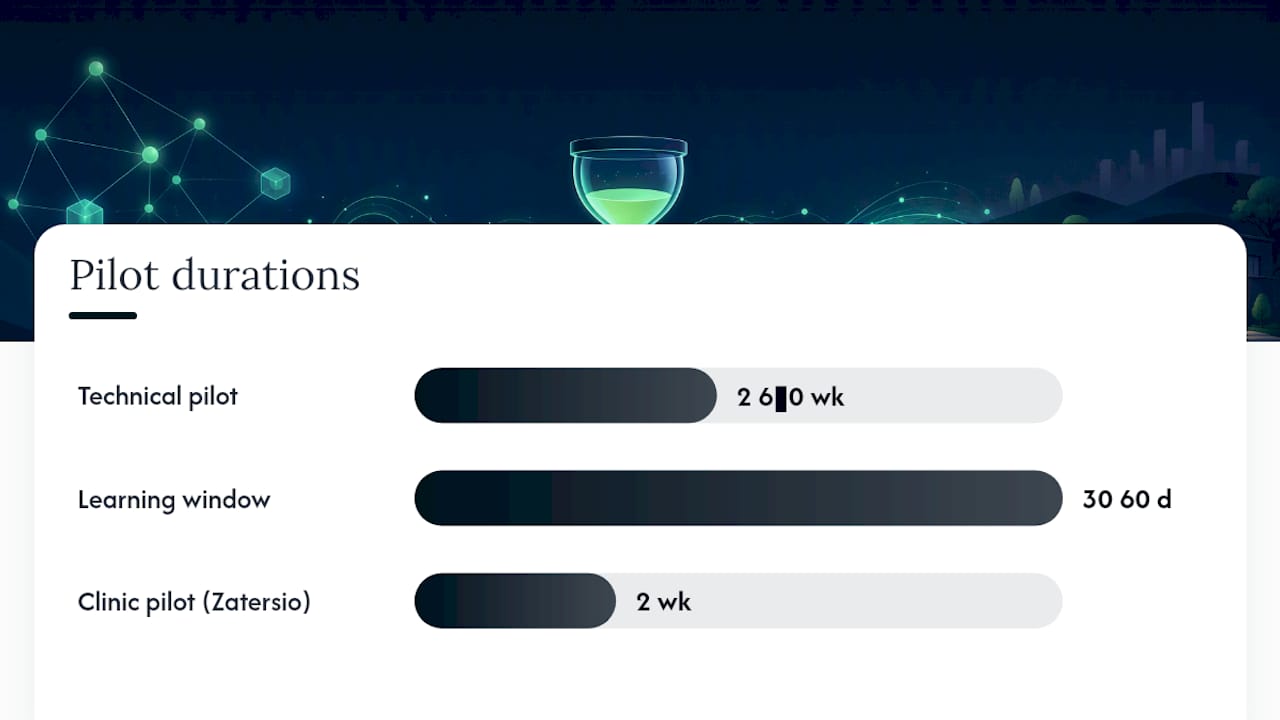
- Define pilot scope and KPIs. Pick one representative crew and one job type. Run a 2 to 4 week technical pilot, then extend to a 30 to 60 day learning window before judging results, since platform onboarding examples consistently show accuracy improving over the first one to two months as the model sees more real jobs.
- Prepare your data. Pull historical job durations, technician skill records, parts mappings, and location feeds before the pilot starts, not during it.
- Prioritize integrations. Connect GPS or telematics first, then calendar and CRM, then inventory, then notification channels.
- Set human-in-the-loop rules. Decide upfront whether the system suggests assignments for approval or auto-applies them, and log every override so you can see whether the human or the algorithm was right.
- Set acceptance criteria before scaling. Agree on the numbers that trigger a wider rollout.
Data prep checklist:
- Historical job duration by job type
- Technician skill and certification records
- Parts and inventory mapping
- Live location or telematics feed
Suggestion-first pilots aren’t a compromise. Domo’s human-in-the-loop research found that dispatchers actually learn the AI’s patterns faster when they review its suggestions before switching to auto-apply, which shortens the trust-building phase rather than stretching it out. Zatersio’s two-week clinic automation pilot followed exactly this shape: narrow scope, dispatcher approval built in from day one, and a defined checkpoint before expanding.
What Results Should a Pilot Actually Deliver?
The metrics that matter fall into five buckets: dispatcher hours saved, on-time arrival rate, travel time reduction, inbound customer calls, and first-time fix rate. Track all five from day one, because a system that improves routing but tanks first-time fix rate isn’t actually winning.
What the data shows: Case studies on AI dispatch automation report dispatch time dropping significantly, with on-time arrival rates improving meaningfully within a few months, and inbound calls falling as automated ETA notifications replace the “where’s my technician” phone tag.
Before you can claim any improvement, you need a baseline. Pull the last three months of dispatch logs and calculate your current average time-to-assign, on-time percentage, and average daily technician drive time. Build a simple dashboard that recalculates these weekly during the pilot rather than waiting for a month-end report. Teams that skip the baseline step almost always end up arguing about whether the pilot worked, because nobody agreed in advance what “worked” meant.
What Goes Wrong With Scheduling Automation, and How Do You Avoid It?
Four failure modes account for most stalled rollouts, and none of them are exotic.
- Bad duration data. If your historical job-duration estimates are rough guesses, the scheduler inherits that inaccuracy. Run short calibration jobs early and use conservative scheduling windows until the model has real data to learn from.
- Dispatcher and technician resistance. People who feel replaced will resist. Suggestion-first flows and short training sessions solve most of this before it becomes a morale problem.
- Parts and inventory mismatches. A perfectly routed technician who arrives without the right part is still a failed visit. Add a pre-assignment check or hold logic for parts-required jobs, since systems that verify inventory before dispatch measurably reduce on-site failures.
- Connectivity gaps. Rural routes and basement jobs kill signal. Define a manual fallback flow and make sure the mobile app queues updates offline.
Pro Tip: Treat your first two weeks of override logs as diagnostic data, not noise. If dispatchers override the same type of suggestion repeatedly, that’s the model telling you exactly what needs recalibrating.
Why Rapid Pilots Beat Big-Bang Rollouts
Every operations lead we talk to underestimates how much a two-week pilot can reveal. The instinct is to spec out a full system, get budget approval, and launch company-wide. That approach almost always fails, because you don’t find the messy edge cases (the technician who covers two skill categories, the job that always overruns, the customer who needs three reschedule attempts) until real jobs run through real dispatchers.
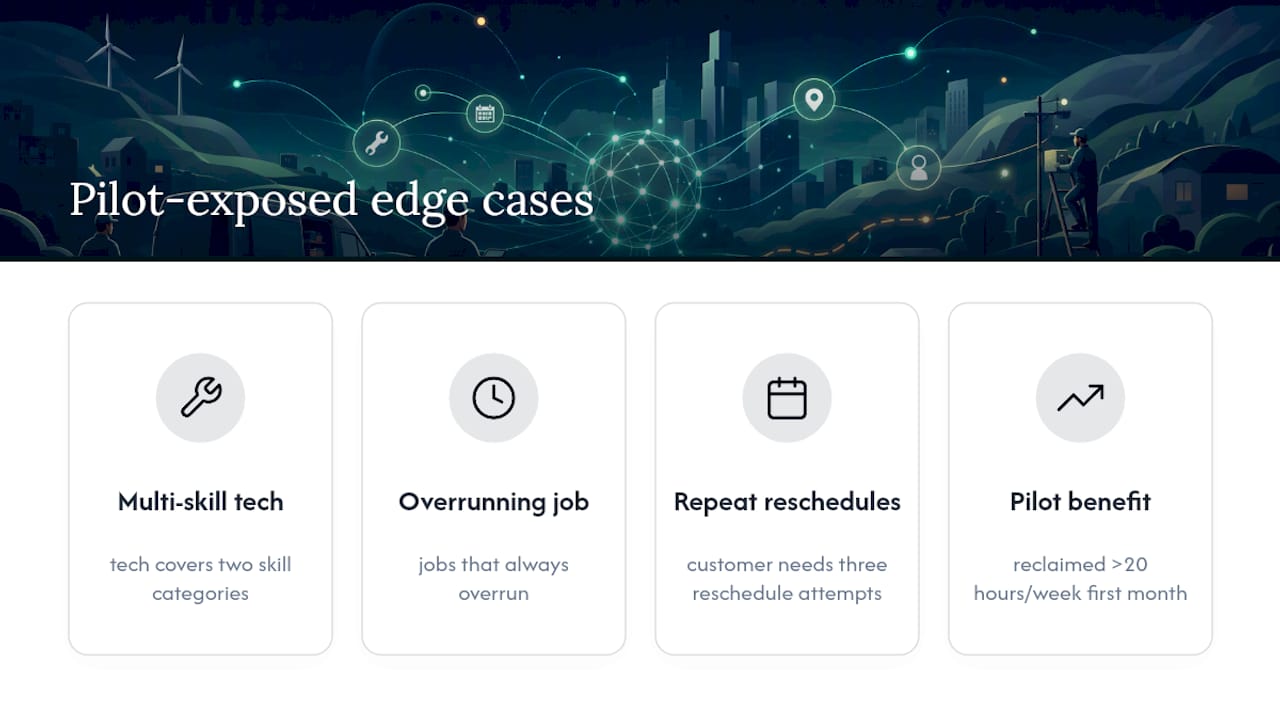
Working pilots can be built in under two weeks specifically because speed surfaces those edge cases fast. A Melbourne firm that automated its scheduling and admin workflow reclaimed more than 20 hours a week within the first month, because the pilot exposed exactly which manual steps were actually worth automating first.
A packaged platform makes sense when your workflow is standard and your integrations are common. A custom build earns its cost when your job types, compliance requirements, or existing systems don’t fit a template, which is where most trades and healthcare operators actually land.
— Lakitha
Get a Working Pilot Running in Two Weeks
Reading about automation and running it are two different things, and the gap between them is usually a scoping conversation that never happens. This gap can be closed with a 14-day pilot that automates one real scheduling workflow, not a slide deck about what’s theoretically possible.

The pilot delivers a working MVP plus a measurement dashboard tracking the same metrics covered above, so you’re comparing real before-and-after numbers, not vendor promises. Pricing is fixed upfront, data stays on Australian infrastructure if that matters for your compliance needs, and eligible builds can be structured to qualify for the R&D Tax Incentive. You get a dedicated engineering team for the build, not a rotating support queue.
If you want to see the shape of a rollout before committing to anything, grab the free AI automation blueprint. If you already know which scheduling workflow is costing you the most dispatcher hours, book a scoping call and Zatersio’s automation team will map the pilot around that specific job type first.
Sources
- Beyond Batch: Modern Job Scheduling with Declarative Orchestration — Kestra
- Job scheduling explained: why it matters for your systems — BMC
- Human-in-the-loop dispatch advice — Domo
FAQ
How Long Does a Field Service Scheduling Automation Pilot Take?
A technical pilot typically takes 2 to 4 weeks to configure, with meaningful accuracy improvements showing up over a 30 to 60 day learning window as the system sees more real jobs.
Does Automated Scheduling Replace Dispatchers?
No. The strongest implementations keep dispatchers approving or overriding AI suggestions, at least until the system has proven itself, which also speeds up staff trust in the tool.
What Data Do I Need Before Starting?
Historical job durations, technician skill records, parts and inventory mappings, and a live location or telematics feed are the minimum data set for an accurate pilot.
Can Zatersio Build a Custom Scheduling Pilot?
Yes. Zatersio runs fixed-price pilots that can go live in about two weeks, covering one scheduling workflow with a measurement dashboard so you can see real before-and-after results.
What’s the Biggest Reason Scheduling Automation Pilots Fail?
Poor historical duration data and dispatcher resistance are the two most common causes, and both are solvable with conservative scheduling windows and a suggestion-first rollout.