
Get a Working Pilot in Two Weeks: Integration Patterns for SMEs
Get a Working Pilot in Two Weeks: Integration Patterns for SMEs
Start with a phased, value-first rollout, not an architecture overhaul. Most small and midsize enterprises should default to a hub-and-spoke or iPaaS setup for every day SaaS-to-SaaS flows, save custom event-driven builds for a handful of high-volume or strategic processes, and keep point-to-point links only where you have two or three systems total. Pick your smallest high-value flow first, prove it works, then expand. Hybrid setups are normal, and a big-bang migration is the fastest way to break something you already depend on.
TL;DR:
- Small to midsize enterprises should start with a phased, value-first integration rollout using a hub-and-spoke or iPaaS setup to avoid damaging a big-bang migration.
- For fewer than five connected apps, point-to-point links are manageable, but beyond that, using a central platform minimizes maintenance complexity and costs.
- Real-time, high-volume flows benefit from event-driven architectures with message brokers, while batch processing suits reporting and analytics tasks.
- Selecting the right pattern depends on app count, data latency needs, team skill, and regulatory or audit requirements, with a focus on practical constraints.
- Building and scaling integrations should follow a gradual, tested approach with versioned contracts, clear ownership, and regular health monitoring to ensure long-term reliability.
Table of Contents
- What Are the Main Integration Patterns for SMEs?
- How Do You Choose the Right Integration Pattern?
- How Do You Implement an Integration Layer Step by Step?
- What Operational Practices Keep Integrations Reliable?
- Which Pattern Fits Common SME Workflows?
- What Does Integration Actually Cost an SME?
- What Tools and Platforms Work for SME Integration?
- How Do You Scale Integrations Without Breaking Them?
- How Do Cloud and Hybrid Setups Change Integration Choices?
- Why Most SMEs Overthink This Decision
- How Zatersio Builds Your First Integration Pilot
- Where to Read More on Integration Patterns
- Sources
- FAQ
What Are the Main Integration Patterns for SMEs?
Five patterns cover almost every integration decision you’ll face. Each solves a different problem, and picking the wrong one is usually what turns a simple project into a maintenance headache six months later.
Point-to-point connects two systems directly, often through a native API or a simple script. It’s fast to build and easy to understand. The catch: it becomes brittle and high-maintenance once you have more than a few connections, since every new system multiplies the number of links you have to maintain.
Hub-and-spoke / iPaaS routes everything through a central platform instead of system-to-system wiring. You get one place to monitor, one place to manage credentials, and pre-built connectors for popular tools. The trade off is a subscription cost and some dependency on the vendor’s roadmap for niche connectors.
Event-driven integration uses webhooks or message brokers so that when something happens in System A, System B finds out without a direct call. Webhooks work fine for simple external events, but they don’t guarantee delivery. For anything that has to arrive reliably, a broker like Kafka, RabbitMQ, or a cloud pub/sub service adds replay and fan-out at the cost of more infrastructure to manage.
API-led layering builds reusable interface layers, usually split into system, process, and experience APIs, so new consumers can plug into existing data without a new custom build each time. It pays off when you expect steady growth and multiple teams pulling from the same data. It’s overkill for a five-person shop with two core apps.
ETL/batch moves data on a schedule rather than in real time, most often for reporting and analytics. It’s the cheapest pattern to run and the easiest to debug, but it’s the wrong choice anywhere near-instant updates matter, like order status or fraud checks.
Quick fit signals:
- A very small number of integrations with low complexity may be suitable for point-to-point integration.
- Five or more connected apps: hub-and-spoke or iPaaS pays for itself in reduced maintenance.
- Real-time fan-out or high volume: event-driven, with a broker if delivery has to be guaranteed.
- Multiple teams reusing the same data over years: API-led layering.
- Reporting, dashboards, nightly reconciliation: ETL/batch.
How Do You Choose the Right Integration Pattern?
Match the pattern to your actual constraints, not to what looks impressive in a vendor deck. Four factors decide most of it: how many apps you’re connecting, how fast the data needs to move, who’s going to maintain it, and what your auditors or regulators expect to see.
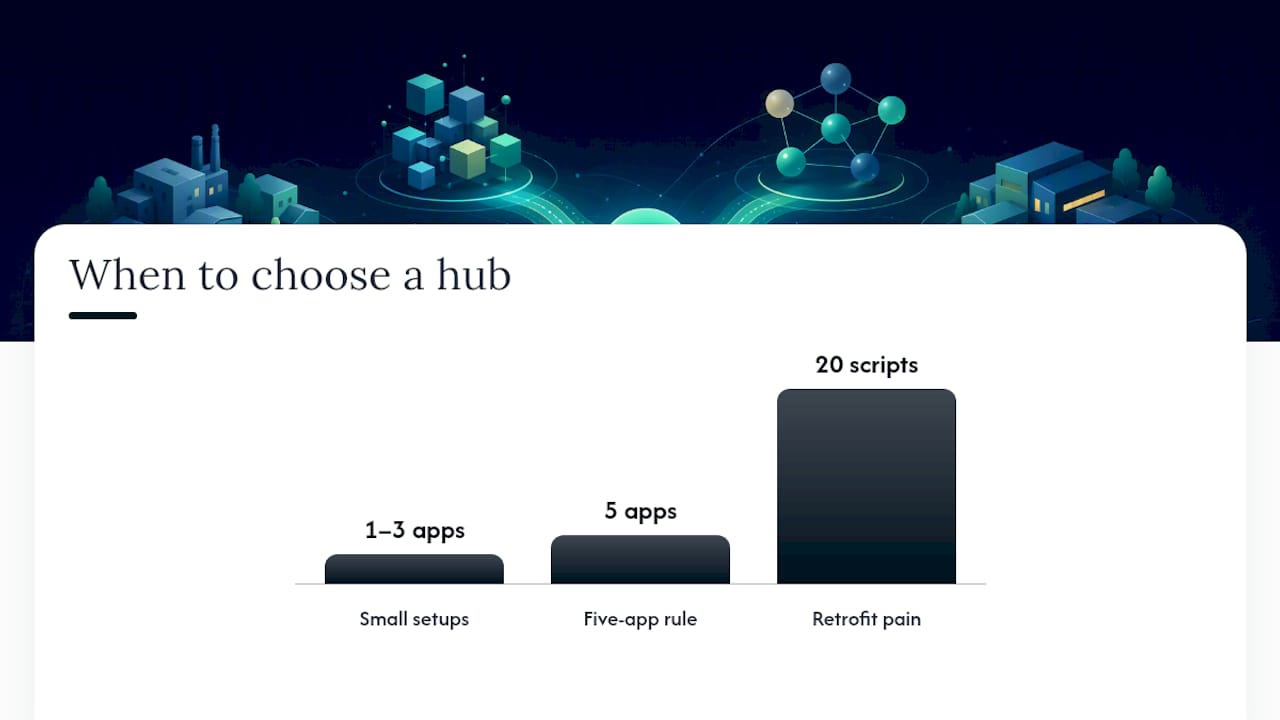
- Count your apps. With one to three systems, direct point-to-point links are genuinely fine, and building a platform layer for them is wasted effort. Past roughly five connected apps, the math flips: n direct connections grow toward n-squared complexity, and a hub cuts that back down to one connection per app.
- Check your latency requirement. If a customer needs to see an update within seconds (stock levels, booking confirmations), lean event-driven. If overnight is acceptable, batch is cheaper and far easier to troubleshoot.
- Be honest about team skill. A two-person IT team with no dedicated integration engineer will get more value from a low-code iPaaS than from hand-rolled message queues, even if the queue is technically the “better” architecture.
- Weigh governance and audit needs. Regulated sectors (healthcare, finance, legal) need traceable data lineage and access logs. That pushes you toward platforms with built-in audit trails rather than scripts nobody documented.
Pro Tip: Run the “five app” test before you buy anything. List every system that currently talks, or should talk, to another. If that list hits five, budget for a hub now, because retrofitting one after twenty custom scripts exist is a much bigger project than building it from day one.
Cost sensitivity matters too. iPaaS subscriptions scale with usage, so a leaner operation might reasonably stay point-to-point longer than the “five app” rule suggests, provided someone owns the maintenance. There’s no shame in staying simple when simple is still working.
How Do You Implement an Integration Layer Step by Step?
Treat this as a rollout, not a rebuild. The sequence below keeps risk low and gives you a working result before you’ve touched everything else in your stack.
- Map current processes and name an owner for each one. You can’t fix what nobody’s responsible for.
- Pick one high-value pilot. CRM-to-invoicing or lead capture-to-CRM are common first choices because the payoff is visible fast.
- Design a small canonical model. Define core objects like customer, order, and invoice, and assign clear mastership for each, rather than trying to standardize your entire data model up front.
- Choose tooling sized to your volume. Low-code iPaaS platforms suit most SMEs thanks to pre-built connectors and managed infrastructure; reserve a custom stack for flows that are genuinely high-volume or strategic.
- Build adapters with versioned contracts, so a schema change on one side doesn’t silently break the other.
- Test in layers. Unit tests for each transformation, end-to-end tests for the full flow, and exception tests that deliberately feed bad data through the pipe.
- Run a dry-run in staging before anything touches production data.
- Migrate gradually. Route new flows through the hub first, then retire old point-to-point links one at a time instead of switching everything over on a single weekend.
Industry guidance backs the phased approach specifically: experts recommend validating ROI with a value-first pilot before expanding scope, rather than committing budget to a full platform before proving the first use case earns its keep. A working CRM-to-invoicing sync that saves four hours a week is worth more, right now, than a beautifully designed architecture diagram with nothing live yet.
If you’re specifically automating the CRM-to-accounting handoff, these CRM automation workflows walk through common failure points that show up when that sync isn’t built carefully.
What Operational Practices Keep Integrations Reliable?
Building the connection is the easy half. Keeping it healthy for the next three years is where most SME integrations quietly fail, usually because nobody set up the basics on day one.
- Watch four metrics. Success rate, latency, error rate, and queue depth tell you almost everything about the health of a flow before a user ever complains.
- Set a retry and backoff policy. A retry/backoff strategy paired with dead-letter queues stops one failed message from silently vanishing or looping forever.
- Rotate credentials on a schedule, and never hard-code secrets directly in a script or connector config.
- Apply least privilege. An integration account should only see the data and actions it actually needs, nothing broader.
- Keep audit logs. If a regulator or a client ever asks what changed and when, you want an answer in minutes, not a week of digging through database history.
- Write a one-page runbook per integration. Who gets paged, what the first three troubleshooting steps are, and how to manually replay a failed message.
- Track platform costs against usage. iPaaS pricing often scales with volume or task count, so a flow that looked cheap at launch can creep upward as your business grows.
For teams without a dedicated security lead, a practical security framework guide offers a useful baseline for credential handling and access control that scales down to small teams without a full security department.
Which Pattern Fits Common SME Workflows?
Seeing the pattern applied to a workflow you already run makes the choice easier than any abstract rule.
- CRM to invoicing. Most SMEs are fine with iPaaS here, or even point-to-point if it’s a single connection. The data volume is low and near-real-time is rarely required. A practical invoice automation guide covers this exact handoff in more detail.
- Order to fulfilment to warehouse. This is where event-driven earns its complexity. Orders need to fan out to inventory, shipping, and notifications simultaneously, and a message broker keeps those consumers decoupled so one slow system doesn’t stall the rest.
- Reporting and analytics. Batch/ETL wins on cost and simplicity almost every time. Scheduled batch processing is often cheaper and easier to maintain than real-time syncing for master data sync and reporting, where a few hours of lag changes nothing.
- Public-facing APIs. A backend-for-frontend layer or a lightweight API gateway shields your internal systems from whatever your website or app needs, so a frontend redesign doesn’t force a backend rewrite.
What Does Integration Actually Cost an SME?
Costs split into three buckets: build, run, and the hidden cost of doing nothing. Point-to-point scripts have the lowest upfront cost, sometimes just developer hours, but that cost resurfaces every time an API changes or a new system joins the mix. iPaaS platforms carry a recurring subscription, usually tiered by task volume or number of connections, which is predictable but compounds as you scale usage.
Custom event-driven infrastructure has the highest upfront cost, since you’re standing up brokers, monitoring, and adapters from scratch, but it scales more cheaply per transaction at high volume than a metered iPaaS plan. The budget question isn’t “which is cheapest” but “cheapest at what scale, and cheapest to fix when it breaks.”
The hidden cost is the one most owners underestimate: staff hours spent manually re-entering data between disconnected systems, reconciling mismatched records, or chasing down why an order didn’t sync. A practical, budget-conscious playbook for connecting core systems makes the case that this manual overhead, not the tooling itself, is usually the bigger line item over a year. Fixed-price project builds also help SMEs avoid the open-ended hourly billing that turns a two-week integration into a two-month invoice.
What Tools and Platforms Work for SME Integration?
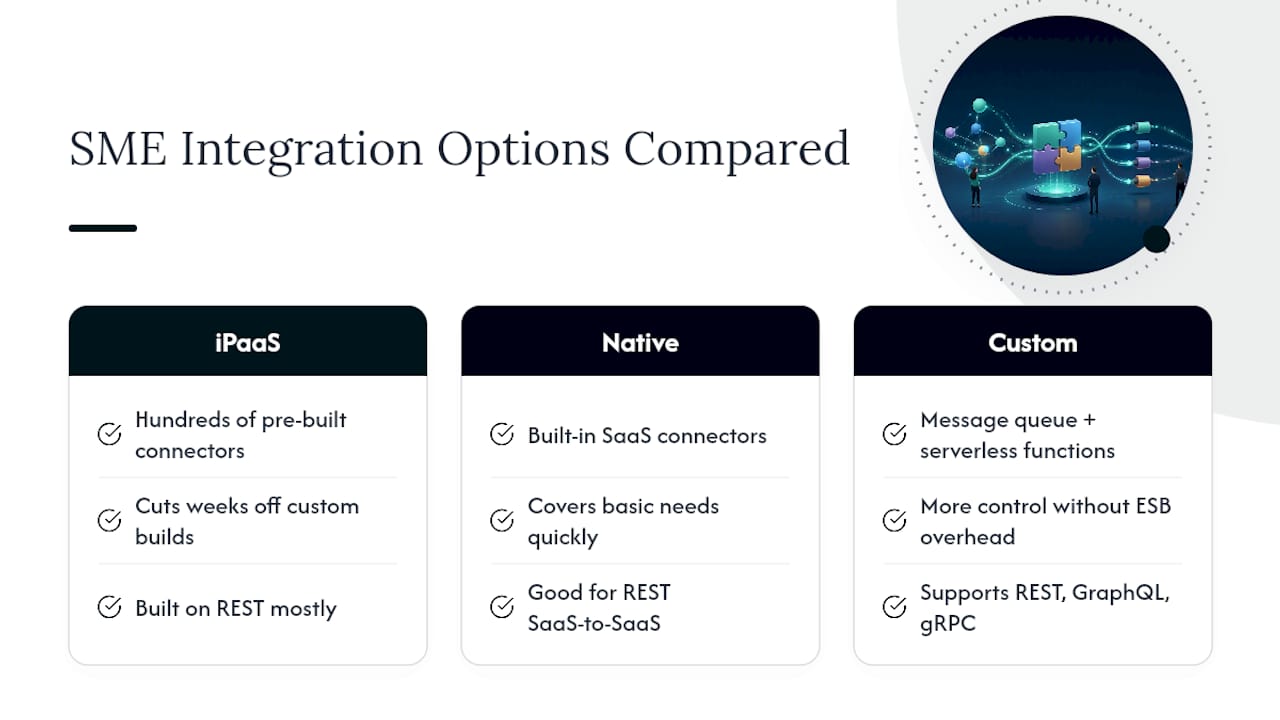
You don’t need enterprise middleware to run a solid integration setup. Low-code iPaaS platforms dominate the SME space because they ship with hundreds of pre-built connectors for common tools like accounting software, CRMs, and payment processors, cutting weeks off a build that would otherwise mean writing custom API calls for each system.
For simpler needs, native integrations built into your existing SaaS tools (many CRMs and accounting platforms now ship with direct connectors to popular apps) can cover the basics without adding another subscription. Where you need more control, a lightweight custom stack built around a message queue and a handful of serverless functions gives you flexibility without the overhead of a full enterprise service bus.
The right choice depends heavily on your API style needs too. REST remains the dominant style for external connections, GraphQL suits frontends that need flexible queries, and gRPC is strongest for high-throughput internal service calls. Most SME integration work never needs gRPC. REST covers the vast majority of SaaS-to-SaaS work, and it’s what most iPaaS connectors are built on anyway.
A quick tactical example of getting a CRM integration running for a small team in a day is a useful reference point for how fast a well-scoped pilot can actually move.
How Do You Scale Integrations Without Breaking Them?
Treat every integration as a living system, not a one-time project. The habits that keep a two-connector setup healthy are the same ones that keep a twenty-connector setup healthy, they just need to start earlier.
Version every contract between systems. When a field gets renamed or a data type changes, a versioned adapter lets the old flow keep running while you migrate consumers one at a time, instead of breaking everything at once. Review your canonical model periodically, not just at launch, since new systems tend to introduce fields the original model never anticipated.
Retire unused connections deliberately. Integrations that outlive their purpose (an old sync to a tool you stopped using) quietly rack up error logs and confuse anyone doing an audit later. A quarterly review of active connections catches this before it becomes clutter nobody wants to untangle.
Document ownership as your team changes. The person who built an integration two years ago may not be the person maintaining it now, and undocumented business logic buried in a transformation script is one of the most common sources of “why did this break” incidents. Keep runbooks current, not just written once and forgotten.
How Do Cloud and Hybrid Setups Change Integration Choices?
Cloud-first SMEs generally have it easier: SaaS tools expose APIs by default, and iPaaS platforms are built to talk to them natively, so most of the connector work is already done for you. The friction shows up when a legacy on-premises system, an older practice management tool or a warehouse system that predates the cloud era, needs to join the picture.
Hybrid environments, where some systems live in the cloud and others sit on local servers, usually need an on-premises agent or a secure tunnel alongside your cloud integration platform. This adds a layer of setup, but it’s a solved problem for most mainstream iPaaS vendors now, not the custom networking project it used to be a decade ago.
Data residency adds another layer for regulated industries. If compliance rules require certain records to stay within a specific jurisdiction, that constrains which platform or hosting region you can use, and it’s worth confirming before you commit to a vendor rather than after migration. For SMEs juggling both cloud SaaS and legacy on-site systems, the practical answer is rarely “migrate everything to the cloud immediately.” It’s building the integration layer to handle both gracefully while you modernize on your own timeline.
Why Most SMEs Overthink This Decision
The integration advice online tends to treat pattern selection like a permanent architectural commitment, when for most SMEs it’s closer to a series of small, reversible bets. Rapid MVP pilots work precisely because they force a decision point after two weeks instead of six months. A fixed-price pilot caps the downside if the first pattern choice turns out wrong, which it sometimes will.
— Lakitha
How Zatersio Builds Your First Integration Pilot
An alternative to hiring a slow enterprise integrator for your first integration build involves engineers who scope and deliver the work directly, with fixed pricing agreed before anything starts, avoiding open-ended hourly billing during projects.

If your first move is a single high-value flow, like CRM-to-invoicing or an order-to-fulfilment sync, Workflow Automation covers exactly this kind of connector build. If you need something more ambitious, like an event-driven pilot connecting several systems at once, MVP Development delivers working software in under two weeks, with the option to structure eligible projects under the R&D Tax Incentive. Every build typically keeps your data on local infrastructure by default, which matters if compliance or audit requirements are part of your decision criteria.
Ready to see what a scoped pilot would actually cost? Check current pricing for single and multi-step automation builds, and start with the smallest flow that would save your team the most hours this month.
Where to Read More on Integration Patterns
For deeper technical grounding beyond SME-specific advice, the API patterns cheat-sheet covers event-driven and messaging patterns in more depth. The enterprise API integration patterns guide is worth a look for API style selection (REST, GraphQL, gRPC) once your integration layer starts handling multiple consumer types.
Sources
- The integration layer / platform pattern for mid-market companies
- API integration patterns guide
- API patterns cheat-sheet
- Integrated enterprise on a budget for SMBs
FAQ
What Are the Different Types of Integration Patterns?
The main types are point-to-point, hub-and-spoke or iPaaS, event-driven (webhooks and message brokers), API-led layering, and ETL/batch. Each fits a different combination of app count, latency need, and team skill, covered in detail above.
What Are Enterprise Integration Patterns?
Enterprise integration patterns are the reusable architectural solutions, like message routing, transformation, and channel design, that solve recurring problems when connecting multiple systems. They originated in large-scale enterprise architecture but scale down well to SME contexts, especially the canonical data model and event-driven concepts.
What Are the Three Types of Integrations?
There’s no single standard “three,” but a common simplified grouping is point-to-point, hub-based (iPaaS), and event-driven. Most real-world SME setups end up as a hybrid mix of at least two of these rather than committing to just one.
What Are the Different Types of Integrations for a Small Business?
Small businesses typically choose between direct point-to-point connections for one or two apps, an iPaaS platform once they’re managing five or more systems, and event-driven setups for real-time, high-volume flows like order fulfillment. Batch/ETL usually handles reporting and analytics separately from the operational flows.
How Many Apps Before I Need an Integration Platform?
Point-to-point connections are manageable with one to three apps, but connection complexity grows sharply past that point. Once you’re connecting five or more systems, an iPaaS or hub-and-spoke setup typically saves more in maintenance than it costs in subscription fees.
Does Zatersio Build Custom Integrations for SMEs?
Yes, Zatersio builds workflow automations and integration pilots directly, with pricing for single workflow automations and multi-step automation across a stack listed on the pricing page. Projects are scoped and delivered by engineers directly, with fixed pricing agreed before work begins.