
Invoice Processing Automation for Finance Teams: A Guide
Invoice Processing Automation for Finance Teams: A Guide

Invoice processing automation is software that ingests invoices from any source, extracts structured data, validates it against purchase orders, routes approvals through a defined workflow, and posts approved records directly to your ERP or accounting system. For AP teams, the practical goal is a high touchless processing rate: invoices that match predefined rules move through the entire cycle without anyone touching them. The teams that get this right see measurable drops in cost per invoice and cycle time, and they free up staff for work that actually requires human judgment.
Before you evaluate a single vendor, decide on one thing: do you need an off-the-shelf tool or a custom build? Most mid-market finance teams start with a SaaS platform. Teams with complex multi-entity structures, unusual matching rules, or bespoke ERP integrations often find that a custom-engineered solution pays back faster and causes fewer headaches long-term.
Three KPIs anchor every successful automation project:
- Touchless rate — the percentage of invoices processed without manual intervention
- Average cycle time — days from invoice receipt to payment approval
- Cost per invoice — total AP processing cost divided by invoice volume
Pro Tip: Before you benchmark against industry figures, measure your current state first. Teams that skip this step have no baseline to prove ROI to leadership six months later.
Table of Contents
- What does invoice processing automation actually replace?
- How does automated invoice processing work, step by step?
- What are the real benefits, and how do you calculate ROI?
- What features should you insist on when evaluating solutions?
- How much does invoice automation software cost?
- What does a realistic implementation roadmap look like?
- When should you build custom vs. buy off the shelf?
- How does Zatersio approach a custom invoice automation project?
- What security and compliance requirements apply to U.S. businesses?
- What mistakes do finance teams make when adopting automation?
- Key Takeaways
- Why the “just buy a tool” advice misses the point for complex AP workflows
- Zatersio builds invoice automation that fits your workflow, not the other way around
- Useful sources and further reading
What does invoice processing automation actually replace?
The full AP automation lifecycle covers six distinct stages: receiving invoices, coding them to the correct GL accounts, routing for approval, executing payment, and reconciling the transaction. Automation targets every one of those stages, but it does not replace everything in your finance stack.
Here is what belongs inside the automation boundary and what sits outside it:
Inside the automation scope:
- Capture (email ingestion, e-invoicing, scanned PDFs)
- Data extraction and enrichment (vendor normalization, tax validation, duplicate detection)
- PO matching (2-way and 3-way)
- Approval routing and exception handling
- ERP posting and payment handoff
- Audit trail and reconciliation logging
Outside the automation scope: Strategic vendor negotiation, complex dispute resolution, and judgment calls on non-standard spend categories still require human involvement. Automation integrates into your finance stack alongside your ERP, bank feeds, and procurement system. It does not replace them.
The invoice automation software market was valued at almost $3.4 billion in 2024 and is estimated to reach $8.9 billion by 2031, which reflects how broadly finance teams are adopting this approach. That growth is not driven by novelty. It is driven by the fact that manual AP is expensive, slow, and error-prone at scale.
“Finance leaders should view invoice processing automation as a strategic enabler of cash flow and analytics, not just a data entry fix.” — IBM
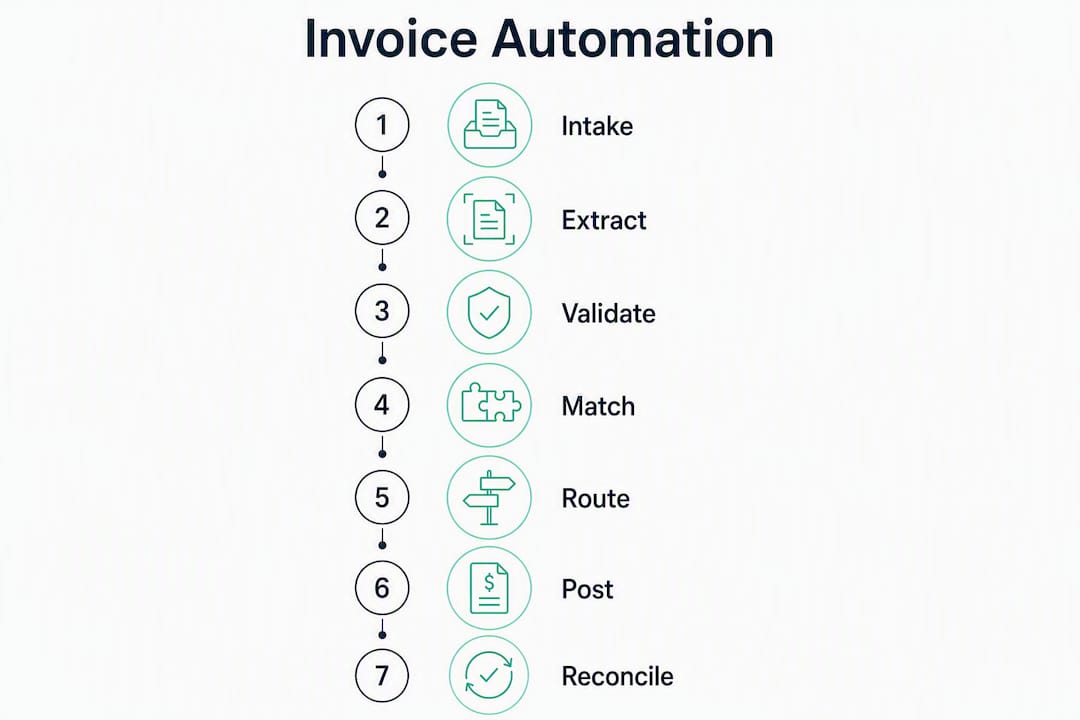
The pipeline you are automating looks like this: Intake → Extract → Validate → Match → Route → Post → Reconcile. Each stage has a failure mode, and understanding where your current process breaks is the first step to fixing it with automation.
How does automated invoice processing work, step by step?
Walk through the technical pipeline once and you will see exactly where your current manual process is burning time.
-
Intake. Invoices arrive by email, supplier e-invoicing portal, EDI feed, or scanned paper. A well-designed system accepts all of these through a single ingestion layer, normalizing the format before any extraction begins.
-
Data capture. This is where OCR invoice processing fits in, but OCR alone is not enough. Template-based OCR breaks when a supplier changes their invoice layout. Template-free AI models, by contrast, adapt to any layout and return structured data without manual reconfiguration. The output is structured JSON: vendor name, invoice number, date, line items, tax amounts, and totals.
-
Validation and enrichment. The extracted data is checked against your vendor master (is this a known supplier?), validated for tax compliance and timestamp accuracy, and screened for duplicates. This step catches the errors that would otherwise create payment disputes or double payments downstream.
-
Matching logic. For PO-backed invoices, the system runs 2-way matching (invoice vs. PO) or 3-way matching (invoice vs. PO vs. goods receipt). Tolerance rules define acceptable variance, so a $0.50 rounding difference does not trigger a manual exception. Multi-line matching handles invoices that reference multiple POs. Non-PO invoices follow a separate coding and approval path.
-
Approval routing. A rules engine assigns each invoice to the correct approver based on amount, cost center, vendor category, or GL code. Exceptions land in a queue with context attached. Escalation policies handle invoices that sit idle past a defined SLA.
-
ERP posting and payment handoff. Approved invoices post to your ERP in the correct format, mapped to the right GL accounts. The system hands off to your payment rail (ACH, wire, virtual card) and logs the full audit trail for reconciliation.
Integration checklist before you go live:
- ERP API endpoints confirmed and tested
- Chart of accounts mapped to invoice coding categories
- Vendor master synchronized (names, tax IDs, payment terms)
- Approval hierarchy configured in the rules engine
- Exception queue owners assigned
Pro Tip: Template-free extraction reduces long-term maintenance costs significantly. If a vendor quotes you a template-based system, ask how many templates they currently maintain and what happens when a supplier updates their invoice format.
What are the real benefits, and how do you calculate ROI?
The business case for accounts payable automation rests on four concrete levers: lower cost per invoice, shorter cycle times, fewer errors, and better cash flow control.

Primary benefits
Cost reduction is the most direct. Manual invoice processing costs organizations significantly more per invoice than automated processing. Industry guidance puts automated processing in roughly the $1–$2 per invoice range, while manual processing typically runs several times higher depending on labor costs and error rates.
Cycle time compression matters for cash flow. Faster approval cycles mean you can capture early payment discounts from suppliers who offer them, typically 1–2% for payment within 10 days. At scale, that adds up to real working capital improvement.
Error reduction cuts the cost of rework. Duplicate payments, miscoded invoices, and missed approvals all generate downstream work. Automation with duplicate detection and validation rules eliminates most of these before they reach the payment stage.
Vendor relationships improve when suppliers get consistent, on-time payments and can check invoice status through a portal rather than calling your AP team.
KPIs to track
| KPI | What it measures | Target direction |
|---|---|---|
| Touchless rate | % of invoices processed without manual touch | Higher is better |
| Average days to process | Days from receipt to approval | Lower is better |
| Cost per invoice | Total AP cost / invoice volume | Lower is better |
| Exception rate | % of invoices requiring manual intervention | Lower is better |
| Invoice aging | % of invoices past due at any point | Lower is better |
| Early payment capture rate | % of available discounts captured | Higher is better |
A simple ROI framework
Take a team processing 1,000 invoices per month at an estimated $8 per invoice manually (labor, errors, rework). That is $8,000 per month in processing cost. Automated processing at $2 per invoice brings that to $2,000. The $6,000 monthly saving funds the implementation cost. Add early payment discounts captured and error-related rework eliminated, and most mid-market teams see payback within six months.
IBM and Workday both position automation as a shift from tactical paperwork to higher-value activities like spend analysis and vendor relationship management. That is the second-order benefit: your AP team stops chasing approvals and starts contributing to strategic decisions.
What features should you insist on when evaluating solutions?
Not all invoice automation software is built the same. These are the capabilities that materially affect long-term success, ranked by the problems they prevent.
Capture quality
Template-free AI extraction is non-negotiable for any organization with more than a handful of suppliers. Template-based systems require a new template for every supplier format and break when formats change. Template-free models handle any layout and return structured data consistently. Line-item extraction (not just header data) is equally important for 3-way matching and spend analytics.
Matching and rules engine
The matching engine needs flexible tolerance rules (dollar and percentage thresholds), multi-PO matching for invoices that reference several purchase orders, and a separate non-PO workflow for services spend. Rigid matching logic with no tolerance configuration generates excessive exceptions and defeats the purpose of automation.
Integration depth
Bi-directional ERP integration is the difference between a tool that helps and one that creates a parallel data silo. You need GL mapping, real-time vendor master sync, and payment orchestration hooks that connect to your existing payment rails. A vendor portal for supplier onboarding and status visibility reduces inbound AP queries significantly.

Operational features
An exception management dashboard with context (why did this invoice fail matching?) speeds resolution. Full audit logs satisfy SOX requirements. Analytics on touchless rate, exception categories, and cycle time by vendor give you the data to continuously improve.
Scalability
Ask vendors directly: does your system require template maintenance? What happens when invoice volume doubles? Template-free capture scales without additional configuration. Template-based systems require proportionally more maintenance as supplier count grows.
How much does invoice automation software cost?
Pricing models vary, and the sticker price rarely tells the full story.
Common pricing structures:
- Per-invoice pricing: You pay a fixed rate per invoice processed, typically in the $1–$2 range for automated invoices. This model aligns cost directly with volume and is easy to model in an ROI calculation.
- Per-user or seat-based: A monthly fee per AP team member, often bundled with module access. Works well for smaller teams with predictable headcount.
- Subscription tiers: Flat monthly fee based on invoice volume bands. Predictable, but watch for overage charges when volume spikes.
- Enterprise contracts: Custom pricing based on volume, integrations, and SLA requirements. Usually includes implementation support.
What pushes cost per invoice up:
- Line-item extraction (more compute than header-only)
- Multi-currency and multi-tax jurisdiction handling
- High exception rates that require human review queues
- Strict SLA requirements for uptime and accuracy
- Custom ERP integrations not covered by standard connectors
Hidden costs to budget for:
- Vendor onboarding fees (some platforms charge per supplier enrolled)
- Custom integration work for non-standard ERPs
- Ongoing template maintenance if you choose a template-based system
- Training and change management time (often underestimated)
Published AP automation pricing guidance confirms that the $1–$2 per invoice range is a realistic baseline for automated processing, but features and volume significantly affect where you land. Get a per-invoice cost commitment in writing before signing.
What does a realistic implementation roadmap look like?
Most failed automation projects share a common cause: teams try to automate a broken process. Process standardization — coding rules, PO matching logic, approval hierarchy — is a necessary precondition. Fix the process first, then automate it.
Phased rollout
| Phase | Activities | Typical timeline |
|---|---|---|
| Phase 0: Discovery | Map current process, identify PO vs. non-PO volumes, locate exception hotspots, document approval hierarchy | 2–4 weeks |
| Phase 1: Pilot | Select 1–2 suppliers, configure capture and matching rules, test ERP posting with live invoices | 2–6 weeks |
| Phase 2: Scale | Enroll remaining suppliers, tune ML models on real data, expand integrations, automate payment handoff | 4–12 weeks |
Small teams (under 500 invoices/month) can complete the full rollout in 8–12 weeks. Mid-market organizations typically need 3–6 months. Enterprise deployments with multiple ERP instances and complex approval hierarchies can run 6–12 months.
Step-by-step implementation guides consistently recommend starting with a sample dataset and a pilot that validates capture accuracy, matching logic, and ERP posting before scaling. Do not skip the pilot. The data you collect in Phase 1 tells you exactly where your exception rate will land and what rules need tuning before you enroll your full supplier base.
Implementation checklist:
- [ ] Current-state process documented (volumes, exception types, approval paths)
- [ ] Vendor master cleaned and deduplicated
- [ ] GL coding rules documented and agreed
- [ ] Approval hierarchy defined and signed off
- [ ] ERP integration tested with sample invoices
- [ ] Exception queue owners assigned
- [ ] Supplier communication plan ready
- [ ] Training sessions scheduled for AP team
- [ ] Success metrics defined (touchless rate target, cycle time target)
Pro Tip: Run your pilot with a mix of invoice types: simple PO-backed invoices, multi-line invoices, and at least a few non-PO service invoices. If your pilot only tests the easy cases, your exception rate will surprise you at scale.
When should you build custom vs. buy off the shelf?
Off-the-shelf SaaS covers most standard AP workflows well. Custom engineering makes sense when your requirements fall outside what packaged software handles without significant workarounds.
Signals that favor off-the-shelf:
- Standard PO-backed invoice volume with straightforward matching rules
- ERP already supported by major AP automation vendors (NetSuite, QuickBooks, Xero)
- Team wants fast deployment and is willing to adapt workflows to the software
- Budget favors predictable subscription pricing over upfront build cost
Signals that favor a custom build:
- Multi-entity or multi-ERP environment with different GL structures per entity
- Bespoke approval logic that no standard rules engine can replicate without heavy configuration
- Unusual payment rails (e.g., embedded payment workflows tied to operational systems)
- Data residency requirements that packaged vendors cannot meet
- Heavy non-PO spend with complex coding logic tied to operational data outside the ERP
A realistic example: a professional services firm with three legal entities, each on a different chart of accounts, with approval rules that reference project codes from a separate project management system. No standard AP automation platform handles that cleanly out of the box. A custom build that connects the project system, the three ERP instances, and the payment rail in a single workflow costs more upfront but eliminates the manual reconciliation that a packaged tool would still require.
For teams using Xero, a practical Xero invoice automation guide covers the specific integration patterns and automation ideas that work well with that platform.
How does Zatersio approach a custom invoice automation project?
Zatersio builds custom automation on a fixed-price, rapid MVP model. The approach is engineering-led: a dedicated team scopes the project, builds a working MVP in under two weeks, and validates it against live invoices before scaling.
A typical project runs like this:
- Discovery (Week 1): Map the current invoice workflow, identify PO vs. non-PO volumes, document the ERP’s posting requirements, and define the matching and approval rules.
- MVP build (Weeks 1–2): Build the capture layer (template-free AI extraction), connect to the ERP endpoint, configure matching logic, and set up the exception queue.
- Validation: Run the MVP against a sample of real invoices. Measure touchless rate, exception categories, and posting accuracy. Tune rules based on results.
- Scale and support: Enroll remaining suppliers, expand integrations, and hand over documentation. For eligible projects, the build can be structured to support the R&D Tax Incentive.
Zatersio also offers accounting firm automation for practices managing invoice workflows across multiple clients, where the complexity of multi-entity handling and client-specific approval rules makes custom engineering the practical choice.
Questions to ask any custom automation vendor:
- What is your SLA for capture accuracy, and how is it measured?
- Who owns the code and the IP at the end of the project?
- Where is invoice data stored, and can we choose the data residency location?
- What does post-deployment support look like, and what does it cost?
- How do you handle changes to matching rules or approval logic after go-live?
What security and compliance requirements apply to U.S. businesses?
Invoice data contains sensitive financial information: vendor bank details, payment amounts, tax IDs, and internal cost center codes. U.S. finance teams need to verify specific controls before deploying any automation system.
Security checklist:
- Encryption at rest (AES-256 or equivalent) and in transit (TLS 1.2+)
- Role-based access controls with least-privilege principles
- Secure API authentication (OAuth 2.0 or equivalent)
- Full audit logging: who accessed what, when, and what action was taken
- Multi-factor authentication for all user accounts
Data residency. Know where your invoice data is stored and processed. Cloud-based AP automation platforms typically host data in U.S. regions, but verify this in the vendor contract. For organizations with cross-border operations, data residency requirements may differ by entity.
Regulatory considerations for U.S. operations:
- Sarbanes-Oxley (SOX): Public companies must maintain audit trails that demonstrate internal controls over financial reporting. Your automation system’s audit log is a core SOX control. Verify that it is tamper-evident and exportable for auditors.
- Tax reporting: Automated invoice coding must correctly classify spend for 1099 reporting and sales tax compliance. Miscoding at scale creates tax exposure.
- Vendor risk management: Your AP automation vendor is a third-party with access to financial data. Run a vendor risk assessment before go-live and include data handling requirements in the contract.
Pro Tip: Ask your automation vendor for their SOC 2 Type II report before signing. A SOC 2 Type II covers a period of time (not just a point-in-time snapshot) and gives your auditors confidence that the vendor’s controls are operating consistently.
What mistakes do finance teams make when adopting automation?
The most expensive mistake is automating a broken process. If your invoice coding is inconsistent, your vendor master is a mess, and your approval hierarchy exists only in people’s heads, automation will execute those problems faster and at higher volume.
Common pitfalls:
- Automating before standardizing. Define your GL coding rules, PO matching tolerances, and approval hierarchy in writing before configuring any system.
- Choosing template-based OCR. Template maintenance is a hidden ongoing cost. Every new supplier format requires a new template. At 50+ suppliers, this becomes a part-time job.
- Neglecting supplier change management. Suppliers need to know how to submit invoices to the new system. Poor communication here is the single biggest driver of exception rates in the first 90 days.
- Underestimating exception rates. Teams often assume 80%+ touchless rates from day one. Realistic first-month touchless rates are lower; they improve as matching rules are tuned on real data.
- Skipping the pilot. Deploying to the full supplier base without a controlled pilot means you discover problems at scale, not in a contained environment.
Best practices that actually move the needle:
- Map and simplify your process before you touch any software
- Choose template-free AI capture from the start
- Define tolerance rules and SLAs in writing before go-live
- Assign an exception queue owner who has authority to resolve issues
- Invest in a supplier communication plan, not just an internal training plan
- Measure touchless rate weekly in the first 90 days and tune rules based on what you see
AI-driven systems that combine machine learning and NLP improve classification accuracy over time, but only if the underlying data and rules are clean. Garbage in, garbage out applies here as much as anywhere in finance.
Key Takeaways
Invoice processing automation delivers measurable cost and time reductions when finance teams prioritize touchless processing, clean vendor data, and the right build approach for their workflow complexity.
| Point | Details |
|---|---|
| Touchless rate is the primary KPI | Track the percentage of invoices processed without manual intervention; it improves as matching rules are tuned on real data. |
| Cost per invoice drops with automation | Automated processing benchmarks around $1–$2 per invoice versus manual processing costs of $8 or more per invoice, with payback often within six months. |
| Pilot before you scale | Run a 2–6 week pilot with a sample supplier set to validate capture accuracy, matching logic, and ERP posting before full rollout. |
| Custom builds suit complex setups | Multi-entity structures, bespoke approval logic, or unusual ERP environments often justify a custom-engineered solution over off-the-shelf SaaS. |
| Zatersio for custom automation | Zatersio delivers fixed-price, engineer-led automation MVPs in under two weeks, with ERP integration and optional data residency choices. |
Why the “just buy a tool” advice misses the point for complex AP workflows
Most articles on this topic end with a software shortlist. That is useful for straightforward AP workflows, but it skips the harder question: what happens when your process does not fit the software?
The conventional wisdom is that SaaS AP automation is always faster and cheaper than building. That is true for simple, standard workflows. It stops being true the moment you have multi-entity GL structures, approval rules that reference data from outside the ERP, or payment workflows embedded in operational systems. At that point, you spend more time configuring workarounds than you would have spent building something that fits.
The total cost of ownership calculation changes when you factor in ongoing template maintenance (for template-based systems), per-seat fees that grow with your team, and the cost of manual reconciliation that a packaged tool still requires for your edge cases. A custom build has higher upfront cost and puts maintenance responsibility on you, but it gives you IP ownership, integration depth, and the ability to change the logic without waiting for a vendor’s product roadmap.
The teams I see get this wrong are the ones who evaluate software before they understand their own process. They pick a tool, discover it cannot handle their non-PO workflow or their multi-entity matching rules, and end up with a partially automated process that still requires significant manual work. The better sequence: map your process, identify your exception hotspots, then decide whether a packaged tool covers 90% of your volume cleanly. If it does, buy the tool. If it does not, build.
Zatersio builds invoice automation that fits your workflow, not the other way around
Off-the-shelf AP automation tools handle standard workflows well. But if your AP process involves multiple entities, non-standard ERP integrations, or approval logic tied to operational data, you are likely to spend more time configuring workarounds than processing invoices.

Zatersio builds custom invoice automation on a fixed-price model, with a working MVP delivered in under two weeks. Your engineering team gets direct access to the build, ERP integration is scoped from day one, and you choose where your data lives. For eligible projects, the build can be structured to qualify for the R&D Tax Incentive, reducing your net cost further. One Melbourne firm using Zatersio’s workflow automation approach recovered more than 20 hours per week in administrative time.
If your AP workflow is too complex for a packaged tool, or you want a pilot scoped to your specific ERP and matching rules, talk to the Zatersio team about a fixed-price automation build.
Useful sources and further reading
These sources cover the technical, operational, and procurement dimensions of invoice processing automation. Independent analyses and primary sources are noted where relevant.
-
IBM — Automated invoice processing: IBM’s overview of AP automation as a strategic finance enabler. Independent editorial perspective from a major technology vendor; useful for framing automation as a cash flow and analytics lever rather than a data entry fix.
-
NetSuite — What is AP automation and how does it work?: Detailed lifecycle overview covering the full invoice-to-pay process. Vendor marketing, but technically accurate and useful for understanding the standard automation scope and ERP integration requirements.
-
Stripe — Automated invoice processing guide: Covers market sizing and automation fundamentals. Vendor content, but the market figures cited are sourced from third-party research.
-
Bill.com — OCR in invoice processing: Explains the difference between OCR capture and full automation intelligence. Vendor marketing; useful for understanding why OCR alone is insufficient for durable automation.
-
Mindee — Invoice OCR API: Product documentation for a template-free invoice extraction API. Vendor content; useful for understanding what template-free extraction looks like technically and how structured JSON output integrates with ERPs.
-
MineralTree — AP automation pricing guide: Published pricing guidance with per-invoice cost ranges. Vendor content; one of the few sources that publishes ballpark cost-per-invoice figures with feature context.
-
Klippa — How to automate invoice processing (step-by-step): Practical implementation guide covering pilot structure and validation steps. Vendor blog; well-structured and consistent with independent implementation guidance.
-
Thoughtful.ai — Automating billing and invoicing with AI: Overview of ML and NLP applications in invoice automation. Vendor content; useful for understanding how AI improves classification accuracy over time.
-
AppZen — AP automation: Describes autonomous AP capabilities combining computer vision, NLP, and business rules. Vendor marketing; treat as an illustration of advanced automation capabilities rather than independent validation.
-
Zatersio — Workflow Automation Services: Zatersio’s service page covering custom automation builds, fixed pricing, and data residency options. Client source; relevant for teams evaluating a custom engineering approach.
-
Coupa — Accounts payable automation: Vendor overview of touchless processing and rule-based exception routing. Vendor marketing; useful for understanding what high-performing AP teams target as a touchless processing benchmark.