
Under Two Weeks: Job Photo Reports Pilot for Australian Project Teams
Under Two Weeks: Job Photo Reports Pilot for Australian Project Teams
Yes, you can reliably convert job photos into consistent, auditable reports by combining timestamped mobile capture, structured site diaries, and template-driven AI captioning. Start small: one site, one crew, one report template, with GPS and timestamp metadata required on every photo. A working MVP of this workflow can be delivered in under two weeks, which is the fastest way to know if the approach fits your operation before you scale it.
TL;DR:
- Accurate photo metadata collection, including GPS, timestamp, and job ID, is crucial for reliable automated reporting; skipping this step causes project failures.
- A four to six-week pilot focused on a difficult site proves the workflow’s robustness and helps determine scalability before larger deployment.
- Privacy obligations in Australia require visible notices, data minimization, role-based access, and retention controls from the start of photo capture workflows.
- AI captioning works effectively when grounded against verified project documents and human review, but poor metadata at capture remains the main failure point.
- Fixed-price, locally built MVPs can be delivered in under two weeks, covering capture, AI captioning, templated exports, and integration, with scope tailored to project needs.
Table of Contents
- What Are the Real Benefits of Job Photo to Report Automation?
- How Does the Technology Actually Work?
- How Do You Roll Out an Automated Photo Reporting Pilot?
- What Privacy Rules Apply to Photographing Job Sites in Australia?
- Why Do Photo Reporting Systems Fail, and How Do You Prevent It?
- What Does a Zatersio Pilot for Photo-to-Report Automation Look Like?
- The Real Bottleneck Isn’t the AI
- Get a Fixed-Price Blueprint for Your Photo Reporting Workflow
- Sources
- FAQ
What Are the Real Benefits of Job Photo to Report Automation?
Project managers who automate job photo reporting usually chase one thing first: fewer hours lost to admin. The bigger payoff, though, is evidentiary. A photo taken at 2:14 PM with GPS coordinates and a job ID attached is far harder to dispute than a photo dropped into a group chat three days later. When a variation claim or insurance dispute lands on your desk, that difference decides whether you spend an afternoon pulling records or a week reconstructing a timeline from memory.
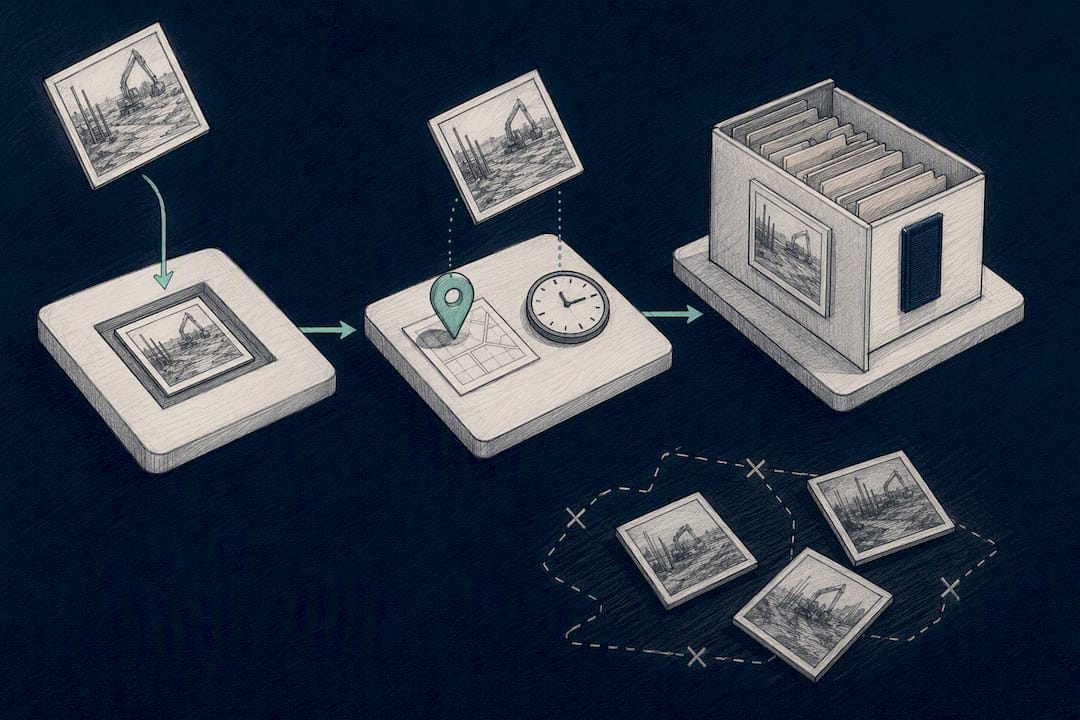
Structured capture also changes what supervisors and office staff actually do all day. Instead of chasing photos from five different phones and pasting them into a Word document, the system assembles the report from data that was already tagged correctly at capture. Large infrastructure projects using digital field platforms have captured hundreds of thousands of records and photos, which shows the model scales well beyond a single site.
The use cases cluster around a handful of recurring jobs:
- Daily site diaries that replace end-of-day memory dumps with real-time entries
- Safety inspections where photo evidence needs to be time-stamped and retrievable
- Defect registers tracking issues from first sighting to close-out
- Maintenance handovers between shifts or contractors
- Insurance and variation claims that hinge on proving what the site looked like on a given date
Pro Tip: Track completeness rate, not just photo count. A site that captures 200 photos a week but leaves half untagged is worse off than one capturing 80 that are all fully metadata-complete.
How Does the Technology Actually Work?
Automated report generation from job photos runs on four connected layers, and understanding each one helps you scope a build or evaluate a vendor without getting lost in marketing language.
Field capture starts with a mobile app that queues photos offline and syncs when connectivity returns, because most job sites have dead zones somewhere. Every photo gets a GPS tag, an immutable timestamp, and a link to a specific job or task as explained in this GPS Time Tracking Setup Guide. Visibility settings decide who sees what, since a defect photo for internal review shouldn’t automatically appear on a client-facing feed.
The metadata model is what makes reports possible later. At minimum, each photo needs a job ID, a task tag, an author, a device ID, and enough context to know whether it’s an overview shot or a close-up detail. Skipping this step is the single most common reason automation projects stall, because you cannot generate a coherent report from photos that were never properly labeled at capture.
AI components handle the heavy lifting on the reporting side. Vision-language models generate draft captions describing what’s in each photo, and research on construction imagery shows these models can produce useful structured output, provided they’re grounded against verified project documents through retrieval-augmented generation (RAG) rather than left to guess. Template rendering then takes the captioned, tagged photos and drops them into a consistent report format.
Export and integration close the loop:
- PDF and DOCX for client-facing and contractual reports
- CSV for feeding into spreadsheets or analytics
- API hooks into your PMS or ERP system
- Short-lived signed links for sharing photos securely without emailing raw files
How Do You Roll Out an Automated Photo Reporting Pilot?
A pilot succeeds or fails based on decisions made before anyone opens the app. Work through these in order:
- Design the template first. Decide the report structure, which photo types are mandatory (overview, close-up, hazard), and which metadata fields cannot be skipped.
- Set your device and capture policy. Choose the app, confirm offline sync works on your actual job sites, and enforce required fields so incomplete photos get rejected at the point of capture, not discovered weeks later.
- Lock in privacy and visibility rules. Put up signage where needed, assign role-based access, and automate retention with time-to-live (TTL) rules so old photos age out on schedule.
- Run the pilot for four to six weeks. Pick one site and one crew, track time saved and completeness rate as your core KPIs, and require human review of any AI-generated caption before it appears in a report used for a claim or dispute.
- Scale deliberately. Once the pilot proves out, plan your integration path, assign ongoing monitoring, and set a review cadence so the system keeps improving instead of drifting.
Pro Tip: Run your pilot on your messiest site, not your easiest one. If the workflow survives spotty connectivity and a crew that hates paperwork, it will work everywhere else.
What Privacy Rules Apply to Photographing Job Sites in Australia?
Job sites capture people, not just materials, and that triggers privacy obligations the moment a face becomes identifiable in a photo. The OAIC’s guidance on facial recognition and privacy requires entities to take reasonable steps to notify individuals whose faces are captured, mitigate bias and accuracy risks, and attach retention controls, with added disclosure obligations for automated decision-making taking effect from December 10, 2026. State-level frameworks reinforce this. Queensland’s Information Privacy Act, for example, treats still images and recordings as personal information whenever an individual is identifiable, regardless of whether facial recognition software is involved.
In practice, that means building these controls into the system rather than bolting them on later:
- Visible signage at site entry points noting photo and video capture
- Minimization: capture only what the report actually needs
- TTL-based automated deletion so photos don’t linger past their useful life
- Role-based access limiting who can view sensitive images
- Documented consent pathways for anyone appearing regularly on site
- Data protection agreements with any third-party vendor handling the photos
Log your privacy notices and retention schedule as formal project documentation, not tribal knowledge. If a regulator or a client ever asks how you handle site photos, you want a paper trail, not a shrug.
Why Do Photo Reporting Systems Fail, and How Do You Prevent It?
Most failures aren’t technical. They’re cultural. Crews treat a new diary app as extra admin unless it’s designed to feel like a running project feed rather than a form to fill out, and platforms built around brief, tag-based entries see meaningfully higher adoption than ones with long mandatory fields.
- Make posting effortless: fewer required fields beats more structure nobody uses
- Curb AI hallucination with RAG grounding and human review before captions touch a safety report or claim
- Plan for dead zones: require offline queueing, auto-sync, and durable device cases with spare chargers on site
- Assign a clear owner for the diary and a fixed review cadence, or data quality drifts within weeks
Pro Tip: If supervisors stop posting within the first two weeks, the template is too heavy, not the crew too lazy. Cut fields before you blame people.
What Does a Zatersio Pilot for Photo-to-Report Automation Look Like?
Working MVPs can be built in under two weeks, on fixed pricing, by a dedicated engineering team with the option to keep data on Australian-resident infrastructure. That combination matters for a photo reporting project specifically, because privacy and speed usually pull in opposite directions unless the build team plans for both from day one.
A typical engagement includes:
- Working mobile capture with GPS tagging and offline sync
- Automated AI captioning grounded against your project documents
- A templated report export in PDF or DOCX
- One integration point into your existing PMS or ERP
Engagements move through discovery, MVP build, pilot validation, and scale, mirroring the pilot structure covered earlier. You can see the model in action in a related case on workflow automation saving a Melbourne business over 20 hours a week.
The Real Bottleneck Isn’t the AI
Most of the conversation around automating job photos fixates on the wrong problem. Vendors sell the vision-language model as the hard part, the thing that needs the most scrutiny. It isn’t. The captioning models work reasonably well when grounded properly, and the research backs that up. The actual failure point sits earlier, at the moment someone takes a photo on site and either tags it correctly or doesn’t bother.
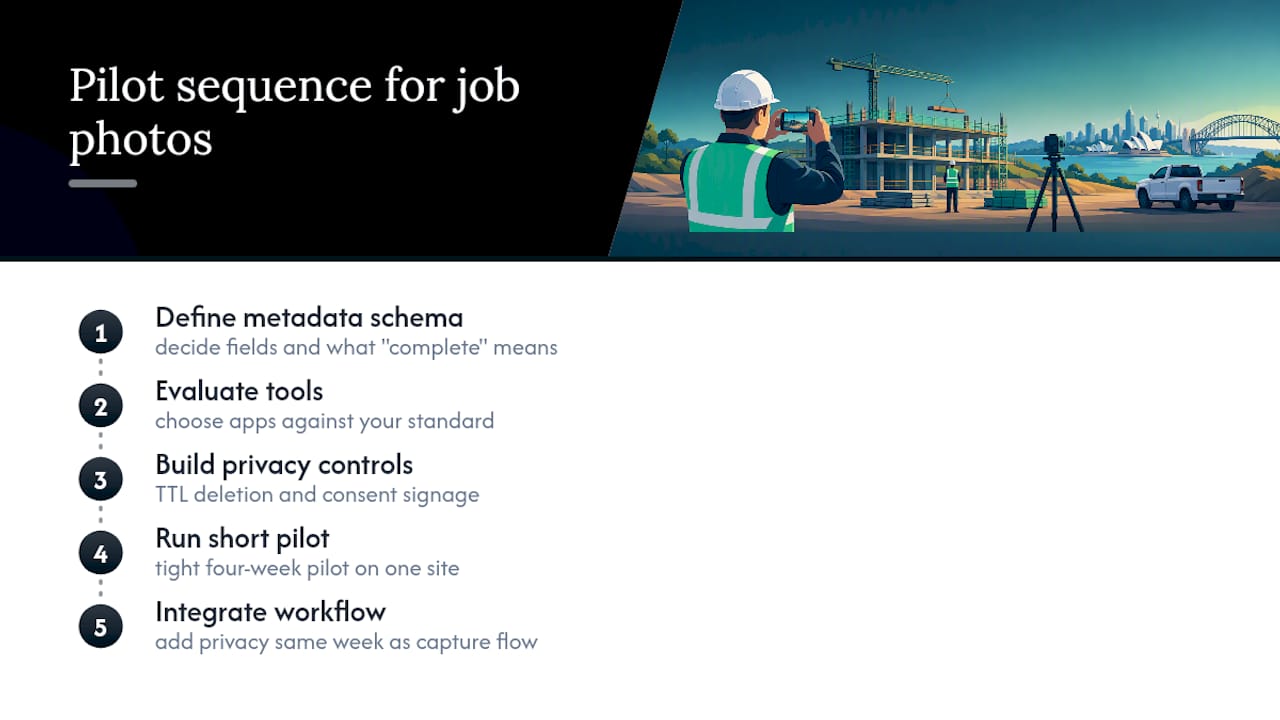
Conventional advice tells project managers to pick software first. That’s backwards. Pick your metadata schema first, decide what “complete” looks like for a photo, and only then evaluate tools against that standard. A polished app feeding your reports garbage metadata produces polished garbage reports.
The other place I’d push back on common wisdom: don’t wait for a perfect privacy policy before you pilot. Build the TTL deletion and consent signage in from the start, run a tight four-week pilot on one site, and treat compliance as a design constraint rather than a document you write after the fact. The teams that get this right build privacy into the workflow the same week they build the capture flow, not the month after launch.
— Lakitha
Get a Fixed-Price Blueprint for Your Photo Reporting Workflow
One alternative to hiring an offshore development shop or stitching together three separate site-diary apps to get the workflow you actually need is a service where projects are scoped and built directly by engineers based locally, on fixed pricing, with no account managers and no handoffs, so what you approve in discovery is what ships two weeks later.

A pilot engagement typically covers mobile capture with GPS tagging, AI captioning grounded against your own project documents, a templated PDF or DOCX export, and one integration into your existing systems, usually validated within four to six weeks of go-live. If your business qualifies for the R&D Tax Incentive, that structuring gets built into the scope from the start, not added later as an afterthought.
Request a free automation blueprint to see exactly how this would work for your sites, or check current pricing for automation builds if you’re ready to move straight to a quote.
Sources
- Facial recognition technology: A guide to assessing the privacy risks (OAIC, July 2026)
- Construction daily logs and site diaries · VIABUILD
- Are large pretrained vision-language models effective construction safety inspectors? (Data-Centric Engineering, 2026)
- Bruce Highway Upgrade - A Queensland TMR Collaborative Project (E7 case study)
FAQ
Is Automating Job Photos Into Reports Actually Reliable?
Yes, when the workflow enforces GPS tagging, timestamps, and job linking at the point of capture. The research on vision-language models shows AI captioning works well for drafting, provided it’s grounded against real project documents rather than left to guess.
How Long Does a Pilot Take to Set Up?
A focused pilot on one site with one crew typically runs four to six weeks, covering template design, device rollout, and KPI tracking. Zatersio can build the underlying MVP for that pilot in under two weeks on fixed pricing.
What Metadata Does Every Job Photo Need?
At minimum, each photo needs a job ID, task tag, author, device ID, and a timestamp with GPS coordinates. Skipping metadata enforcement at capture is the most common reason automated reporting projects break down later.
Do Job Site Photos Trigger Privacy Obligations in Australia?
Yes. The OAIC’s guidance requires notification when faces are captured, and state frameworks like Queensland’s Information Privacy Act treat identifiable images as personal information regardless of whether facial recognition software is used.
What Does Zatersio Charge for a Photo Reporting Automation Build?
Pricing depends on scope: a single workflow automation runs 2,000 to 4,000 AUD one off, while a multi-step automation across your systems runs 4,000 to 9,000 AUD. MVP development pricing is scoped per project and available on request.