
Missed Call Text Back for Small Businesses: Setup Guide
Missed Call Text Back for Small Businesses: Setup Guide

Enable a missed call text back on your business number right now. That single step stops the most common lead-loss pattern in service businesses: a caller hangs up, hits voicemail, and dials your competitor. Automated SMS triggered by a missed call holds the lead in a live conversation while you buy time for a human follow-up or booking flow.
First steps to get started:
- Enable the feature in your SaaS platform, VoIP settings, or SMS workflow
- Pick one short template (under 160 characters, business name included)
- Set a 30–60 second delay before the message fires, balancing speed and a natural feel
- Test end-to-end: call your own number, verify delivery, and confirm reply routing
- Assign a team member to handle incoming SMS replies within your SLA window
Pro Tip: Don’t skip the end-to-end test. Call your number from a cell phone, let it ring out, and confirm the auto-text arrives, routes to your inbox, and triggers the right follow-up. Most setup failures are discovered here, not in the configuration screen.
Table of Contents
- What does “missed call text back” actually mean?
- Why does this work, and which businesses benefit most?
- How do you set up missed call text back?
- High-converting templates you can copy right now
- Carrier and legal rules you need to follow
- How do the main solution approaches compare?
- Which metrics tell you if it’s working?
- How should your team handle the conversation after the auto-text fires?
- Key Takeaways
- The case for building it right the first time
- What Zatersio builds for businesses that need more than a toggle
- Useful sources and further reading
What does “missed call text back” actually mean?
The industry term is auto-reply SMS on missed call, though most platforms market it as “missed call text back.” The mechanism is straightforward: when an inbound call goes unanswered or rolls to voicemail, the system fires an automated SMS to the caller’s number with a 30–60 second delay. That text opens a two-way conversation, and a booking link or human handoff follows once the caller replies.
Implementation types vary by technical approach:
- Built-in SaaS toggle (e.g., Allo, GoHighLevel): the fastest path; enable a setting, write your template, and the platform handles delivery from your business number
- VoIP auto-reply: some hosted phone systems include a native missed-call SMS rule you configure in the admin portal
- SMS API workflow: connect Twilio to a trigger via Zapier or a custom webhook; the most flexible DIY option
- Custom automation: a bespoke build that integrates your phone system, CRM, calendar, and routing rules into a single workflow
Common real-world scenarios:
- After-hours auto-reply: a plumber’s line rings at 9 PM; the caller gets a text within 30–60 seconds acknowledging the missed call and asking for a brief description of the issue
- Busy-hours instant reply: a dental office is on another call; the auto-text fires after a 30–60 second delay so the patient doesn’t hang up and call a competing practice
- Filtered reply for returning callers: the system checks the CRM, recognizes an existing patient, and sends a personalized message with their name
Why does this work, and which businesses benefit most?
Most callers who reach voicemail don’t leave a message. They simply call the next business on the list. An instant text changes that dynamic by acknowledging the caller before they’ve had time to dial elsewhere.
SMS outperforms voicemail and email for immediate engagement. SMS reminders and two-way text conversations reach clients where they’re already looking and consistently outperform other channels for reducing no-shows and driving replies.
The businesses that see the strongest results share one trait: their revenue depends on converting inbound calls into booked appointments or jobs.
- Trades and home services: HVAC, plumbing, electrical, and landscaping companies lose jobs every time a call goes unanswered during a busy run
- Medical and dental offices: patients who can’t reach the front desk will book elsewhere; an instant text keeps them in your funnel
- Salons and medspas: appointment-driven revenue means every missed call is a potential booking gap
- Restaurants during rush hours: reservation and catering inquiries pile up fast; a quick text acknowledgment holds the inquiry
- Legal and financial services: high-value leads expect fast responses; a delayed reply signals disorganization
Businesses that add instant texts to missed callers report meaningful lead recovery and booking uplifts, particularly when the auto-text is paired with a follow-up booking link sent after the initial reply. The shift to SMS also improves lead qualification: callers tend to describe their needs in more detail over text than they would in a rushed voicemail, giving your team better context before the human follow-up.

How do you set up missed call text back?
The right setup path depends on your budget, technical comfort, and integration needs. Here’s a quick decision tree before the steps:
- Twilio API + Zapier — DIY-friendly, highly customizable, requires some technical setup
- Custom automation build — best for multi-location operations, complex CRM routing, or regulated data environments
SaaS platform setup (Allo / GoHighLevel / LeadsOrbit)
- Create or log into your platform account and connect your business phone number
- Navigate to the missed-call or automation settings and enable the feature
- Write your template (under 160 characters; include your business name and a clear CTA)
- Set the delay to 30–60 seconds
- Define business hours and lunch-break exceptions so the message doesn’t fire when staff are present but briefly unavailable
- Save and run a live test from a separate phone
GoHighLevel’s support documentation walks through each configuration field in detail, including sub-account settings for agencies managing multiple client locations.
Twilio API + Zapier setup
Pro Tip: Set business-hours exceptions before you go live. A short lunch meeting or a staff huddle can trigger auto-replies that confuse callers who know you’re open. Define exact hours, add lunch-break windows, and test a call during each exception period.
| Approach | Best For | Setup Time | Technical Skill | Compliance Support |
|---|---|---|---|---|
| SaaS (Allo, GoHighLevel, LeadsOrbit) | Single-location SMBs | Under 1 hour | Low | Built-in 10DLC, opt-out handling |
| VoIP auto-reply | Existing hosted-phone users | 1–2 hours | Low–Medium | Varies by provider |
| Twilio API + Zapier | DIY, custom triggers | 3 hours | Medium | Manual 10DLC registration required |
| Custom automation build | Multi-location, CRM-heavy, regulated | Days to weeks | High (or outsourced) | Fully configurable |

High-converting templates you can copy right now
The first message has one job: keep the caller engaged long enough for a human or booking flow to take over. Keep it under 160 characters, sound human, and skip the link.
Guidelines for the first text:
- Include your business name so the caller knows who’s texting
- Acknowledge the missed call directly
- Ask one simple question or give one clear next step
- Add opt-out language: “Reply STOP to unsubscribe”
- No URLs in the first message (more on why in the compliance section)
Ready-to-use templates:
- General inquiry: “Hi, this is [Business Name]. Sorry we missed your call! What can we help you with? Reply STOP to opt out.”
- After-hours: “Hi from [Business Name]. We’re closed right now but saw your call. We’ll follow up first thing tomorrow. Any details you can share? Reply STOP to opt out.”
- Urgent/emergency flag: “Hi, [Business Name] here. Missed your call — if this is urgent, reply URGENT and we’ll prioritize your callback. Reply STOP to opt out.”
- Appointment-based: “Hi, this is [Business Name]. We missed your call. Looking to book an appointment? Reply YES and we’ll send you a link. Reply STOP to opt out.”
Industry-specific variants:
- Trades: “Hi, [Company] here. Missed your call — what’s the job? We’ll get back to you within the hour. Reply STOP to opt out.”
- Medical/dental: “Hi from [Practice Name]. We missed your call. Please reply with your name and we’ll call you right back. Reply STOP to opt out.”
- Salon/medspa: “Hi, [Salon Name] here. Missed your call! Want to book a service? Reply with your preferred day and we’ll sort it. Reply STOP to opt out.”
- Restaurant: “Hi from [Restaurant Name]. Missed your call — reservation or catering inquiry? Let us know and we’ll get back to you shortly. Reply STOP to opt out.”
Pro Tip: Use caller-name tokens when your platform supports them. “Hi Sarah” outperforms “Hi there” for reply rates. Most SaaS platforms pull the name from your CRM contact record if the number is already saved.
Dos and don’ts:
- Do keep it conversational and short
- Do test the message on your own phone before going live
- Don’t include a booking link in the first message
- Don’t use all-caps or excessive punctuation (carrier spam filters flag both)
- Don’t send the same template to every industry segment if you serve multiple verticals
Carrier and legal rules you need to follow
Compliance isn’t optional. The two frameworks that matter most for U.S. businesses are 10DLC carrier registration and the Telephone Consumer Protection Act (TCPA).
The four compliance steps
- Register your number under 10DLC: if you’re sending application-to-person (A2P) SMS from a local 10-digit number, carriers require brand and campaign registration through The Campaign Registry. Unregistered numbers face filtering and delivery failures.
- Classify your message as transactional: a missed-call auto-reply is transactional because the caller initiated contact. Keep the first message transactional and include clear opt-out mechanics — “Reply STOP to unsubscribe” — to stay within TCPA safe-harbor guidelines.
- Keep records of inbound consent: the caller dialed you first, which establishes a reasonable basis for the reply. Log the inbound call timestamp and the outbound SMS timestamp in your CRM.
- Honor opt-outs immediately: if a contact replies STOP, your platform must suppress future messages to that number. Verify this works during your end-to-end test.
| Sender Type | Best For | 10DLC Required | Throughput | Typical Cost |
|---|---|---|---|---|
| Local 10-digit (10DLC) | SMBs, personalized feel | Yes | Moderate | Low per-message |
| Toll-free number | Mid-volume, national brands | Separate TF verification | Higher | Low–moderate |
| Short code | High-volume, enterprise | Dedicated registration | Very high | Higher monthly |
Deliverability best practices:
- Avoid shortened URLs (bit.ly, etc.) in the first message; carriers flag them on unknown numbers
- Send booking links only after the lead replies to the initial text
- Monitor delivery receipts and carrier error codes in your platform dashboard
- Keep message content consistent with your registered campaign description
Pro Tip: Treat the first auto-reply as a conversation opener, not a marketing message. The moment you add a promotional offer or a link to an unknown number, you increase the chance of carrier filtering. Save the offer for message two.
How do the main solution approaches compare?
The right tool depends on what you’re optimizing for: speed of setup, depth of integration, or long-term flexibility.
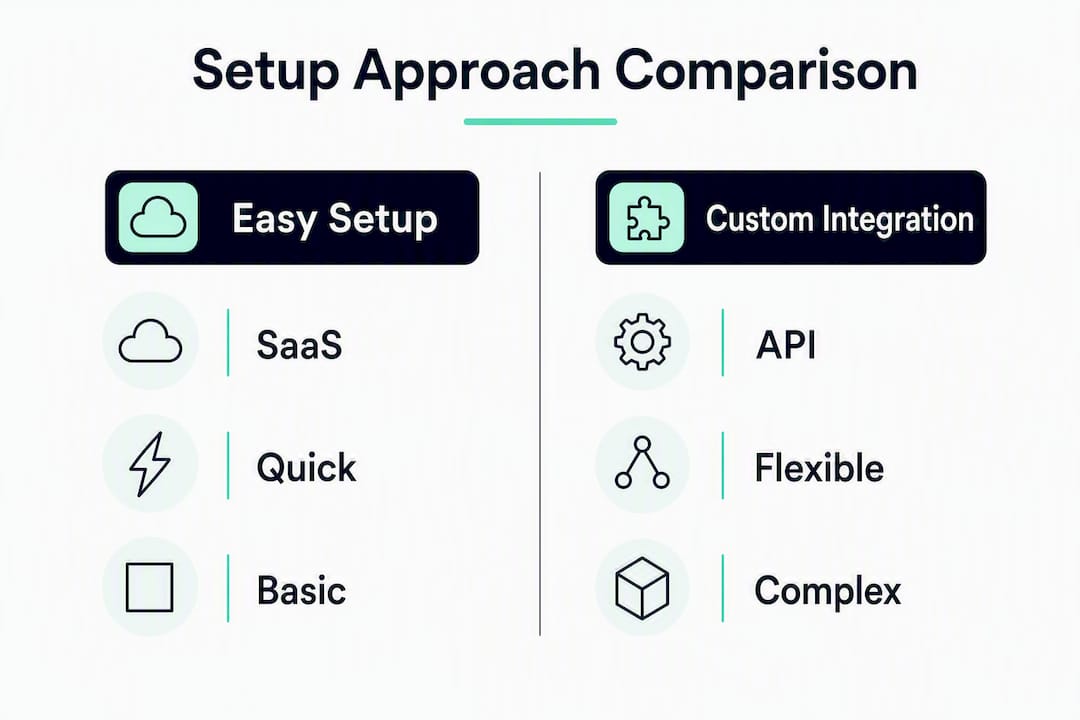
| Dimension | SaaS (Allo, GoHighLevel, LeadsOrbit) | Twilio API + Zapier | Custom Build |
|---|---|---|---|
| Best for | Single-location SMBs, fast deployment | DIY teams, custom triggers | Multi-location, regulated industries |
| Setup complexity | Low; toggle + template | Medium; webhook + Zap config | High; scoped engineering project |
| Integrations | Native CRM, calendar, booking tools | Any API-connected tool | Fully bespoke |
| Pricing model | Monthly SaaS + per-message carrier fees | Pay-per-message + Zapier plan | Fixed-price project build |
| Compliance support | Built-in 10DLC, opt-out handling | Manual registration required | Fully configurable per requirements |
| Customization | Templates, two-way chat, basic flows | Flexible logic, multi-step Zaps | Unlimited routing, CRM writes, escalation |
| Deliverability | Local numbers, toll-free options | Local or toll-free via Twilio | Any sender type |
| Support/SLA | Platform support desk | Community + Twilio docs | Dedicated engineering team |
When to use each approach:
- Twilio API + Zapier — suits teams with a developer or a tech-comfortable ops manager who wants precise control over triggers, delays, and CRM writes without paying for a full platform.
- Custom automation — is the right call when you have multiple locations, complex routing rules, regulated data (healthcare, legal, finance), or a CRM that no off-the-shelf platform integrates with cleanly.
Practical setup options span native platform toggles through to Twilio API-based workflows, and the integration points — number porting, webhook triggers, CRM connections — are the variables that most often determine which path is realistic for a given business.
Pricing note: SaaS plans typically combine a monthly platform fee with per-message carrier charges. Twilio charges per message segment with no monthly minimum. Custom builds are scoped as fixed-price projects. Budget separately for 10DLC brand registration (a one-time fee) and campaign registration (a recurring monthly carrier fee).
Which metrics tell you if it’s working?
Track these five KPIs from day one:
- Reply rate: the percentage of auto-texts that receive at least one reply; this is your primary engagement signal
- Reply-to-booking ratio: of the leads who replied, how many converted to a booked appointment or job
- Recovered leads: missed callers who would otherwise have been lost, now in an active conversation
- Time-to-human-response: how long between the first reply and a human picking up the thread
- Delivered vs. filtered rate: the share of messages that reached the handset vs. those blocked by carriers
How to instrument these:
- Tag every inbound missed-call lead in your CRM with a “missed-call-text-back” source label
- Pull delivery receipts from your platform or Twilio console daily for the first two weeks
- Send booking links as a second message (after the lead replies) and track clicks separately from the initial reply
- Set a calendar reminder to review reply-to-booking ratio at the 30-day mark
A simple A/B test plan for the first 30 days:
Split your missed callers into two groups and test one variable at a time:
- Timing: 30-second delay vs. 60-second delay; measure reply rate
- Wording: question opener (“What can we help with?”) vs. statement opener (“We’ll call you right back”); measure reply rate
- CTA style: “Reply YES to book” vs. no explicit CTA in the first message; measure reply-to-booking ratio
Two-way SMS appointment reminders and confirmations work best when paired with a follow-up sequence, so once your initial auto-reply is performing well, layer in a 24-hour and 2–4 hour reminder sequence for confirmed bookings.
How should your team handle the conversation after the auto-text fires?
The auto-text buys you time. What happens next determines whether the lead converts.
A practical workflow:
- Missed call fires → auto-text sends within 30–60 seconds → CRM tags the lead as “missed-call-SMS” → SLA timer starts → team member picks up the thread
SLA recommendations by business type:
- High-value services (legal, financial, medical): respond within 15–30 minutes of the first reply
- Trades and home services: within 30–60 minutes during business hours
- General inquiries and restaurants: within 60 minutes; after-hours replies get a next-morning follow-up
Handling multiple simultaneous missed callers:
- Route all SMS replies to a shared team inbox, not a personal cell phone
- Assign conversations by round-robin or by availability status
- Set an escalation rule: if a reply contains the word “URGENT” or “EMERGENCY,” route it immediately to the on-call team member
- Use CRM tags to prevent two team members from responding to the same thread
Pro Tip: Use the initial text to qualify urgency before sending any links. Ask “What can we help with?” first. Once the caller replies, you know whether to send a booking link, escalate to a phone call, or route to a specialist. This also keeps your first message link-free, which protects deliverability.
The goal is for automation to handle the first 60 seconds and humans to handle everything after the first reply. That split keeps the process fast without making it feel robotic.
Key Takeaways
Missed call text back works because it holds leads in an active conversation before they dial a competitor, and the 30–60 second timing window, link-free first message, and human handoff SLA are the three variables that determine whether it converts.
| Point | Details |
|---|---|
| Fire the text within 30–60 seconds | Sending too fast feels robotic; waiting longer risks losing the lead to a competitor. |
| No links in the first message | Carrier filters flag links from unknown numbers; send the booking link only after the first reply. |
| Register under 10DLC | Unregistered A2P numbers face carrier filtering; register brand and campaign before going live. |
| Track reply-to-booking ratio | Reply rate shows engagement; reply-to-booking ratio shows whether the workflow actually converts leads. |
| Zatersio builds custom flows | For complex routing, CRM integration, or regulated data, a bespoke automation build outperforms any off-the-shelf toggle. |
The case for building it right the first time
Most articles on this topic stop at “enable the toggle.” That’s fine for a solo operator with one phone line and a simple booking flow. But the businesses I see struggling with missed-call automation aren’t failing because they didn’t enable the feature. They’re failing because the feature doesn’t fit their actual workflow.
A multi-location trades business with three phone lines, two CRMs, and a field dispatch system can’t solve this with a SaaS toggle. Neither can a healthcare practice with HIPAA data requirements, or a law firm that needs call recordings and SMS threads stored in a specific jurisdiction. Off-the-shelf platforms make assumptions about your workflow. A custom-built automation doesn’t.
The 30–60 second timing rule, the link-free first message, the 10DLC registration — these are table stakes. The real differentiator is what happens after the first reply: does the conversation route to the right person, update the right CRM record, trigger the right follow-up, and stay within your data residency requirements? That’s an engineering problem, not a settings problem.
Fixed-price, rapid builds exist precisely for this. You don’t need a six-month agency engagement to get a compliant, CRM-integrated missed-call automation. You need a scoped project with clear deliverables and a team that understands both the SMS compliance layer and the business logic underneath it.
What Zatersio builds for businesses that need more than a toggle
Off-the-shelf platforms cover the basics. When your routing is complex, your CRM is custom, or your industry has data requirements that a generic SaaS can’t meet, a purpose-built automation is the faster path to a working system.

Zatersio builds custom missed-call automation workflows with calendar and CRM integration, 10DLC-compliant SMS flows, and configurable data residency options — all at a fixed price, delivered in under two weeks. Whether you need a single-location auto-reply or a multi-route field dispatch integration, the build is scoped to your exact requirements. No monthly platform lock-in, no per-seat pricing surprises.
The right next step: request a free AI automation blueprint and get a scoped plan for your missed-call workflow before you commit to any platform or build.
Useful sources and further reading
- Missed Call Text Back: Complete Guide — covers the trigger-action path, lead recovery rationale, and implementation overview
- Where and How to Configure the Missed Call Text Back Feature | GoHighLevel Support — step-by-step platform configuration for GoHighLevel users
- SMS Appointment Reminder Software | Sinch — data on SMS performance for appointment reminders and two-way conversation flows
- Appointment Reminder Texts and Emails | Twilio — two-message reminder sequence best practices and real-time calendar update capabilities