
Onboarding Automation: A Practical Roadmap for HR and IT
Onboarding Automation: A Practical Roadmap for HR and IT
Onboarding automation uses software to trigger, route, and complete repetitive onboarding tasks without manual handoffs, so new hires get access, paperwork, and training on time, every time. The payoff is real: faster time-to-productivity, fewer compliance errors, and a first-day experience that actually reflects well on your organization.
Three actions to start right now:
- Map one manual process that causes the most delays today (identity provisioning and tax forms are the usual culprits).
- Pick a pilot with a clear before/after metric, such as average hours to complete I-9 and system access.
- Set a success threshold before you launch, for example, 90% of new hires fully provisioned by 8 AM on Day 1.
Pro Tip: Start with identity and access provisioning or W-4/I-9 form collection. These two processes block everything else on Day 1, and both have well-supported automation patterns you can deploy quickly.
Key Takeaways
Onboarding automation delivers the fastest ROI when you automate the blockers first — identity provisioning and compliance documents — then expand to training, benefits, and access approvals.
| Point | Details |
|---|---|
| Start with blockers | Automate identity provisioning and I-9/W-4 collection before anything else. |
| Measure before you build | Capture baseline time-to-complete and error rate so your pilot has a clear success threshold. |
| Build human fallbacks | Every automated path needs an exception route with a named human owner. |
| U.S. compliance is non-negotiable | I-9 sequencing, data retention, and audit logging must be enforced by the workflow design. |
| Zatersio for custom builds | Fixed-price, engineer-built automation MVPs for complex integrations and document parsing workflows. |
Table of Contents
- Why manual onboarding costs more than you think
- What onboarding automation actually covers
- Concrete automations you can implement today
- Which tool categories power onboarding automation?
- How to implement onboarding automation step by step
- How do you measure onboarding automation success?
- U.S. compliance and security controls you can’t skip
- Best practices and pitfalls to avoid
- What AI and RPA can realistically automate in onboarding
- Where teams actually win with onboarding automation
- When a custom automation build is the right call
- Sources
Why manual onboarding costs more than you think
Manual onboarding fails in predictable ways. HR emails a checklist to IT. IT waits for a ticket. The hiring manager sends a Slack message. Payroll gets a PDF with a typo. By the time the new hire arrives, half the tasks are incomplete and nobody owns the gap.
The core failure modes are consistent across organizations:
- Manual handoffs between siloed teams — HR, IT, payroll, and facilities each work from separate systems with no shared trigger.
- Lost or late documents — paper I-9s, unsigned offer letters, and missing W-4s create compliance exposure before the employee’s first coffee.
- IT provisioning delays — accounts, VPN credentials, and device setup often take days because no automated trigger fires when an offer is accepted.
- Payroll data entry errors — re-keying employee data from one system into another introduces mistakes that cost time and money to correct.
- Inconsistent new-hire experience — some managers send welcome emails; others don’t. Some roles get training on Day 1; others wait weeks.
The downstream costs compound quickly. Structured onboarding programs linked to retention show measurable ROI, which means a broken process doesn’t just frustrate new hires — it drives early attrition. And management research confirms that structured tasks and early support directly accelerate new-hire ramp time. Every week a new hire spends waiting for access or chasing paperwork is a week of productivity your organization already paid for and didn’t get.
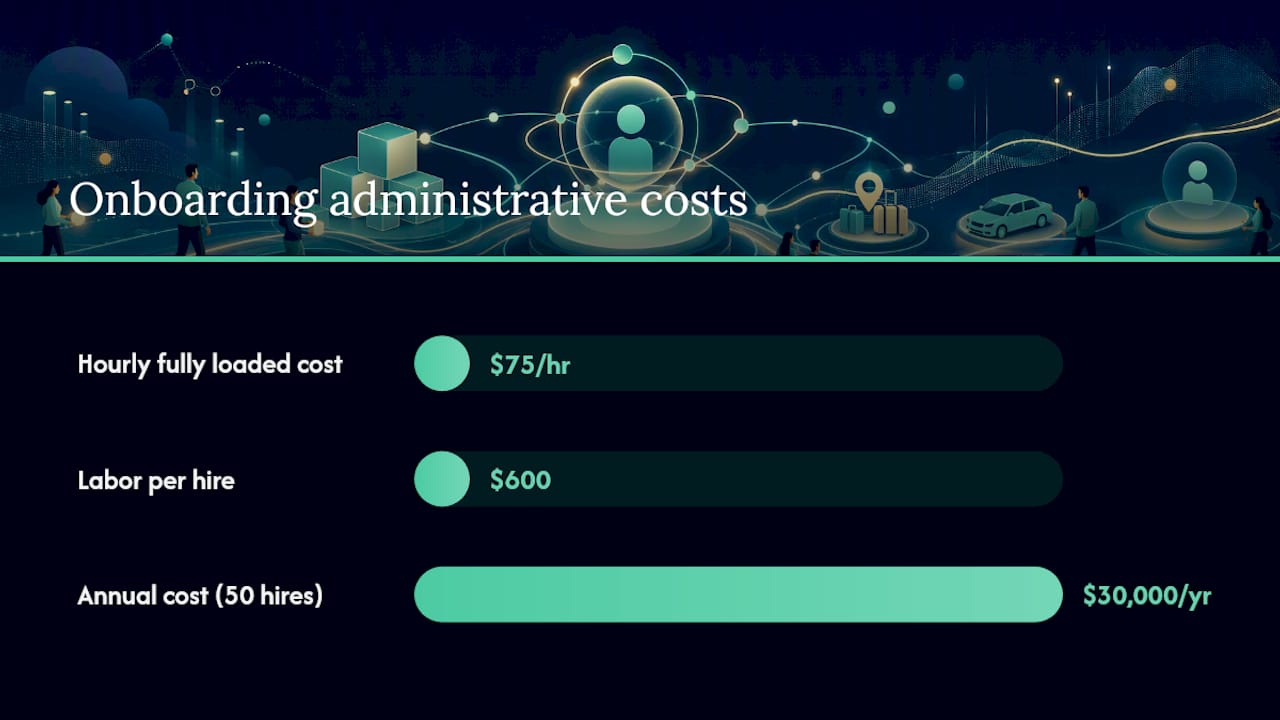
A practical cost example: if onboarding a single employee takes 8 hours of combined HR, IT, and manager time at an average fully loaded cost of $75/hour, that’s $600 in labor per hire before the person does a single productive task. Multiply by 50 hires a year and you’re looking at $30,000 in pure administrative overhead, before accounting for errors, rework, or early turnover.
What onboarding automation actually covers
Onboarding automation is the use of event-driven workflows, system integrations, and rules-based logic to handle tasks across the full onboarding lifecycle, from the moment an offer is accepted through the first 90 days of employment. It touches far more than just paperwork.
The scope typically spans six phases:
- Pre-boarding — offer letter delivery, e-signature collection, background check initiation, and welcome communications triggered by offer acceptance.
- IT provisioning — account creation in Active Directory or a cloud identity provider, email setup, software license assignment, and device enrollment in an MDM platform.
- Payroll and benefits setup — W-4 and direct deposit form collection, benefits enrollment triggers, and data sync to your payroll system.
- Compliance documentation — I-9 completion and evidence handling, state-specific tax forms, and policy acknowledgment tracking.
- Training enrollment — automatic assignment of required courses in your LMS based on role, department, and location.
- Access management — role-based permissions, SSO provisioning, and least-privilege access grants tied to the employee’s job profile.
Who owns what
| Phase | Primary Owner | Supporting Teams |
|---|---|---|
| Pre-boarding communications | HR / Talent Acquisition | Hiring Manager |
| IT provisioning | IT / Systems Admin | Security |
| Payroll and benefits setup | HR / Payroll | Finance |
| Compliance documentation | HR / Legal | Compliance |
| Training enrollment | L&D / HR | Hiring Manager |
| Access management | IT / Security | HR |
The systems typically involved include: an HRIS or HCM platform (Workday, BambooHR, ADP), an identity provider (Microsoft Entra ID, Okta), an SSO layer, an MDM solution (Jamf, Intune), a payroll system, an LMS, and an e-signature tool (DocuSign, Adobe Acrobat Sign). Getting these systems to talk to each other is where most of the automation value lives, and where most of the complexity sits.
Concrete automations you can implement today
Each automation below follows a trigger-action-outcome structure so you can evaluate fit and estimate impact before committing to a build.
-
I-9 and compliance document generation Trigger: Offer accepted and start date confirmed. Action: System generates I-9 packet, sends magic-link portal access to new hire, and routes completed form to HR for Section 2 review. Outcome: Eliminates manual document prep; reduces I-9 completion time from days to hours.
-
Identity provisioning Trigger: HR marks hire as “active” in HRIS (or start date minus N days). Action: Entra Lifecycle Workflows or equivalent fires account creation, assigns licenses, and sends credentials to the new hire’s personal email. Outcome: New hire has working credentials before Day 1. Microsoft Entra’s prehire workflow templates demonstrate exactly this pattern.
-
Equipment and device provisioning Trigger: Identity provisioning complete. Action: MDM enrollment ticket auto-created; device ships or is staged; configuration profile pushed automatically. Outcome: Device is ready and enrolled before the employee arrives.
-
Benefits enrollment Trigger: Day 1 or configurable pre-boarding window opens. Action: Benefits platform sends enrollment link with deadline; reminders fire automatically at 72 hours and 24 hours before close. Outcome: Enrollment completion rates improve; HR stops chasing employees manually.
-
Training assignment Trigger: Employee record created in HRIS with role and department. Action: LMS assigns mandatory courses based on role profile; completion deadlines set automatically. Outcome: Compliance training starts Day 1 without any manual LMS configuration.
-
Access approvals Trigger: Training milestone completed or manager approval received. Action: Workflow routes access request to approver; on approval, permissions granted automatically via SCIM or API. Outcome: Reduces access provisioning from days to minutes.
-
Welcome communications Trigger: Offer acceptance or configurable pre-boarding date. Action: Personalized welcome email sequence fires (Day -7, Day -3, Day 1), including team intro, schedule, and first-week checklist. Outcome: Consistent experience regardless of which manager or HR rep is handling the hire.
End-to-end example workflow
Here’s how a complete automated flow looks from offer to first-week readiness:
- Recruiter marks offer as accepted in the ATS.
- HRIS webhook fires, creating the employee record and triggering the pre-boarding workflow.
- E-signature platform sends offer letter and I-9 packet; new hire completes both via magic link.
- On I-9 submission, identity provisioning triggers in Entra; email and software licenses assigned.
- MDM enrollment ticket auto-created; device staged and shipped.
- Benefits enrollment email sent with 30-day window and automated reminders.
- LMS assigns role-based training; completion tracked automatically.
- Day 1 welcome email fires with credentials, schedule, and buddy assignment.
- Manager receives a Day 1 readiness summary showing which tasks are complete and which need attention.
Which tool categories power onboarding automation?
No single platform handles everything. Effective onboarding automation connects several tool categories through APIs, webhooks, and middleware.
| Tool Category | Purpose | Common Integration Points |
|---|---|---|
| HRIS / HCM | Employee record of truth; triggers downstream workflows | ATS, payroll, identity provider |
| Identity Provider (IdP) | Account creation, SSO, lifecycle management | HRIS, MDM, SaaS apps |
| Workflow / Orchestration | Routes tasks, manages approvals, handles exceptions | All systems via API/webhook |
| RPA | Automates legacy systems with no API | Payroll, ERP, older HRIS |
| E-signature | Collects legally binding signatures on forms | HRIS, compliance storage |
| MDM | Device enrollment and configuration | Identity provider, IT ticketing |
| LMS | Training assignment and completion tracking | HRIS, role/department data |
Common integration patterns
Three patterns cover most enterprise onboarding automation:
- Event-driven HRIS webhook → orchestration → provisioning. The HRIS fires a webhook on a status change (offer accepted, start date set). An orchestration layer (Workato, Zapier, or a custom build) receives the event and triggers downstream actions in the IdP, LMS, and payroll system simultaneously.
- SSO / just-in-time provisioning. When a new hire logs in for the first time via SSO, the identity provider automatically creates accounts in connected SaaS apps using SCIM. No manual app-by-app setup required.
- API-led data sync. A scheduled or event-triggered API call keeps employee data consistent across HRIS, payroll, and benefits platforms, eliminating re-keying and the errors that come with it.
Pro Tip: The build-vs-buy decision comes down to one question: does your process require document parsing, conditional routing, or custom SLAs that off-the-shelf tools can’t handle? If yes, custom engineering pays for itself quickly. If your workflows map cleanly to a platform’s template library, configure first and build only where you hit a wall.
How to implement onboarding automation step by step
A phased approach reduces risk and builds organizational confidence. Here’s the playbook.
Phase 1: Discovery and process mapping (weeks 1–2)
- Interview HR, IT, payroll, and at least two hiring managers.
- Document every manual step in the current onboarding process, who does it, how long it takes, and what system it touches.
- Identify handoff points where work stalls or errors occur most often.
- Catalog all systems involved and confirm which have APIs or webhook support.
Phase 2: Prioritization (week 3)
Score each process on two axes: business impact (time saved, error reduction, compliance risk) and implementation effort (API availability, data quality, exception volume). High-impact, low-effort processes are your pilot candidates. Identity provisioning and I-9/W-4 collection typically land in this quadrant.
Phase 3: Pilot design (weeks 4–6)
- Define the minimal viable automation scope: one trigger, one action, one measurable outcome.
- Set baseline metrics before you start (current average time, error rate, completion percentage).
- Assign a pilot cohort (a single department or location works well).
- Build in a human fallback for every exception path.
- Assign clear ownership: who monitors the automation, who handles exceptions, who approves changes.
Phase 4: Measurement and iteration (weeks 7–10)
- Track KPIs weekly against baseline.
- Run a retrospective with HR, IT, and at least one new hire from the pilot cohort.
- Fix the top three failure modes before expanding scope.
Phase 5: Scale
- Roll out to additional departments or locations one at a time.
- Add automation layers (benefits, training, access approvals) after the core provisioning flow is stable.
- Review the HBR guidance on onboarding buddies before scaling: automated workflows handle tasks, but a human buddy handles the experience. Build buddy assignment into your scaled workflow as a triggered task, not an afterthought.
Implementation checklist:
- [ ] Process map documented with owners and system touchpoints
- [ ] Pilot process selected with baseline metrics captured
- [ ] Exception handling paths defined for every automation
- [ ] Rollback plan in place if automation fails
- [ ] Communication sent to affected teams before go-live
- [ ] Monitoring and alerting configured from Day 1
How do you measure onboarding automation success?
Measurement starts before you build anything. Capture your baseline on these KPIs:
- Time-to-complete onboarding — hours or days from offer acceptance to all tasks marked complete.
- Time-to-productivity — days until the new hire is performing at expected output (manager-rated or task-based).
- Error rate in payroll and data entry — percentage of new hire records requiring correction in the first 30 days.
- Day 1 readiness rate — percentage of new hires with all access, devices, and required forms complete by 8 AM on start date.
- New-hire NPS — a simple 3-question survey at Day 7 and Day 30.
- Cost per onboarded hire — total HR, IT, and manager hours multiplied by loaded cost, divided by hires.
Sample ROI calculation
Baseline: 8 hours of combined staff time per hire at $75/hour = $600/hire. After automating identity provisioning, I-9 collection, and training assignment, the same process takes roughly 2 hours of human time. That’s $450 saved per hire. At 50 hires per year, the annual saving is $22,500 in labor alone, before accounting for reduced error correction and lower early attrition.
For dashboard cadence, review Day 1 readiness rate and error rate weekly during the first 90 days post-launch, then shift to monthly once the process stabilizes. New-hire NPS should be reviewed after every cohort of at least five hires.
U.S. compliance and security controls you can’t skip
Onboarding automation in the United States carries specific legal obligations. Getting the workflow right means building compliance in from the start, not bolting it on later.
U.S. compliance checklist:
- I-9 evidence handling — Section 1 must be completed by the employee on or before Day 1. Section 2 requires physical or authorized remote document review. Automated systems must enforce this sequencing and store evidence with a tamper-evident audit trail.
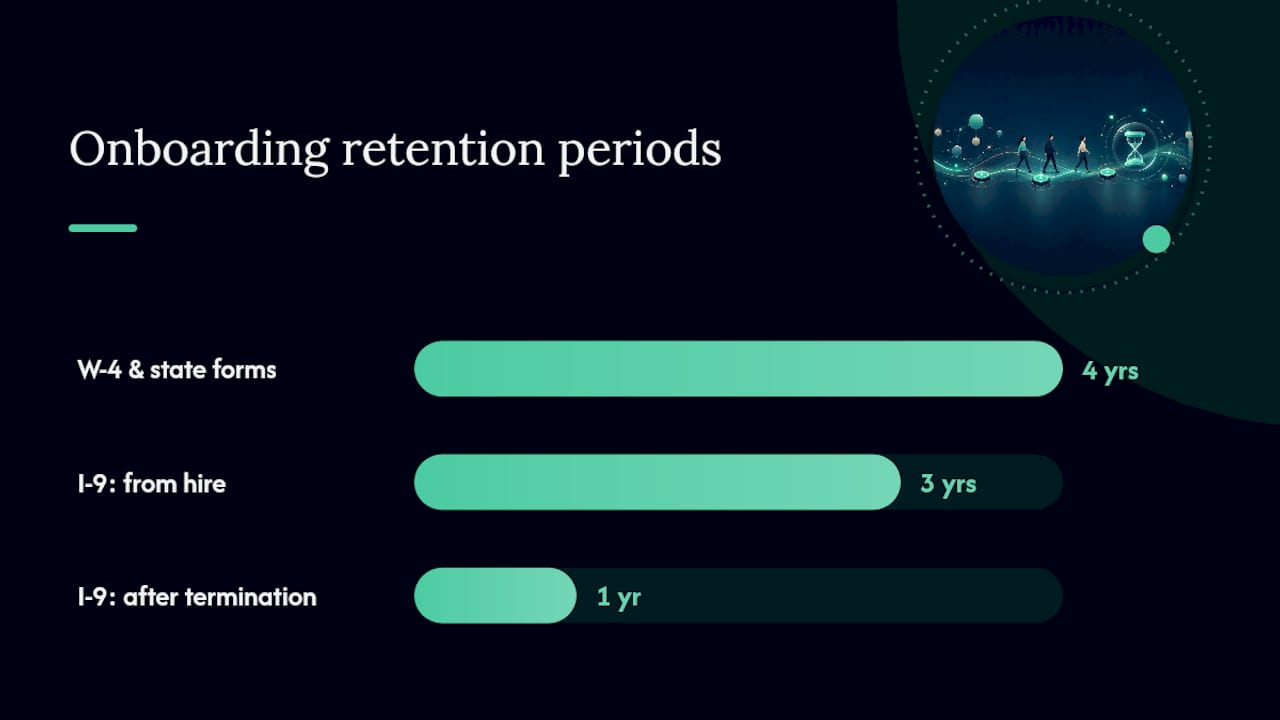
- W-4 and state withholding forms — collect and route to payroll automatically; retain per IRS and state requirements (generally four years).
- Data minimization — collect only what’s required for the specific onboarding step. Don’t route Social Security Numbers through systems that don’t need them.
- Retention policies — I-9 records must be retained for three years from hire date or one year after termination, whichever is later. Automate archival and deletion triggers.
- EEOC and state privacy laws — some states (California, Virginia, Colorado) have specific employee data rights. Build consent and data-access workflows accordingly.
Security controls to implement:
- Encryption at rest and in transit for all employee PII.
- Role-based access control (RBAC) so only authorized roles can view or modify onboarding records.
- Audit logging on every automated action, including who triggered it, what changed, and when.
- Least-privilege service accounts for every integration — no automation should run with admin credentials.
- MFA enforced on all portals new hires access during pre-boarding.
IBM’s analysis of intelligent automation confirms that AI and RPA platforms can automate federal and state compliance document generation and verification, substantially reducing human error. The caveat: the automation must enforce the legal sequencing, not just the convenience sequencing.
Pro Tip: Separate the role that configures automation rules from the role that approves exceptions. This role separation is a basic internal control that also satisfies most SOC 2 and HIPAA audit requirements for access governance.
Best practices and pitfalls to avoid
| Do | Don’t |
|---|---|
| Map exceptions before you automate | Assume every hire fits the standard workflow |
| Build human fallbacks into every path | Let automation fail silently with no alert |
| Gate progression on required steps | Allow new hires to skip compliance tasks |
| Test with a small pilot cohort first | Roll out to the whole organization at once |
| Assign a named owner for each automation | Leave monitoring to “the team” with no individual accountability |
| Communicate changes to HR and IT before go-live | Surprise teams with a new process on launch day |
| Version-control your workflow configurations | Make undocumented changes to live automations |
Adoption checklist:
- Send a pre-launch communication to HR, IT, and hiring managers explaining what’s changing and why.
- Run a 30-minute walkthrough with each affected team before go-live.
- Designate a single point of contact for exception escalation during the first 30 days.
- Schedule a 30-day retrospective with all stakeholders.
- Monitor error queues and exception logs daily for the first two weeks.
Red flags to watch for:
- Automating a process before the underlying data is clean (garbage in, garbage out).
- No fallback for roles with complex access requirements (executives, contractors, remote-only employees).
- Weak monitoring that only alerts on complete failures, not on partial completions or data mismatches.
- Over-automating the human touchpoints — a welcome email is not a substitute for a manager check-in or a buddy introduction.
What AI and RPA can realistically automate in onboarding
The honest picture is that AI and RPA handle structured, rules-based tasks well and struggle with judgment-heavy exceptions. Here’s what the evidence supports:
- Fully automatable: account creation, license assignment, form generation, document routing, reminder sequences, training enrollment, and data sync between systems with clean APIs.
- Automatable with human review: I-9 Section 2 verification (remote or in-person review still required), benefits elections with complex eligibility rules, and access requests for sensitive systems.
- Requires human judgment: role-specific access exceptions, onboarding for executives or contractors with non-standard arrangements, and any situation where the employee’s record has a data conflict.
Intelligent automation platforms that combine AI and RPA can automate federal and state compliance document generation and verification, substantially reducing human error and saving hours per hire — but the legal sequencing requirements for I-9 and tax forms must be enforced by the workflow design, not assumed. IBM’s onboarding automation research makes clear that document parsing, structured data extraction, and conditional routing are where bespoke engineering delivers the highest ROI.
Advanced implementations use document intelligence to parse incoming forms, extract structured data, and populate HRIS and payroll systems automatically, flagging incomplete or mismatched submissions for human review rather than letting them pass through. This hybrid pattern keeps exceptions manageable without requiring a human to touch every record.
Pro Tip: Design your automation to surface exceptions proactively, not reactively. A daily exception report sent to the HR ops lead is far cheaper than discovering a provisioning gap on a new hire’s first morning.
Where teams actually win with onboarding automation
The organizations that get the most from automated onboarding share one trait: they automate the blockers first. Identity provisioning and compliance document collection are the two tasks that, when delayed, cascade into every other part of the onboarding experience. Fix those two, and the rest of the process gets easier almost automatically.
The teams that struggle are usually the ones that try to automate everything at once, or that automate the visible parts (welcome emails, training assignments) while leaving the invisible blockers (IT provisioning, payroll data entry) untouched. A polished welcome portal doesn’t help much if the new hire can’t log in.
My concrete recommendation: run a two-week identity and payroll sync pilot with your next five hires. Measure Day 1 readiness rate and payroll error rate before and after. The numbers will tell you whether to expand the scope or fix the data quality issues first. Either outcome is useful.
When a custom automation build is the right call
Off-the-shelf platforms cover the standard onboarding workflow well. But when your process involves document parsing, conditional routing across legacy systems, hybrid AI workflows, or compliance requirements that don’t fit a template, custom engineering pays for itself faster than another year of workarounds.

Zatersio builds rapid, engineer-led automation MVPs for exactly these situations. Fixed pricing means no scope creep surprises. A working build in under two weeks means you’re measuring real outcomes, not waiting on a vendor roadmap. For compliance-sensitive implementations, data residency options keep your employee PII where your legal team needs it.
The fit is clearest when you need:
- Document parsing and structured data extraction from I-9s, W-4s, or custom intake forms.
- Custom integrations between an HRIS, a legacy payroll system, and a modern identity provider.
- Hybrid AI and human-review workflows with configurable exception routing.
- A fixed-scope pilot you can measure and expand without a long-term platform contract.
Start with a scoping call. Zatersio’s team maps your current process, identifies the highest-impact automation, and delivers a working pilot you can measure against your baseline. Explore Zatersio’s automation builds or book a discovery session to scope your first automation in under a week.
Sources
- Getting new hires up to speed quickly | MIT Sloan Management Review
- Every new employee needs an onboarding buddy | Harvard Business Review
- Onboarding retention whitepaper | HCI