
OpenAI vs Azure OpenAI: Enterprise Decision Checklist
OpenAI vs Azure OpenAI: Enterprise Decision Checklist
For most enterprises, the choice between OpenAI and Azure OpenAI comes down to one question: do you need the model, or do you need the model inside your compliance boundary? If you are prototyping fast or need access to the latest experimental APIs the moment they ship, the direct OpenAI API is the faster path. If your workload touches regulated data, your team already runs on Azure, or your security team requires private networking and inherited certifications, Azure OpenAI Service is the right call.
Three factors drive almost every enterprise decision in this comparison:
- Model parity is real but release timing is not. The underlying GPT-family intelligence is the same on both platforms, but new features and experimental APIs tend to arrive on the direct platform first.
- Data residency and networking are Azure’s clearest advantage. Azure keeps your data inside the Azure boundary, supports VNet and Private Endpoint integration, and gives you regional selection for residency requirements.
- Pricing shape, not per-token rate, is what changes your bill. Per-token costs are comparable, but Azure adds support plans, networking overhead, and provisioned throughput hosting that push total cost higher for many deployments.
Quick guidance by reader type: if you are building a prototype or MVP, start with the OpenAI API and migrate later if compliance demands it. If you are running a pilot at scale in a regulated industry, provision an Azure OpenAI resource and run your compliance review in parallel. If you are in a procurement or security review, the sections on data governance and certifications below are where to start.
Key Takeaways
Azure OpenAI is the right choice for regulated, Azure-first, or private-network workloads; the direct OpenAI API is faster for prototyping and early model access.
| Point | Details |
|---|---|
| Model parity, not quality | Both platforms run the same GPT-family models; Azure typically lags on new feature releases by weeks to months. |
| Data stays in Azure | Azure OpenAI keeps data within the Azure boundary, supports VNet and Private Endpoint, and allows customer deletion of fine-tuning artifacts. |
| Total cost, not token rate | Per-token pricing for equivalent models generally aligns closely, but Azure support plans, PTU hosting, and networking overhead often push total bills higher for many deployments. |
| Three vendor questions | Ask every vendor: data processing region confirmation, BAA availability, and quota increase lead time before signing. |
| Migration is feasible but planned | Switching to Azure requires deployment naming changes, API-version pinning, and auth updates — budget deliberate engineering time. |
| Zatersio approach | Zatersio defaults to direct OpenAI for fast MVPs and provisions Azure OpenAI when compliance or existing Azure investments require it, with platform selection confirmed before build starts. |
Table of Contents
- How Do OpenAI and Azure OpenAI Actually Compare?
- Which models are available on each platform?
- How does each platform handle your data and privacy?
- What security controls and certifications does each platform offer?
- How does each platform fit into your enterprise architecture?
- What are the real pricing and SLA differences?
- What developer experience differences will your engineering team face?
- How do you choose between OpenAI and Azure OpenAI?
- What engineering pitfalls should you plan for?
- Our take on how platform selection plays out in real projects
- Ready to build on the right platform from day one?
- Sources
How Do OpenAI and Azure OpenAI Actually Compare?
| Dimension | OpenAI API | Azure OpenAI Service |
|---|---|---|
| Best for | Fast prototyping, latest models, startups | Regulated workloads, Azure-first enterprises |
| Access & eligibility | Self-serve signup, immediate | Azure subscription required; enterprise enrollment for higher quotas |
| Models available | Full GPT-4o, o-series, DALL-E, Whisper, Embeddings | GPT-4o, o-series, DALL-E, Whisper, Embeddings — with slight release lag |
| Fine-tuning | Available; data processed on OpenAI infrastructure | Available; fine-tuning data stored in Azure Storage, removable by customer |
| Data handling & residency | Processed on OpenAI-controlled infrastructure | Data stays within Azure; regional selection supported |
| Security & networking | API keys; public endpoints only | Microsoft Entra ID, Private Link, VNet integration, Azure Policy |
| Compliance certifications | SOC 2 Type II, ISO 27001 | SOC 2, ISO 27001, HIPAA, FedRAMP (Government tier), PCI DSS |
| Enterprise ecosystem | API gateway, proxy, third-party secrets stores | Native Azure Monitor, Key Vault, Event Hubs, Entra ID |
| Developer tooling | OpenAI Python/Node SDKs, REST API | Same SDKs; requires deployment names, API-version pinning |
| Pricing model | Pay-per-token; enterprise negotiation direct | Pay-per-token or Provisioned Throughput Units (PTUs); billed via Azure subscription |
| SLA & support | OpenAI enterprise agreement | Azure SLA; integrates with existing EA/MCA support contracts |
| Procurement | Direct with OpenAI | Via Azure; consumption counts toward MACC commitments |
The simplest shortcut: OpenAI API for speed, Azure OpenAI for governance.
Which models are available on each platform?
Azure OpenAI hosts OpenAI model weights inside Azure and integrates them with Azure identity and monitoring services. The practical result is that the model intelligence on GPT-4o on Azure closely matches what you get from GPT-4o on the direct API. The differences are about timing and surface area, not quality.
Where the gap shows up:
- Experimental and preview APIs (Realtime audio, new embedding models, early o-series releases) typically appear on the direct OpenAI platform weeks to months before they reach Azure.
- Feature parity at GA is generally strong. Once a model reaches general availability on OpenAI, Azure usually follows within a predictable window.
- Regional model availability on Azure varies. Not every model is available in every Azure region, which matters if your data residency requirements pin you to a specific geography.
For time-sensitive projects where you need the newest capability the day it ships, the direct API removes the wait. For production workloads where you need a stable, certified environment and can accept a short lag, Azure’s release cadence is rarely a blocker.
When model timeliness should drive your choice: if your competitive advantage depends on shipping features built on the latest model capabilities within days of release, build on the direct OpenAI API and plan a migration path to Azure once the model reaches GA there.
How does each platform handle your data and privacy?
This is where the two platforms diverge most sharply, and it is the section your legal and procurement teams should read carefully.
OpenAI API: data submitted via the API is processed on OpenAI-controlled infrastructure. By default, OpenAI does not use API data to train models, but the data does leave your cloud environment. Enterprise agreements include a Data Processing Addendum (DPA), and you should confirm the specific retention terms and deletion controls in your contract.
Azure OpenAI Service: customer data stays within Microsoft Azure. You choose the Azure region, data is encrypted at rest and in transit, and you can select regional deployments to satisfy data residency requirements. Fine-tuning data and fine-tuned models are stored in Azure Storage and can be removed by the customer on demand. Transient request and response logs may be retained for up to 30 days for debugging and abuse review, with documented deletion controls.
For regulated industries, the practical controls on Azure include:
- Regional deployment selection for residency compliance
- Customer-managed encryption keys (via Azure Key Vault)
- Private Endpoints to keep traffic off the public internet
- Customer deletion of fine-tuning artifacts
- Azure Policy for governance guardrails
For healthcare and financial services workloads: confirm Business Associate Agreement (BAA) availability with Microsoft before committing to Azure OpenAI for HIPAA-covered data. BAA coverage is available under Microsoft’s enterprise agreements, but it must be explicitly in scope. Direct OpenAI does not currently offer a BAA for the standard API tier.
Pro Tip: If your data residency requirement is specific to a country or region (for example, data must remain in the US East geography), verify the exact Azure region your deployment will use before writing it into a compliance policy. Not all models are available in all regions.
What security controls and certifications does each platform offer?
Security reviewers need specifics, not marketing language. Here is what each platform actually provides.
Azure OpenAI security controls:
- Microsoft Entra ID integration (managed identities, service principals, role-based access control)
- Private Link and Private Endpoint for network isolation, keeping traffic inside your VNet
- VNet integration so the service endpoint is never exposed to the public internet
- Azure Policy for enforcing configuration standards across deployments
- Centralized logging and audit trails via Azure Monitor and Log Analytics
- Encryption at rest and in transit, with customer-managed key options
Direct OpenAI security controls:
- API key authentication (no native managed identity support)
- Public HTTPS endpoints only; no native VNet or Private Endpoint support
- Network isolation requires a proxy or API gateway layer you build and maintain
- Audit logging depends on your own infrastructure (API gateway logs, SIEM ingestion)
Certification coverage:
| Certification | OpenAI API | Azure OpenAI |
|---|---|---|
| SOC 2 Type II | Yes | Yes |
| ISO 27001 | Yes | Yes |
| HIPAA | BAA not standard | BAA available (enterprise) |
| FedRAMP | No | Yes (Azure Government) |
| PCI DSS | Partial | Yes (Azure scope) |
Azure OpenAI’s regional availability and compliance resources are documented on the Azure product page and are the right starting point for a formal security review. The key enterprise advantage is inheritance: by deploying inside Azure, you inherit the certifications and controls Microsoft has already built and audited, rather than building equivalent controls yourself.
Teams often choose Azure not because the models are better but because Azure lets them inherit certifications and centralized governance from an existing enterprise Azure footprint. That inheritance is real cost avoidance in a compliance review.
How does each platform fit into your enterprise architecture?
Azure-first enterprises get the most direct integration path. Azure OpenAI connects natively to:
- Microsoft Entra ID for identity and access management, including managed identities that eliminate credential rotation
- Azure Key Vault for secrets management
- Azure Monitor and Log Analytics for centralized observability
- Event Hubs for streaming inference results into downstream pipelines
- Azure API Management for rate limiting, caching, and policy enforcement at the gateway layer
For a team already running workloads on Azure, adding Azure OpenAI is largely a matter of provisioning a resource and wiring it into existing IAM and monitoring patterns. The operational overhead is low because the integration primitives already exist.
Direct OpenAI in a non-Azure environment is simpler to start but requires you to build the governance layer yourself. A typical pattern uses an API gateway (AWS API Gateway, Kong, or a custom proxy) to centralize authentication, rate limiting, and logging. Secrets live in your existing secrets store (AWS Secrets Manager, HashiCorp Vault). Audit logs flow into your SIEM via the gateway. It works, but each component is something your team owns and maintains.
Hybrid usage is a legitimate operational pattern. Some teams run Azure OpenAI as their primary production surface for compliance reasons, and maintain a direct OpenAI account for early access to new models and experimental features. The tradeoff is two billing relationships, two quota pools, and two sets of deployment configurations to manage. For teams with the operational maturity to handle that, it is a practical way to get both governance and speed.
Pro Tip: If you are building AI agents or complex multi-step automations on Azure, wire your Azure OpenAI resource into Azure API Management from day one. It gives you a single choke point for rate limiting, retry logic, and cost attribution across multiple consuming applications.

What are the real pricing and SLA differences?
Per-token pricing for equivalent models tends to align closely between the two platforms. The total bill diverges because of what surrounds the tokens.
Azure OpenAI cost drivers beyond per-token rates:
- Enterprise support plans (required for SLA-backed support)
- Network egress and Private Endpoint costs
- Provisioned Throughput Units (PTUs): hourly hosting fees for reserved capacity, which provide predictable throughput but add fixed cost regardless of actual usage
- Fine-tuned model hosting: charged hourly on Azure, which makes low-volume fine-tuning experiments more expensive than on the direct API
Analysts report that per-token costs are comparable, but Azure’s support plans, networking, and infrastructure overhead push total bills higher for many deployments. PTUs and Private Link provide predictable capacity and strong networking isolation, which finance teams value for large, steady workloads, but they are not cost-efficient for bursty or experimental usage.
The MACC factor: Azure OpenAI consumption can count toward your existing Microsoft Azure Committed Spend (MACC). For enterprises with unused committed spend, this can make Azure OpenAI effectively free at the margin. Direct OpenAI billing is entirely separate and requires its own enterprise negotiation.
SLA and support differences:
- Azure OpenAI SLA is backed by Microsoft and integrates with your existing Enterprise Agreement or Microsoft Customer Agreement support tier
- Quota increases on Azure go through the Azure support portal and can take days; plan provisioning timelines into your project schedule
- Direct OpenAI enterprise support is negotiated directly with OpenAI and is separate from any Microsoft relationship
Procurement questions to bring to vendor meetings:
- Can Azure OpenAI consumption apply against our current MACC balance?
- What is the provisioning lead time for PTU capacity in our required region?
- Is a BAA available under our enterprise agreement for HIPAA-covered workloads?
- What are the SLA terms for model availability and API uptime?
- What is the quota increase process and typical turnaround time?
What developer experience differences will your engineering team face?
The APIs are close enough that migration looks simple on paper. In practice, switching between OpenAI and Azure OpenAI endpoints requires code and operational changes that catch teams off guard.
Authentication:
- Direct OpenAI: API key passed in the request header. Simple, but requires secure rotation and storage.
- Azure OpenAI: API key or Microsoft Entra ID (managed identity or service principal). Entra ID is the recommended path for production; it eliminates long-lived credentials and integrates with Azure RBAC.
API differences that matter in code:
- Direct OpenAI uses model names (
gpt-4o) in API calls. Azure OpenAI uses deployment names — a resource-specific string you define when you create the deployment. Forgetting to translate model names to deployment names is the most common source of call failures during migration. - Azure requires an
api-versionquery parameter pinned to a specific date string. Omitting it or using an unsupported version returns an error. - Endpoint format differs: Azure uses
https://{resource-name}.openai.azure.com/openai/deployments/{deployment-name}/...rather thanhttps://api.openai.com/v1/....
Rate limits and quota:
- Direct OpenAI uses tiered rate limits that scale with your account tier and usage history.
- Azure OpenAI uses resource-level quotas assigned per model per region. Increasing quota requires a support request, which adds lead time to capacity planning.
For API testing and debugging during integration, EndPlex provides a native API workbench that handles both endpoint formats cleanly, which reduces the friction of switching between environments during development.
On authentication in production: never ship a long-lived API key in application code or environment variables in a shared environment. On Azure, use a managed identity and grant it the
Cognitive Services OpenAI Userrole on the resource. On direct OpenAI, store the key in a secrets manager (AWS Secrets Manager, Azure Key Vault, or HashiCorp Vault) and rotate it on a schedule.
Pro Tip: Pin your Azure OpenAI SDK and api-version in a lock file from day one. A transitive dependency update — for example, an httpx version that removes a proxies parameter — can break your client silently. Upgrading the official OpenAI client library usually resolves these errors, but only if your dependency versions are explicit and reproducible.
How do you choose between OpenAI and Azure OpenAI?
Work through these questions in order. The first “yes” that applies usually determines your platform.
- Do you handle regulated data (HIPAA, FedRAMP, financial PII)? If yes, Azure OpenAI is the default choice. Confirm BAA availability and FedRAMP scope before committing.
- Does your team already run a significant Azure footprint? If yes, Azure OpenAI adds minimal operational overhead and may apply against existing MACC commitments.
- Do you require private networking (no public egress to AI endpoints)? If yes, Azure Private Link and VNet integration are the only native solution. Direct OpenAI requires a proxy layer you build and own.
- Do you need the latest model or experimental API within days of release? If yes, start on the direct OpenAI API. Plan a migration path to Azure once the model reaches GA there.
- Do you have large, predictable, steady-state volume? If yes, Azure PTUs offer cost predictability that pay-per-token billing cannot match at scale.
If/then guidance:
- Regulatory requirement present → Azure OpenAI, run compliance review in parallel with provisioning
- Azure-first enterprise, no regulatory blocker → Azure OpenAI, wire into existing IAM and monitoring
- Startup or prototype, no regulated data → Direct OpenAI API, migrate if compliance demands it later
- Need newest model immediately → Direct OpenAI, with Azure as the production target once GA
Red flags that should pause your decision:
- Data residency requirement is unresolved and the vendor cannot confirm the exact processing region
- BAA is required but not confirmed in scope under your enterprise agreement
- Projected peak traffic exceeds your current quota and the increase timeline is unknown
- Your security team requires private networking but the budget for proxy infrastructure is not approved
Pro Tip: Before signing any enterprise agreement, ask both vendors for a written confirmation of the data processing region for your specific deployment. “Processed in the US” is not the same as “processed only in US East 2.” The specificity matters for compliance documentation.
What engineering pitfalls should you plan for?
Most migration pain is predictable. Here is where teams consistently run into trouble, and what to do about it.
- Deployment name vs. model name confusion. Azure requires you to create a named deployment for each model and use that deployment name in API calls. Teams that copy OpenAI API code directly to Azure get immediate call failures. Fix: define a deployment naming convention in your infrastructure-as-code templates before writing application code.
- API-version pinning omissions. Azure OpenAI requires an explicit
api-versionparameter. Leaving it out, or using a version string that has been deprecated, returns a 400 error. Fix: pin the version in a shared configuration constant and include it in your CI/CD linting checks. - Transitive HTTP client dependency breaks. A common runtime error arises when an HTTP client library update removes a parameter the OpenAI client depends on (the
httpxproxiesparameter removal is a well-documented example). Fix: use a lock file (requirements.txtwith pinned versions orpoetry.lock), and upgrade the official OpenAI client library as the first remediation step when you see proxy-related errors. - Cold-start latency on provisioned fine-tuned models. Provisioned fine-tuned model deployments on Azure can exhibit cold-start latency that does not appear in benchmarks run against warm instances. Fix: benchmark warm and cold latency in your target region before committing to a provisioned deployment tier.
- Quota not provisioned before go-live. Azure resource-level quotas are not automatically sufficient for production traffic. Fix: submit quota increase requests at least two weeks before your planned production cutover and verify the approved quota in your staging environment.
Operational checklist for safe migration:
- Audit all references to OpenAI model names in code and replace with Azure deployment names
- Add
api-versionto all Azure API calls and pin it in shared config - Switch authentication from API key to managed identity in production
- Verify quota in the target region against projected peak throughput
- Run smoke tests for latency and throughput in staging before cutting over production traffic
- Set up Azure Monitor alerts on token consumption and error rates before go-live
On dependency management: treat your AI client library version the same way you treat your database driver version. Pin it, test upgrades in isolation, and never let a transitive update reach production without a deliberate review. The cost of an unexpected breaking change in a production AI endpoint is high.
Pro Tip: Use a dedicated Azure resource for staging that mirrors your production configuration exactly, including region, model deployment, and quota tier. Testing against a different region or a shared dev resource will not surface region-specific latency or quota issues before they hit production.
Our take on how platform selection plays out in real projects
The question we hear most often from clients is not “which platform is better?” It is “which platform is right for this project, right now?” Those are different questions, and the answer changes based on where a team is in its build cycle.
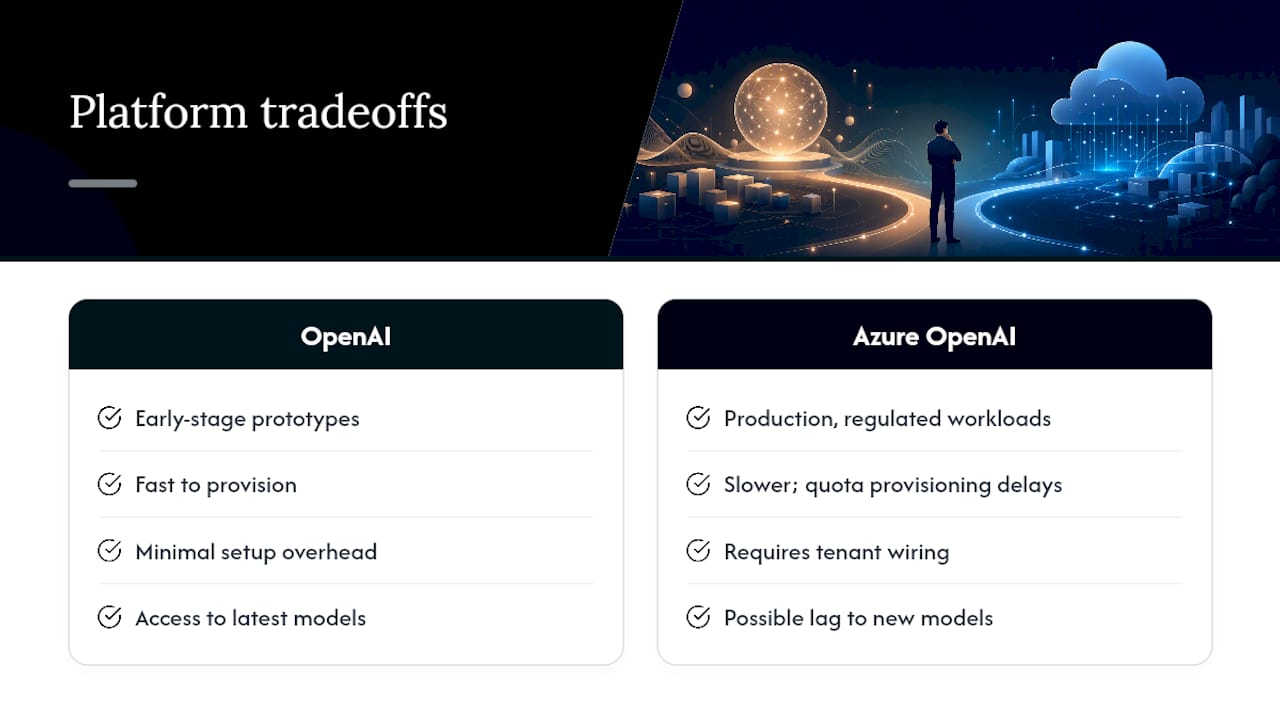
At Zatersio, the default for early-stage builds is the direct OpenAI API. It is faster to provision, has no deployment-naming overhead, and gives access to the latest models without a lag. For a two-week MVP, that speed matters. We have seen teams lose a full sprint to Azure provisioning and quota requests before writing a single line of application code.
The calculus shifts the moment regulated data enters the picture. A healthcare client building an intake automation tool cannot put patient data through a public API endpoint, full stop. For that engagement, we provision Azure OpenAI from day one, wire it into the client’s existing Azure tenant, and run the compliance checklist in parallel with the build. The governance overhead is real, but it is the cost of operating in that space, and Azure’s native controls make it manageable.
The pattern we see most often in practice: teams prototype on direct OpenAI, validate the use case, then migrate to Azure when the workload moves toward production in a regulated context. Migration is feasible but not trivial. Deployment naming, API-version pinning, and authentication changes all require deliberate engineering time. Plan for it rather than treating it as a one-afternoon task.
What clients should expect from an implementation partner: a clear compliance checklist before the first line of code, a platform recommendation with written rationale, and a migration plan that accounts for the operational differences described in this article. A partner who skips the compliance conversation and jumps straight to building is one to be cautious about.
Ready to build on the right platform from day one?
Choosing the wrong platform at the start of a project costs more than the migration. It costs the time your team spends undoing architectural decisions that seemed fine in week one.

Zatersio builds AI-powered MVPs and automations with platform selection baked into the scoping process, not bolted on afterward. You get a compliance checklist, a secure prototype, and a cost forecast before any significant development spend. Fixed pricing means no billing surprises, and your data residency requirements are confirmed in writing before the build starts. Whether your workload belongs on the direct OpenAI API or inside Azure’s compliance boundary, we scope it correctly the first time.
Book a scoping call to get a platform recommendation and a working AI agent or MVP build scoped for your specific requirements. If you are evaluating Azure OpenAI for a regulated industry, our MVP development service includes compliance-ready architecture from day one.
Sources
Security and procurement teams should verify claims directly against vendor documentation. These are the primary sources worth bookmarking.
Read first for data residency and DPA/BAA details:
- Is the Azure OpenAI Service completely separate from OpenAI (the company) from a data governance/privacy perspective? | Microsoft Q&A
- Azure OpenAI overview | Microsoft Learn
- Azure OpenAI Pricing: Models, Costs & Tracking AI Spend In 2026 | CloudZero (blog)
- Azure OpenAI vs OpenAI: the enterprise decision - Amit Kothari
For procurement and cost modeling:
For engineering and developer teams:
For independent analysis: