
Ship With Maintenance in Mind: Software Maintenance Packages for SMBs
Ship With Maintenance in Mind: Software Maintenance Packages for SMBs
A software maintenance package is a service agreement that keeps your application secure, current, and running after launch. It typically bundles corrective, adaptive, perfective, and preventive maintenance into monthly hours or an SLA. Choose a monthly retainer for steady work, on-demand for occasional fixes, or a managed SLA when downtime is not an option. The rest of this guide breaks down each choice.
TL;DR:
- Fixed-price MVP development can include maintenance costs upfront, reducing surprises during later support phases.
- Businesses handling sensitive data or operating critical systems should choose managed SLA packages with guaranteed response times.
- Regular reports, clear scope boundaries, and defined response times are essential for maintaining transparency and efficacy in support agreements.
- Rollover hours, overage charges, and vague incident definitions can create hidden costs in maintenance plans.
- Proper initial audits and documentation during the first 30 to 90 days minimize future rework and lower long-term support expenses.
Table of Contents
- What Software Maintenance Packages Actually Include
- Retainer, On-Demand, or Managed SLA: Which Model Fits?
- How Do You Choose the Right Maintenance Package?
- Contracts and SLAs: The Fine Print That Actually Matters
- Turning Maintenance Packages Into an Annual Budget
- The First 30, 60, and 90 Days of a Maintenance Handover
- Why Maintenance Deserves the Same Attention as the Build
- How Zatersio Turns Your MVP Into a Maintenance-Ready Asset
- Sources
What Software Maintenance Packages Actually Include
Every credible package draws on four maintenance categories that the Australian Taxation Office recognizes as standard practice for extending software life. Understanding what falls into each bucket keeps you from paying twice for the same work or getting surprised when a request lands outside scope.
Corrective maintenance fixes bugs and defects that slip past launch. A checkout button that fails on Safari, a report that miscalculates tax, a login that locks out users after a password reset. This is the reactive, break-fix work most people picture when they hear “maintenance.”
Adaptive maintenance keeps your software compatible with a moving world. Operating system updates, browser changes, payment gateway API version bumps, and new device screen sizes all force code changes even when nothing about your product itself has changed.
Perfective maintenance improves what already works. Faster page loads, cleaner admin dashboards, small usability tweaks based on user feedback. It is not new features so much as sharpening the existing ones.
Preventive maintenance heads off problems before they surface. Dependency upgrades, code refactoring, security patching, and monitoring setup all fall here, and it is the category most businesses underfund until something breaks.
A typical monthly deliverable list looks like this:
- Security patches and dependency version upgrades
- Uptime and error monitoring, often built on platforms like Microsoft Azure for cloud-native applications
- Bug triage and fixes within the agreed hour allotment
- Small feature tweaks and UI adjustments
- Monthly or quarterly performance reports
What packages almost never include is major feature development or a full re-architecture. If you want a new module, a redesigned data model, or a platform migration, that work usually shifts to a separate time-and-materials quote once the monthly hour allotment is exhausted. Knowing that boundary before you sign saves arguments later.
Pro Tip: Ask a prospective provider for a redacted sample monthly report before you sign anything. If they cannot produce one, they likely do not run a structured reporting process, and you will find out the hard way once you are already locked in.
Retainer, On-Demand, or Managed SLA: Which Model Fits?
Maintenance agreements generally fall into three commercial shapes: dedicated retainers, on-demand support, and managed SLAs with guaranteed response levels. Picking the wrong one is the single most common budgeting mistake business owners make when they move from build to maintenance.
Monthly retainers buy you a fixed block of hours and steady access to a team that already knows your codebase. You pay whether or not you use every hour, but you get predictability and a team that does not need re-onboarding every time something breaks. Retainers fit products with active user bases, regular feature requests, or compliance obligations that demand continuous attention.
On-demand maintenance charges per incident or by the hour with no monthly commitment. It suits low-traffic internal tools, seasonal applications, or software that has genuinely stabilized and rarely needs a human touch. The tradeoff is response time. Without a retainer or SLA, you are competing with every other client for whoever happens to be free that week.
Managed SLA agreements guarantee response and resolution times backed by contractual penalties. IBM’s software support model is a useful reference point here: enterprise support services commonly pair guaranteed response windows with structured escalation paths and lifecycle upgrade planning. This model fits mission-critical systems, payment infrastructure, or healthcare and finance applications where an outage carries real financial or regulatory consequences.
A few billing traps show up across all three models:
- Prepaid hour blocks that expire monthly with no rollover, effectively forcing you to “use it or lose it”
- Overage rates that jump sharply once you exceed the base allotment
- Vague definitions of what counts as a billable “incident” versus routine included work
Comparing the plan’s flat price against a realistic à la carte hourly estimate before you sign tells you whether the package genuinely saves money or just feels safer. Rollover terms are almost always negotiable, and a provider that refuses to discuss them is signaling something about how they run their business.
How Do You Choose the Right Maintenance Package?
Start with business impact, not price. A checkout flow that processes payments deserves a different maintenance posture than an internal spreadsheet replacement, even if both took the same number of hours to build.
Rank your priorities before you talk to a single provider:
- Business criticality. Does downtime cost you revenue, customers, or regulatory standing?
- Compliance exposure. Do you handle health records, financial data, or anything covered by privacy law that demands specific data residency or audit trails?
- Integration complexity. How many third-party APIs, payment processors, or internal systems does your app touch, and how often do those vendors push breaking changes?
- Internal skill gaps. Can your own team triage a P1 incident at 2 a.m., or does everything route externally?
Once you know your priorities, run every proposal through a contract checklist:
- Monthly hour allotment and what happens when you exceed it
- Defined response and resolution times by severity
- Reporting cadence and format (weekly, monthly, dashboard access)
- Escalation path when the primary contact is unavailable
- Explicit exclusions (major features, re-architecture, third-party licensing costs)
- IP ownership and code access, including source repository credentials
- Termination and transition clauses if you switch providers later
Good maintenance relationships behave like an extension of your internal team rather than a ticket queue you throw problems into. That distinction shows up in how a provider prioritizes work. Ask them directly: “How do you decide what gets fixed first when three things break at once?” A vague answer is a red flag. So is a provider who cannot tell you their average response time without checking.
Other questions worth asking every candidate:
- What is your actual (not advertised) average response time for the last quarter?
- Who specifically will work on our account, and how much turnover has that team had?
- Can you show a redacted example of a monthly report?
- What happens to unused hours at the end of the month?
Pro Tip: If a provider cannot answer “what does not fit inside this package” clearly and specifically, assume the answer is “whatever we decide later” and price your risk accordingly.
A simple decision flow helps here. Small internal tools with low usage and no compliance exposure usually do fine with on-demand support and a fast-response freelancer or small shop. Customer-facing products with real revenue at stake generally need a retainer at minimum. Anything touching payments, health data, or systems where an hour of downtime creates measurable losses belongs on a managed SLA, full stop.
Contracts and SLAs: The Fine Print That Actually Matters
SLA metrics translate directly into how fast your problem gets solved, so read them literally rather than skimming past them. Most agreements define severity in four tiers, sometimes called P1 through P4.
- P1 (critical): Full outage or data loss, typically requiring response within an hour and resolution within a few hours.
- P2 (high): Major feature broken, no workaround, response usually within a few hours.
- P3 (medium): Partial degradation with a workaround available, response within a business day.
- P4 (low): Cosmetic issues or minor requests, handled in the next scheduled release cycle.
Enterprise support providers commonly structure their SLAs around exactly this kind of tiered response model, pairing guaranteed windows with formal escalation paths so a stuck ticket does not sit unattended. That structure is what separates a real SLA from a marketing promise.
Statistic Callout: Maintenance-specific support providers frame structured agreements as a direct lever against downtime and unplanned cost, positioning continuous patching and monitoring as cheaper over time than reactive, ad-hoc fixes applied only after something breaks.
Beyond severity tiers, watch these clauses closely:
- Coverage windows. Business hours only, or 24/7? A retainer covering 9 to 5 weekdays offers little protection for an app with global users.
- Maintenance windows. When can the provider take the system offline for updates, and how much notice do you get?
- Change management. Does every fix go through a review and approval step, or can the provider push changes unilaterally?
- Emergency provisioning. What happens outside normal coverage hours during a genuine P1? This is often billed separately, and the rate should be spelled out, not left to a phone call in a crisis.
- IP ownership, backups, and data residency. Confirm who owns the code, where backups live, and whether data stays within a specific jurisdiction, particularly if you operate under privacy or healthcare regulations.
- Warranty and liability limits. Most contracts cap financial liability well below the cost of a serious outage. Know that number before you need it.
Regular reporting cycles are what keep any of this honest. A monthly report showing hours used, incidents resolved, and upcoming risk items gives you a paper trail and a natural checkpoint to renegotiate scope before small friction turns into a contract dispute.
Turning Maintenance Packages Into an Annual Budget
Maintenance spend tends to fall into a few recognizable shapes rather than a single number, which makes forecasting easier than it first appears.
Small retainers for straightforward applications typically run a modest number of hours per month at a blended hourly rate. Enterprise managed SLAs cost considerably more because they bundle guaranteed response times, dedicated staff, and round-the-clock coverage. Pure hourly, on-demand rates sit somewhere in between but carry the least predictability, since a bad month can spike your bill without warning.
To forecast annual spend, multiply your expected monthly hours by the blended rate, then add a buffer for overage. If your package includes 10 hours a month and you routinely use 14, budget for the overage rate every month rather than treating it as an exception.
A few line items get missed when comparing outsourced maintenance to hiring in-house:
- Recruiting, onboarding, and training a full-time developer
- Salary on-costs like superannuation, leave, and benefits
- Tooling, licenses, and infrastructure the in-house hire needs
- Coverage gaps during leave, illness, or turnover
- Ramp-up time before a new hire understands your codebase
Third-party maintenance providers often market lower total cost of ownership specifically because they spread specialized expertise across multiple clients instead of one salary against one product. That math does not hold for every business, especially once you are large enough to need a dedicated internal team, but it is worth running the numbers rather than assuming outsourcing is automatically cheaper or in-house is automatically safer.
Finally, budget separately for major upgrades. Platform migrations, framework version jumps, and compliance-driven overhauls almost never fit inside a standard retainer, so build a rough annual reserve for the unexpected big project rather than assuming your monthly hours will stretch to cover it.
The First 30, 60, and 90 Days of a Maintenance Handover
The first month after a build wraps sets the tone for everything that follows, and it is where most surprise billing happens. A structured initial audit is standard practice, and it should produce concrete artifacts, not just a verbal “yes, we understand your system.”
- Days 1 to 30: Audit and documentation. The provider maps your architecture, reviews existing test coverage, and produces a runbook covering deployment steps, environment access, and known issues.
- Days 31 to 60: Monitoring and process setup. Alerting gets configured, a reporting cadence is agreed, and the first patch cycle runs to validate the handover actually works under real conditions.
- Days 61 to 90: Steady-state operation. Response times stabilize, the backlog from the audit gets prioritized, and you get your first full monthly report that reflects the ongoing rhythm rather than onboarding noise.
That audit phase is exactly where uncapped billing sneaks in. Negotiate a fixed price or an hour cap for the audit itself, and require a specific artifact list as a deliverable: a runbook, an environment access checklist, and a test coverage report at minimum. Providers that build these artifacts upfront consistently spend less time re-discovering the same issues six months later, which shows up directly in your invoice.
Why Maintenance Deserves the Same Attention as the Build
Most businesses treat maintenance as an afterthought, something to sort out once the “real” work of building is done. That gets the priority backward. The build is the easy part to get excited about. What happens in month fourteen, when a payment gateway changes its API and nobody on staff remembers exactly how the integration was wired, is where products actually die or survive.
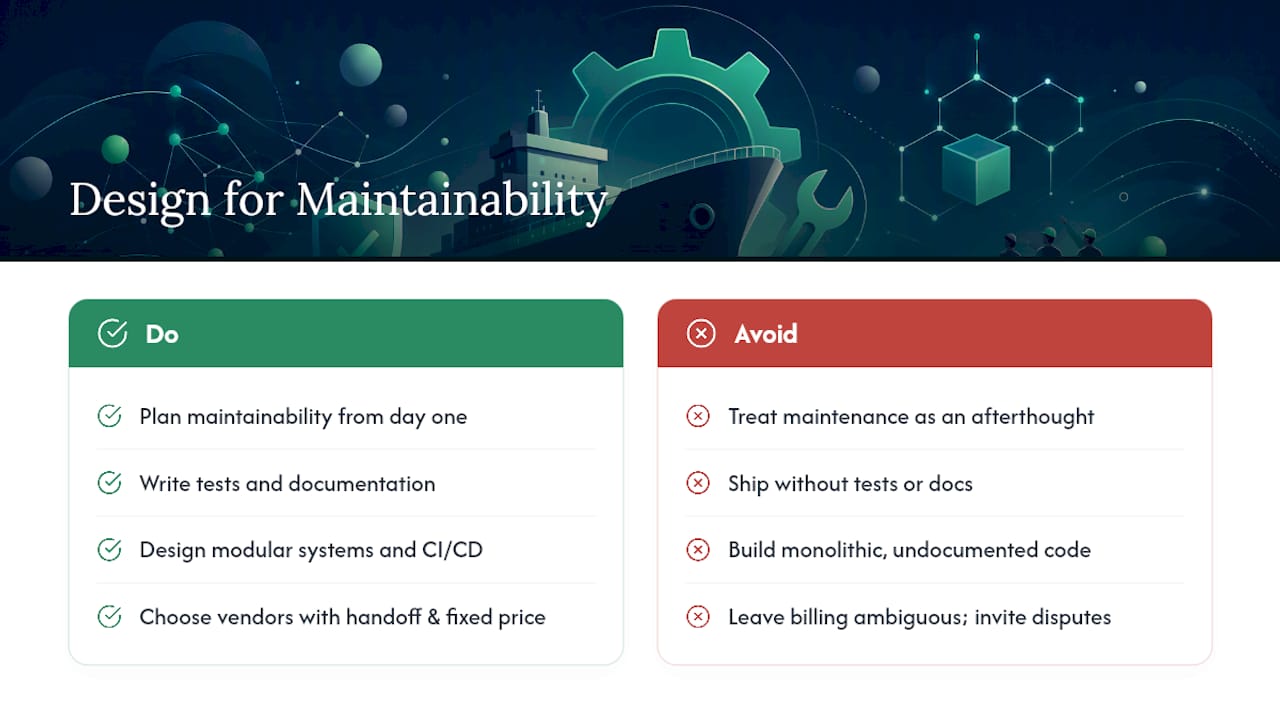
The uncomfortable truth is that a lot of maintenance cost is self-inflicted during the build phase. Code written without tests, without documentation, without any thought toward the next engineer who touches it, turns every future fix into an archaeology project. Modular architecture and a real CI/CD pipeline are not gold-plating. They are what determine whether your monthly hour allotment covers actual improvements or gets eaten by rediscovering how your own system works.
Some providers build MVPs with maintenance handoff in mind from day one rather than treating maintenance as a problem for future you. Fixed pricing can remove the ambiguity that turns maintenance conversations into billing disputes, dedicated engineering teams may reduce re-onboarding tax every time something breaks, and data residency options can matter the moment compliance enters the picture. The businesses that spend the least on maintenance are usually the ones who thought about maintainability before the first line of code was written, not after the invoices started arriving.
— Lakitha
How Zatersio Turns Your MVP Into a Maintenance-Ready Asset
Some providers offer an alternative to open-ended agency retainers for businesses that want a maintenance-ready build from the start, not a scramble to document a system after the fact. Delivering working MVPs in under two weeks with fixed pricing can help you know your build cost and your ongoing support cost before either project begins, not after a change order shows up.

For startups and small to mid-size businesses, Zatersio typically recommends starting with a lighter retainer once your MVP launches. It is enough to cover corrective and preventive work without the overhead of a full managed SLA you do not yet need at early scale. That model works because the same dedicated engineering team that built your product handles the maintenance, so there is no audit phase spent relearning your own codebase. Data residency options in Australia also mean healthcare, legal, and financial applications can stay compliant without a separate infrastructure conversation.
If you are planning a new build or an automation project and want maintenance costs factored in from the first sprint rather than negotiated later, start with a look at Zatersio’s MVP development process and get a fixed quote before you write a single ticket.
Sources
- ATO — In-house software (depreciation) / guidance
- E-Bits — IT maintenance for business in Australia
- IBM — Software support services