
What a Voicebot for Business Actually Delivers in 2026
What a Voicebot for Business Actually Delivers in 2026
A voicebot can answer routine calls 24/7, qualify leads, and book appointments so your team focuses on the work only humans can do. Salesforce documents AI voice agents pre-qualifying leads and triggering follow-up actions across systems automatically, and field tests reported by CloudTalk show one voice agent answering every inbound call during a trial period and closing out most of those conversations without a human stepping in. Zatersio builds these systems as working pilots in under two weeks for eligible projects.
Three groups get the most out of a voice automation program:
- Service-based businesses drowning in booking and rescheduling calls
- Sales teams that lose leads to slow callback times
- Support teams fielding the same five questions all day
Key Takeaways
A voicebot for business earns its cost by automating one high-volume, well-defined call flow first, then expanding only once containment and conversion metrics prove it out.
| Point | Details |
|---|---|
| Start with one flow | Booking, triage, or lead qualification pilots deliver the fastest measurable ROI. |
| Verify the tech stack | Confirm barge-in, partials, and CRM tool-calling before signing any contract. |
| Match KPIs to the use case | Track AHT and containment for support, leads captured for sales. |
| Plan for compliance upfront | Data residency and retention policies matter more once regulated data is involved. |
| Zatersio ships pilots fast | Fixed-price MVPs in under two weeks, with R&D Tax Incentive guidance for eligible builds. |
Table of Contents
- Is a Voicebot for Business Worth It? Benefits and Top Use Cases
- How Do Voicebots Work? The Real-Time Stack Explained
- What Should You Budget and When Will It Launch?
- How Do You Evaluate a Voicebot Vendor? Checklist and Red Flags
- Publisher Proof: What a Rapid MVP Approach Looks Like in Practice
- What Does the First 90 Days of a Voicebot Pilot Look Like?
- What Is a Voicebot, Exactly?
- Is Voicebot Data Actually Private and Secure?
- Can a Voicebot Handle Multiple Languages and Growing Call Volume?
- Why the “Set It and Forget It” Pitch on Voicebots Is Wrong
- Build Your Voicebot Pilot Without the Long Procurement Cycle
- Sources
Is a Voicebot for Business Worth It? Benefits and Top Use Cases
The value of a voicebot for business comes down to which call types you hand off first. Not every use case pays back at the same speed, and picking the wrong starting point is the most common reason pilots stall.
- Inbound triage and self-service. A voice agent answers common questions (hours, order status, pricing) without a hold queue. Track average handle time (AHT) and containment rate, the share of calls resolved without a transfer.
- Lead qualification and routing. The agent asks the same screening questions a sales development rep would, at 2 a.m. or during a lunch rush, then routes hot leads to a human. Track leads captured per 100 calls and pipeline conversion.
- Appointment booking and rescheduling. Instead of a caller hanging up after two rings of hold music, the bot checks the calendar and confirms a slot in real time. Track booking completion rate against abandoned-call rate.
- Payment reminders and collections. Outbound voice campaigns remind customers of due invoices and can take a payment over the phone. Track days sales outstanding and reminder-to-payment conversion.
- IVR replacement. Old-school “press 1 for sales” menus fail badly in noisy environments or when someone is driving. A voice agent that understands natural speech performs better in exactly those conditions.
RingCentral’s use-case research frames voice as the highest-stakes customer channel because callers are usually more frustrated or more urgent than someone typing a chat message. That is precisely why containment and AHT matter more here than on any other channel: a bad voice experience costs you a customer faster than a slow chat reply ever will.
How Do Voicebots Work? The Real-Time Stack Explained

Every credible voicebot for business runs on the same basic pipeline: speech-to-text (STT) converts the caller’s words into text, a natural language understanding layer or large language model figures out intent and calls the right tools, and text-to-speech (TTS) turns the response back into audio. Deepgram’s architecture breakdown describes this as a streaming loop, not a batch process. Latency between when a caller stops talking and the bot responds is what separates a natural conversation from an awkward robot call.
Before you sign anything, verify these capabilities exist and work under real conditions, not just in a demo:
- Barge-in support, so a caller can interrupt the bot mid-sentence, the way people actually talk
- Partial transcription, so the system starts processing speech before the caller finishes
- Tool-calling, so the agent can actually look up an order or check a calendar, not just talk about it
- Multi-turn memory, so it doesn’t ask for your account number three times in one call
Integration is where most projects live or die. A voicebot that can’t write back to your CRM, calendar, point-of-sale system, ticketing platform, or EMR is just an expensive answering machine. Ask specifically how the vendor handles actions like creating a support case, scheduling an appointment, or updating a customer record mid-call, and ask for a human handoff path when the bot hits its limit.
Pro Tip: Ask any vendor to show you a call where the bot got interrupted and recovered gracefully. If they can’t produce one, barge-in probably isn’t real yet.
What Should You Budget and When Will It Launch?
A single-flow pilot, like appointment booking, can go from kickoff to live calls in a matter of weeks. A full contact-center replacement covering dozens of intents and multiple languages is a multi-month program, and treating it like a two-week sprint is how expectations get wrecked before launch.
Pricing generally falls into a few recognizable models:
- Per-minute, all-in pricing, common with turnkey platforms that bundle STT, LLM, and TTS costs into one rate
- Platform fee plus usage, where you pay a base subscription and a per-call or per-minute charge on top
- Fixed implementation and setup fees, covering integration work, prompt design, and testing
- Ongoing maintenance, for monitoring, retraining, and adding new flows over time
byVoice’s platform documentation notes that some providers offer no-code, template-driven onboarding for standard flows, which shortens time-to-launch considerably. Others are API-first, built for teams that need custom logic and are willing to trade speed for flexibility. Call volume, number of languages, and compliance requirements (especially in healthcare or finance) are the biggest cost drivers beyond the base platform fee.
How Do You Evaluate a Voicebot Vendor? Checklist and Red Flags
Choosing among the best voicebot platforms starts with a short checklist, not a feature-comparison spreadsheet fifty rows long.
- Integration depth. Confirm the bot can write to your specific CRM or scheduling tool, not just “integrate broadly.”
- Latency and UX features. Ask for a live call demo with real interruptions, not a scripted one.
- Security and data residency. Confirm where call recordings and transcripts are stored and who can access them.
- Observability. You need call-level logs and dashboards, not a monthly PDF summary.
- Support model and SLA. Ask what happens when the bot fails mid-call, and how fast a human engineer responds.
- Pricing transparency. Get every fee in writing, including per-minute overage charges.
Walk away from any vendor claiming 100% automation with no fallback, since Deepgram’s guidance on latency and UX guardrails makes clear that trustworthy voice experiences depend on graceful failure, not the absence of it. Opaque pricing and vague integration promises (“we work with most CRMs”) are the two most common red flags in procurement conversations.
Pro Tip: Ask the vendor to walk through a call that failed during their own testing. Their answer tells you more about the product than any sales deck will.
Publisher Proof: What a Rapid MVP Approach Looks Like in Practice
A fixed-scope, short-cycle build reduces the two biggest risks in voice automation: overspending before you know if the flow works, and waiting months to find out it doesn’t. Zatersio’s model is built around that constraint directly.
- Working pilots delivered in under two weeks for eligible, well-scoped projects
- Fixed pricing agreed upfront, so a growing call volume doesn’t quietly inflate your invoice
- Guidance on structuring eligible builds for the R&D Tax Incentive
- A choice of data residency options for businesses in regulated sectors like healthcare and legal services
A trades business drowning in booking calls, a healthcare clinic losing hours to appointment reminders, a law firm buried in intake paperwork: each of these is the same underlying problem. Someone is doing manual, repetitive administrative work that a well-scoped voice or automation build can absorb in weeks, not quarters.
Starting with a narrow scope and real metrics from week one, rather than a sprawling roadmap, is what makes the second phase of the build easier to justify to a finance team.
What Does the First 90 Days of a Voicebot Pilot Look Like?
Getting from an idea to a measurable pilot follows a fairly consistent sequence, whether you’re automating bookings or lead intake.
- Define the goal and KPIs. Pick one metric, whether it’s AHT, containment rate, or leads captured, and agree on a target before writing a single prompt.
- Pick one or two flows. Map the conversation path end to end, including every piece of data the bot needs to pull or write.
- Connect the systems. Wire up the CRM or calendar API, run test calls with real edge cases, and refine handoff rules for when the bot should escalate to a person.
- Measure and iterate. Review call logs weekly, adjust prompts based on where callers get stuck, and use pilot data to justify wider rollout.
A single-flow pilot, like automated booking, is consistently the fastest route to a result you can show a skeptical stakeholder.
| Point | Details |
|---|---|
| Start narrow | Pick one flow, like booking or triage, before building anything broader. |
| Track the right metric | AHT and containment rate tell you more than call volume alone. |
| Build in handoff rules | Every pilot needs a clear point where the bot passes to a human. |
What Is a Voicebot, Exactly?
A voicebot, often called an AI voice agent, is a software system that holds a phone conversation with a caller and can take real action based on what it hears, rather than just playing recorded prompts. That last part is the distinction that matters for business use. Older interactive voice response (IVR) systems could route calls based on keypad input or a handful of recognized keywords. A modern voicebot understands open-ended speech, holds context across multiple turns, and can look up an order, check a calendar, or update a database mid-call.
The term covers a range of sophistication. Some voicebots are simple, single-purpose flows that answer one question, like “what are your hours.” Others are full conversational agents that qualify a lead, answer follow-up questions, and hand off to a live rep only when the conversation genuinely needs a human. What ties them together is the ability to combine speech recognition, language understanding, and action, in that order, fast enough that the caller doesn’t notice the machinery behind it.
For businesses, that means a voicebot isn’t a fancier phone tree. It’s closer to a digital employee that never sleeps, never gets flustered by a busy Monday, and can be deployed to handle the calls your team dreads most: the repetitive ones. Whether it replaces a receptionist, an SDR, or a collections clerk depends entirely on which flow you build first, which is why scoping the first pilot carefully matters more than picking the “best” platform on paper.
Is Voicebot Data Actually Private and Secure?
Every phone call handled by a voicebot generates a transcript, and often a recording, of a real conversation, which means it carries the same privacy weight as any other customer data your business holds. If you operate in the European Union or handle EU residents’ data, GDPR governs how that transcript is stored, for how long, and who can access it. Businesses in healthcare contexts need to consider HIPAA-equivalent handling if any part of the conversation touches patient information, and legal or financial firms carry their own confidentiality obligations regardless of jurisdiction.
Three questions belong in every vendor conversation before a single call goes live:
- Where is the data stored, physically? Data residency matters for regulated sectors and for businesses that want contractual certainty about jurisdiction, not just a vague promise of “cloud storage.”
- Who can access transcripts and recordings, and for how long are they retained? Ask for a retention policy in writing, not a verbal assurance.
- What gets redacted automatically? Card numbers, health details, and other sensitive fields spoken aloud during a call should never sit unmasked in a transcript that a support agent can pull up later.
Zatersio builds in a choice of data residency options specifically so healthcare, legal, and finance clients can meet their own compliance obligations rather than adopting a vendor’s default, one-size-fits-all storage location. That flexibility matters more than most buyers realize until an auditor asks where the data actually lives.
Can a Voicebot Handle Multiple Languages and Growing Call Volume?
Scripts written for one flow rarely stay static, and a voicebot for business needs to flex in at least three directions as the company grows. The first is language. A voice agent serving a single-language customer base today may need Spanish, Mandarin, or another language within a year, and swapping languages usually means retraining the intent model, not just translating a script word for word.
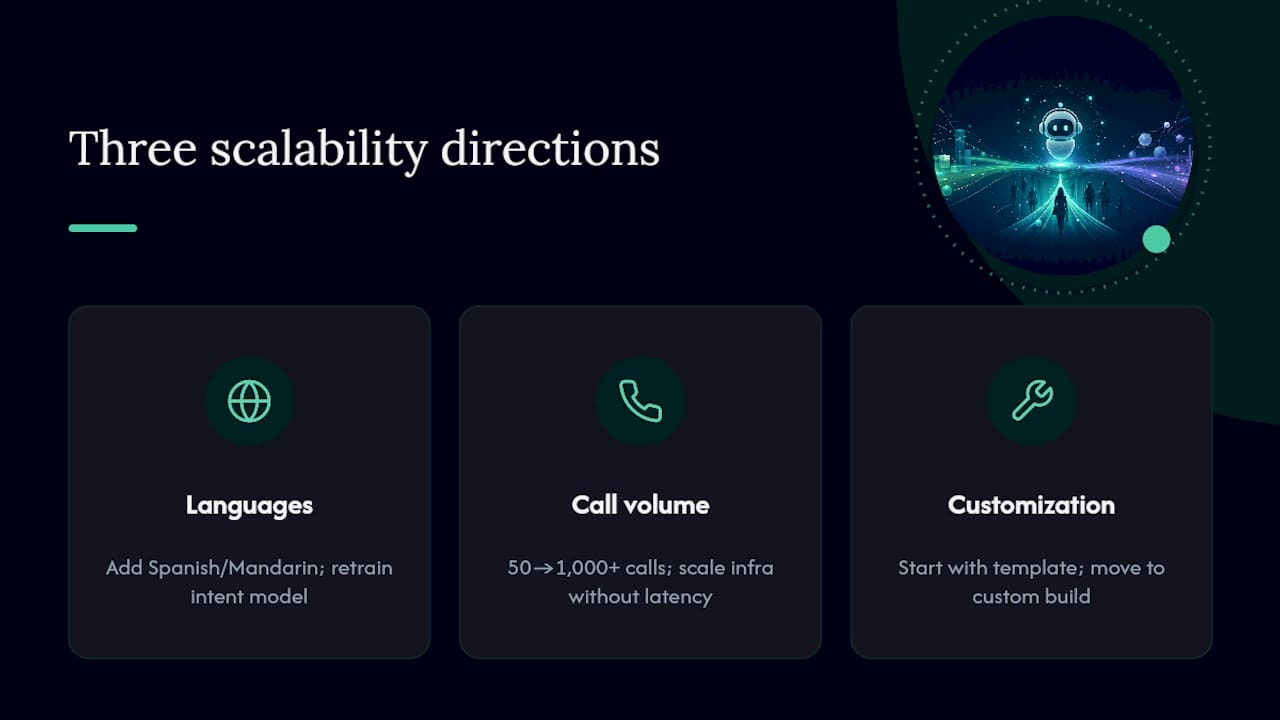
The second is call volume. A pilot handling fifty calls a day behaves differently under a thousand calls a day, especially during seasonal spikes like tax season for accountants or holiday bookings for trades businesses. The infrastructure needs to scale without introducing latency, since a slow bot under load is worse than a busy signal.
The third is script customization itself. A generic template can launch a basic flow fast, but a voicebot that sounds like it was built specifically for your business, using your terminology, your tone, and your actual booking rules, converts better than one that reads from a boilerplate script. This is the tradeoff between the no-code, template-driven platforms and API-first, custom-built agents: templates launch faster, custom builds fit better. Most growing businesses start with a template for the pilot and move to a customized build once the flow proves out, which is a big part of why starting narrow, as covered earlier, pays off twice: once at launch, and again when it’s time to scale.
Why the “Set It and Forget It” Pitch on Voicebots Is Wrong
Most vendor marketing sells voice automation as a switch you flip once. Set up the bot, watch the savings roll in, done. That framing survives about one bad call before reality intervenes: a caller with an accent the model mishandles, a booking edge case nobody scripted, a CRM field that didn’t map the way someone assumed it would.
The businesses that get real value treat their first flow as a live experiment, not a finished product. They watch call logs weekly, adjust prompts based on where real callers stumble, and only expand scope once the metrics justify it. That is unglamorous work, and it’s exactly the part most vendor pitches skip.
The conventional advice tells you to pick “the best voicebot platform.” That’s the wrong first question. The right one is: which single call type, if automated well, would free up the most time for your team this month? Answer that, build a tight pilot around it, and measure containment and booking completion before committing to anything bigger. Platforms matter less than scope discipline, and almost every failed pilot traces back to skipping that step.
— Lakitha
Build Your Voicebot Pilot Without the Long Procurement Cycle
Zatersio builds working voicebot pilots in under two weeks for eligible projects, with fixed pricing agreed before any code gets written, so you know the cost before your team commits a single hour to the project.

Every build includes direct access to the engineers doing the actual work, not an account manager relaying messages, plus a choice of data residency options for businesses handling sensitive customer data. Where a project qualifies, Zatersio also helps structure the build to meet R&D Tax Incentive requirements, turning part of the development cost into a future offset rather than a pure expense. This isn’t a template you configure yourself; it’s a bespoke build scoped around the one call flow costing your team the most time right now, whether that’s booking, triage, or lead intake.
If a single flow, like appointment booking or after-hours triage, is the bottleneck slowing your team down, start scoping your MVP and get a fixed quote before your next budget cycle closes.
Sources
- AI Voice Agents: A Complete Guide | Salesforce
- Top voice AI agent use cases by industry | RingCentral Blog
- 5 Use Cases for AI Voice Agents for You and Your Business Right Now | Deepgram
- 6 Best Voice AI Agent Use Cases to Never Miss a Call in 2026 | CloudTalk
- AI Voice Bot & Voice Agent Platform — byVoice