
Work Order Automation: A Practical Guide for Maintenance Teams
Work Order Automation: A Practical Guide for Maintenance Teams
Work order automation uses triggers, rules, and AI to create, route, and close maintenance tasks without manual data entry. Teams that implement it typically cut admin hours by 20 to 40 percent, shrink time-to-close, and see first-time fix rates climb because technicians arrive with the right context. The trigger can be a sensor alert, a form submission, or a simple HTTP request, and each one removes a step someone used to do by hand.
TL;DR:
- Implement creation and closure automation first, as these stages present the lowest risk and quickest measurable improvements.
- Ensure your asset registry and parts master data are accurate before automating to prevent misdirected work orders.
- Use simple integration patterns like HTTP triggers or Power Automate, and restrict trigger access to secure, authenticated users.
- Target a 20 to 40 percent reduction in admin hours and track KPIs such as MTTC, backlog size, and first-time fix rate during the pilot.
- Fix foundational data issues before deploying AI-driven diagnostics or prioritization, as incomplete data undermines automation effectiveness.
Table of Contents
- What Is Work Order Automation and Where Does It Fit in Your Stack?
- What Should You Automate at Each Stage of the Work Order Lifecycle?
- How Do You Plan a Work Order Automation Pilot?
- Which Integration Patterns Actually Work for Automated Work Orders?
- What KPIs and ROI Should You Expect From Automation?
- What Are the Biggest Risks in Work Order Automation, and How Do You Manage Them?
- How Does a Delivery Partner Actually Run an Automation Pilot?
- What Should You Do This Week to Start a Pilot?
- Get a Working Automation Pilot Built Without the Long Build Cycle
- A Straight Answer on What Actually Moves the Needle
- Sources
What Is Work Order Automation and Where Does It Fit in Your Stack?
Work order automation isn’t a single tool. It’s a chain: a trigger fires, an orchestration layer decides what happens next, and the resulting task lands in a CMMS or field service platform where a technician can act on it. Work order management itself covers creation, assignment, tracking, and completion, and digitizing that lifecycle is what makes automation possible in the first place.
The stack usually has five parts, including a field service system that manages work order workflows and automation features:
- Triggers — sensor alerts, scheduled jobs, intake forms, or API calls that start the process
- Orchestration/middleware — the logic layer (Power Automate, an integration platform, or custom code) that routes data
- CMMS or Field Service system — where the work order lives, gets assigned, and gets tracked
- Mobile execution — the technician-facing app for closing tasks in the field
- Analytics — the reporting layer that turns closed work orders into KPIs
Rule-based flows follow static logic: “if sensor reads above threshold, create a work order.” AI-enabled systems go further, generating a fully populated work order with a diagnosis, parts list, and technician assignment based on patterns in the data. Where automation lives depends on your systems: some CMMS platforms build it in natively, while others need an API-first layer sitting on top to connect everything.
What Should You Automate at Each Stage of the Work Order Lifecycle?
Every stage of a work order has a manual version and an automated one. Here’s where the time actually goes, and where automation pays off fastest.
- Creation. IoT sensors flag anomalies, scheduled jobs generate preventive maintenance tasks, intake forms capture requests from staff, and API triggers pull events from other systems. Auto-populate asset ID, location, priority, and issue category so nobody types the same details twice.
- Planning and scheduling. Automated parts checks confirm stock before a technician is dispatched, capacity rules balance workload across the team, and approval routing kicks in automatically for anything over a cost threshold.
- Assignment and routing. Skills matching, certification checks, current workload, and location all factor into who gets the job, without a planner manually scanning a roster.
- Execution and mobile closure. Technicians work offline, attach photos, log parts consumption, and trigger a purchase order automatically when stock drops below a set level.
- Close and reporting. Completion fields auto-fill from mobile inputs, closing a work order can kick off invoicing or a warranty claim, and the data flows straight into your dashboards.
Vendor platforms in this space, including Monitory, package these five stages into a single feature set: auto-generation, prioritization, routing, parts pre-staging, and mobile execution.
Pro Tip: Start with creation and closure automation before touching assignment and scheduling. Those two stages carry the least risk and the fastest measurable win, which makes it easier to get buy-in for the harder automations later.
How Do You Plan a Work Order Automation Pilot?
A pilot succeeds or fails based on scope discipline. Pick too many processes at once and you lose the ability to measure what actually worked.
- Define outcomes first. Choose 1 to 3 pilot processes (usually creation and closure) with a specific target, like a cut in administrative minutes per work order.
- Check data readiness. You need a clean asset registry, an accurate parts master, and a technician skills matrix before automation can route anything correctly.
- Design the flow. Map the trigger, the fields it populates, and the approval logic before writing a single line of integration code.
- Build and validate. Run the automation in parallel with the manual process for two to three weeks and compare outputs.
- Build trust with dashboards. Give stakeholders visibility into what the system is doing before asking them to fully rely on it.
- Approve and expand. Only widen scope once the pilot’s numbers hold up.
Stakeholder alignment matters as much as the technical build:
- The maintenance manager owns the success metrics and signs off on scope
- A planner or scheduler validates that routing logic matches real-world constraints
- IT or security reviews data residency, authentication, and integration risk
- Your implementation partner or vendor handles the technical build and testing
When you scale beyond the pilot, add governance: documented approval gates, tuned confidence thresholds for AI-driven decisions, and a change log so nobody loses track of what’s automated and why.
Which Integration Patterns Actually Work for Automated Work Orders?
The right integration pattern depends on what’s triggering the work order and how much risk you can tolerate on data accuracy.
- HTTP or webhook triggers. A calling system posts a JSON payload with fields like asset ID, issue description, priority, and a unique source record ID. That last field matters more than it sounds: without it, a retried request can create duplicate work orders. Build in an idempotency check that looks for an existing record before creating a new one.
- Power Automate and Dynamics 365 Field Service. Flows can trigger from Dataverse record changes or from an HTTP request, and should include a Response action that returns the new work order ID back to the calling system, along with correct ownership and security role assignment.
- API-first orchestration. A webhook fires, middleware processes it, and the CMMS receives the finished work order. Decide upfront whether you need real-time processing or whether a batch job every few minutes is good enough. Batching reduces API rate-limit pressure.
- IoT plus AI fault detection. Sensor patterns feed a model that can auto-generate a fully populated work order, complete with diagnosis and parts list, scored with a confidence level. High-severity events should route through an approval gate rather than dispatching automatically.
When you’re exposing an HTTP-triggered flow, decide carefully who can call it. Restricting the trigger to authenticated tenant users rather than leaving it open to anyone is a basic security decision that’s easy to skip and expensive to fix later.
Test every pattern in a staging environment first, and watch Dataverse API limits if you’re running high-volume triggers through Power Automate.
What KPIs and ROI Should You Expect From Automation?
Track a small set of numbers, not a dozen. Mean time to close (MTTC), mean time to repair (MTTR), backlog size, first-time fix rate, admin hours saved, and technician utilization tell you almost everything you need.
To build the ROI case: multiply reclaimed admin hours by loaded labor rate, add an estimate for downtime avoided, and factor in efficiency gains from automated parts ordering.
Realistic pilot targets:
- 20 to 40 percent reduction in administrative hours spent on work order creation and closure
- MTTC improvements that vary widely by use case, so measure your own baseline before promising a number to leadership
- Backlog reduction as auto-generated work orders eliminate the lag between issue and ticket
Review dashboards weekly during a pilot, then move to a monthly cadence once the automation is stable.
What Are the Biggest Risks in Work Order Automation, and How Do You Manage Them?
An incomplete asset registry or wrong part numbers will misdirect a work order faster than any software bug will. Fix your master data before you automate anything downstream of it.
- Set confidence thresholds for AI-generated work orders, and route anything flagged P1 or P2 through human approval before dispatch
- Confirm data residency and authentication requirements for any cloud connector before it touches production data
- Start with low-risk auto-generation (admin-heavy, non-critical tasks) and only extend to autonomous dispatch once the system has earned trust on lower-stakes work
Pro Tip: Treat your first month of automated dashboards as a trial run for the whole team, not just the system. Moving from manual chasing to trusting a real-time dashboard is a cultural shift, and skipping that adjustment period is the most common reason pilots stall.
How Does a Delivery Partner Actually Run an Automation Pilot?
Most successful pilots follow a tight arc: define one process, build the integration, run it in parallel with the manual method, then hand over documentation and training once the numbers hold up. Zatersio runs this model with fixed pricing, R&D Tax Incentive structuring for eligible builds, and a choice of data residency, so operations teams get a working automation without an open-ended contract.

One Melbourne firm used this exact approach to reclaim more than 20 hours a week previously lost to manual admin, targeting exactly the creation and closure stages this guide recommends starting with. Expect a delivered pilot to run in weeks, not quarters, with a clear handover and training session at the end.
Choose a delivered build when you lack in-house integration bandwidth or want a working system fast. Choose in-house development when you already have the technical team and just need the roadmap.
What Should You Do This Week to Start a Pilot?
- Pick one pilot process (creation or closure, not both) and write down a specific success metric
- Confirm your asset registry and parts master are accurate enough to trust
- Choose your integration pattern: an HTTP trigger for a quick test, or Power Automate and Dataverse if you’re already in the Microsoft ecosystem
- Assign a maintenance manager, a planner, and an IT reviewer, and set a 4 to 8 week pilot window
- Track MTTC, backlog size, and admin hours saved from day one
Get a Working Automation Pilot Built Without the Long Build Cycle
Reading a roadmap is one thing. Getting the integration built, tested, and handed to your team is another, and that’s the gap Zatersio closes for maintenance operations that don’t have spare engineering hours to spend on it themselves.

Instead of a six-month internal build or a rigid off-the-shelf platform you have to bend your process around, Zatersio delivers a working MVP automation in under two weeks, built around your actual CMMS, triggers, and approval rules, at a fixed price agreed upfront. For teams weighing an HTTP-triggered flow or a Power Automate pattern like the ones covered above, Zatersio’s engineers build and test that exact integration rather than leaving you to figure it out from documentation. Eligible builds can also qualify for R&D Tax Incentive structuring, and you choose your data residency setup from the start.
If you manage maintenance operations and want to see what a two-week pilot looks like for your specific work order process, start with the MVP development page to scope your build, or request the free automation blueprint to map your triggers and integration points before committing to anything.
A Straight Answer on What Actually Moves the Needle
Most articles on this topic oversell AI auto-generation and undersell the boring stuff. The real gains in the first 90 days almost never come from a fault-detection model writing perfectly diagnosed work orders. They come from killing the five minutes a technician spends typing an asset ID that a trigger could have populated automatically, repeated across hundreds of work orders a month.
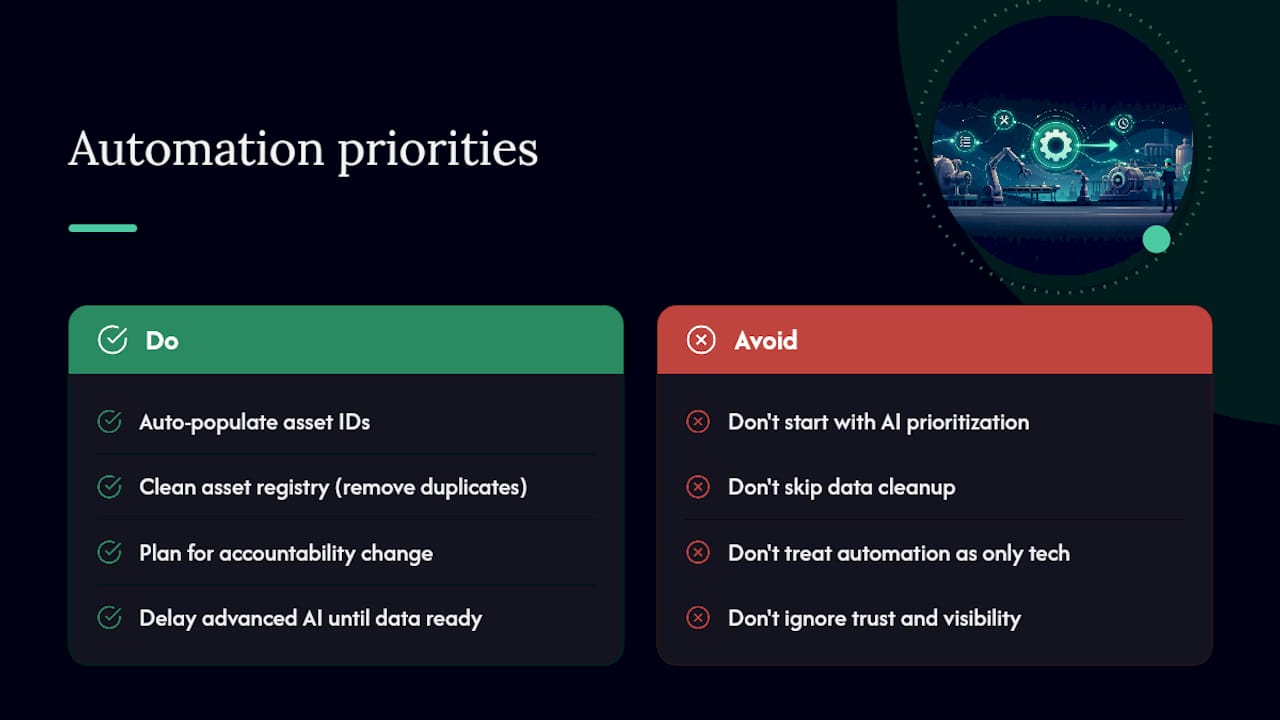
The pilots that fail usually fail for a data reason, not a technology reason. Teams jump straight to AI-generated prioritization while their asset registry still has duplicate entries and half-updated part numbers. Fix the boring foundation first. The AI layer is genuinely valuable once your data can support it, particularly for catching fault patterns a planner would miss, but it’s a second-year capability for most teams, not a launch feature.
The other thing conventional advice gets wrong: it treats automation as a technology rollout when it’s really a change in how accountability works. Once a dashboard shows exactly how long a work order sat untouched, that visibility changes conversations on the floor. Plan for that shift explicitly, or the best-built pilot in the world will stall on trust, not code.
— Lakitha
Sources
- Create work order flows in Dynamics 365 Field Service (Power Automate)
- What is work order management? | IBM
- Automatic work order generation using AI fault detection systems
- AI Work Order Automation Software for Manufacturing — Monitory